Category: SEO Reporting & Analytics

Guides on understanding SEO reports, metrics and analytics for Melbourne business owners.

  • Melbourne Cup Week Traffic and What Analytics Show

    Melbourne Cup Week Traffic and What Analytics Show

    Melbourne Cup website traffic often dips for most local businesses, then bounces back within a week. The Cup Day public holiday, long weekends and a city glued to the race all pull people away from searching for services.

    Here’s the short version. For many Melbourne service businesses, the Tuesday holiday and the Monday many people take off are quieter. Hospitality, fashion, beauty and event businesses often see the opposite, with a lift in the weeks before. Reading your numbers properly takes about 20 minutes in GA4 and Search Console, and the key is comparing Cup week with last year’s Cup week, not with an ordinary week. This guide shows you how, with exact menu paths.

    What Melbourne Cup week does to your reports

    In 2026, Melbourne Cup Day falls on Tuesday 3 November. It’s a public holiday across Victoria, unless a regional council has set a different local holiday, according to Business Victoria. Many people take Monday off too, which turns it into a four-day break.

    Attention also shifts to the race. The Victoria Racing Club reported 286,746 people attended the 2025 Carnival, and the 2025 Cup reached 2.3 million people on national TV. Streaming on 9Now grew 25% to 463,000. That’s a lot of people watching, not searching for a plumber.

    Take a Moorabbin electrician. Cup week usually shows fewer visits from Google, fewer form fills and fewer calls on Monday and Tuesday, then a jump on Wednesday as people catch up on jobs. A South Yarra milliner or a Prahran hair salon sees the reverse: a spike in searches in late October, then a quiet patch after the Carnival ends.

    The whole Carnival matters, not just Tuesday. In 2026, Derby Day is Saturday 31 October, Oaks Day is Thursday 5 November and Stakes Day is Saturday 7 November. Businesses near Flemington, in Kensington and Ascot Vale, often see local search patterns shift across all four race days, from parking and food to last-minute outfits.

    Neither pattern means your SEO has stopped working. It means the calendar moved your customers. Good SEO reporting accounts for that before anyone panics.

    Not sure whether your Melbourne Cup website traffic dip is normal or a real drop? Get a free consultation and we’ll check your numbers.

    How to check your Melbourne Cup website traffic

    Follow these steps once the week is over. Set aside 20 minutes and have last year’s dates ready. If you don’t have a full year of data yet, compare with the week after instead. GA4 is Google Analytics 4, the free tool that tracks visits to your site. Google Search Console shows how your site appears in Google search.

    1. Find last year’s Cup week dates

    Cup Day moves each year because it’s the first Tuesday in November. In 2025 it was Tuesday 4 November. In 2026 it’s Tuesday 3 November. Write down both weeks, Saturday to Friday, before you open any report.

    2. Open the traffic report in GA4

    Go to Reports > Acquisition > Traffic acquisition. You’ll see a chart and a table of channels such as Organic Search, Direct and Paid Search.

    3. Compare Cup week with last year’s Cup week

    Click the date range at the top right, choose Custom, set this year’s Cup week, then switch on Compare and enter last year’s dates. Click Apply. The table now shows both weeks and the change for each channel.

    4. Focus on Organic Search

    Click Add comparison + at the top, choose Session default channel group, then Organic Search. Google’s help page on applying comparisons to reports explains each option. Organic Search is unpaid traffic from Google and other search engines.

    5. Check enquiries, not just visits

    Go to Reports > Engagement > Events or your key events report. Compare form fills and phone clicks for the same two weeks. Fewer visits with the same enquiries is a good result. It usually means casual browsers stayed away while serious buyers still found you.

    6. Check Search Console for demand

    In Search Console, go to Performance > Search results. Click the Date filter, choose Compare, then Custom, and enter both Cup weeks. Tick Total impressions and Average position. If impressions fell but position held, fewer people searched. Your rankings are fine.

    7. Look at the week after

    Repeat step 3 for the week after Cup week. A bounce back confirms the dip was seasonal. This is the step most owners skip. Search Console data also runs a couple of days behind, so wait until at least the following Monday before reading the full week.

    8. Check your Google Business Profile calls

    Search for your business name on Google while signed in, then click Performance on your profile. You’ll see calls, website clicks and direction requests. Set the date range to November and compare it with your usual month. Local businesses often see map-driven calls fall on the holiday and recover quickly.

    What good looks like

    Use this table to read your SEO tracking results for Cup week. The goal isn’t more traffic every single week. It’s knowing which changes are normal and which need action, so you spend time only where it counts.

    What your Cup week numbers mean and what to do
    What you see What it means What to do
    Visits down, position steady Fewer people searching Nothing, check the next week
    Visits down, enquiries steady Fewer browsers, same buyers A good result, no action
    Visits up for event businesses Seasonal demand is working Note which pages won
    Position down across many pages Not seasonal Check for a Google update or site issue
    No bounce back after a week Something else changed Look at errors and tracking

    Statistics: 2025 Melbourne Cup Carnival attendance of 286,746, national TV reach of 2.3 million for the Cup and 9Now viewership of 463,000, up 25%. Source: Victoria Racing Club, November 2025.

    Melbourne Cup website traffic: a typical service business week Melbourne Cup website traffic for a typical service business: steady in the week before, a dip on Monday and Cup Day Tuesday, then a bounce back from Wednesday. Illustration only, not real data. Typical pattern for a service business ThuFriMonCup DayWedThuFri Illustration only. Your own pattern depends on your industry. Best SEO Agency Melbourne
    A short dip around the holiday, then a bounce back, is normal for many service businesses

    Want to see how other Melbourne businesses read their seasonal numbers? See our results.

    Common mistakes

    1. Comparing with the previous week. The week before Cup week is normal, so the drop looks huge. Fix: always compare with last year’s Cup week.
    2. Using calendar dates for year-on-year. 3 November 2026 isn’t the same day of the week as 3 November 2025. Fix: line up the Tuesdays.
    3. Changing your website in a panic. Rewriting pages after one quiet week makes it harder to see what really happened. Fix: wait for the week after.
    4. Ignoring enquiries. Visits are only half the picture. Fix: check form fills and calls alongside traffic. If your key events aren’t set up, the report can’t show enquiries at all.
    5. Forgetting the holiday next year. Fix: add a note in your calendar now saying “Cup week, expect a dip”, so next year’s report makes sense straight away.

    SEO reporting checklist for Cup week SEO reporting checklist for Cup week: compare with last year’s Cup week, line up the Tuesdays, check enquiries as well as visits, and check the week after before making changes. Before you worry about Cup week ✓ Compare with last year’s Cup week ✓ Line up the Tuesdays, not the dates ✓ Check enquiries as well as visits ✓ Wait for the week after before changing anything Best SEO Agency Melbourne
    Four checks that stop a holiday dip turning into a panic

    What to do next

    Run the eight steps above next week, then again the week after. If your numbers bounce back, you’re done. If they don’t, the cause is probably not the Cup. Our plain-English guide to Google Search Console and our guide to finding organic traffic in GA4 will help you dig further. Our SEO Reporting and Analytics service, part of our SEO services, does this for you each month, following our four-step process.

    If your traffic is still down a fortnight after the Cup, it’s time for a second pair of eyes. Get your free consultation. No lock-in contracts.

    Melbourne Cup website traffic FAQs

    Does Melbourne Cup website traffic always drop?

    Not always. Many service businesses see a dip around the holiday, while fashion, hospitality and event businesses often see a lift beforehand. Your industry decides the pattern.

    Should I pause my SEO work during Cup week?

    No. Pages you update now still count after the holiday, and your competitors keep working. Just avoid judging results on one quiet week. Publishing or updating pages before a holiday is fine, because Google keeps crawling while you’re at the races.

    How do I compare Cup week with last year in GA4?

    Open the date range, choose Custom, set this year’s Cup week and switch on Compare. Enter last year’s Cup week, lining up the Tuesdays, then click Apply.

    Do regional Victorian businesses see the same pattern?

    Not always. Some councils swap Cup Day for a local holiday, so check your area’s date first. More answers are on our FAQ and blog.
  • How to Track Phone Clicks on Your Website

    How to Track Phone Clicks on Your Website

    To track phone clicks website visitors make, you send a GA4 event every time someone taps a phone link, then mark that event as a key event. The easiest no-code way is Google Tag Manager, a free Google tool. It takes about 30 minutes and shows which pages and searches make your phone ring.

    For many Melbourne trades, clinics and service businesses, the phone is the main source of work. Yet most websites only track forms, so the best leads never show up in reports. GA4 doesn’t reliably record phone taps by itself, which is why a short setup is needed.

    This guide covers what phone click data tells you, the exact steps and menu paths, what good looks like, and the mistakes to avoid.

    What phone click tracking tells you

    A phone click is a tap or click on a link that starts a call, usually written as a tel: link in your site’s code. Tracking it shows how many people tried to call from your site, which page they were on and how they found you.

    Take an electrician in Coburg whose site has the number in the header and on every service page. Before tracking, the owner only knew the phone was busy. After tracking, GA4 shows that most taps come from mobile visitors who found the switchboard upgrades page through Google search. That’s a clear sign to improve that page and to keep the number easy to tap.

    Phone click data also rounds out your SEO reporting. When you compare it with Search Console, explained in our plain-English Search Console guide, you can link the searches people make to the calls they place. A phone tap isn’t always a finished call, but it’s a strong sign of intent.

    Not sure your calls are being counted? Get a free consultation and we’ll check how you track phone clicks on your website.

    How to track phone clicks on your website

    You’ll need access to your GA4 property and a Google Tag Manager account. If Tag Manager isn’t on your site yet, your web developer or a WordPress plugin can add it in a few minutes. Once it’s installed, you can track phone clicks website visitors make on every page with a single trigger, so there’s no need to edit each page.

    Phone click tracking in four parts Four steps to track phone clicks website visitors make: check the tel link, create a Tag Manager trigger, send a GA4 event, then mark it as a key event. Phone click tracking in four parts 1. Checktel: link 2. TriggerJust Links 3. TagGA4 event 4. Key eventStar in GA4 Test in Preview before you publish Best SEO Agency Melbourne
    About 30 minutes from start to finish

    Step 1. Check your number is a tel: link

    On your phone, open your website and tap the number. If the dialler opens, it’s a tel: link. If nothing happens, the number is plain text and can’t be tracked. Ask your web person to turn it into a link first.

    Step 2. Turn on the Click URL variable

    In Tag Manager, go to Variables, click Configure under Built-In Variables, and tick Click URL. This lets Tag Manager read the address of the link someone tapped.

    Step 3. Create a phone click trigger

    Go to Triggers > New, click Trigger Configuration and choose Click – Just Links. Under This trigger fires on, choose Some Link Clicks, then set Click URL starts with tel:. Name it “Phone click” and save. Google’s click trigger help page shows the same options.

    Step 4. Create a GA4 event tag

    Go to Tags > New, click Tag Configuration and choose Google Analytics > Google Analytics: GA4 Event. Enter your Measurement ID, which starts with G-, and name the event phone_click. Under Event Parameters, add link_url with the value {{Click URL}}, so you can tell numbers apart if you have more than one. Choose the “Phone click” trigger and save.

    Step 5. Test in Preview mode

    Click Preview in the top right of Tag Manager and enter your website address. A new tab opens your site. Click your phone number, then return to the Tag Assistant tab. Under Tags Fired, you should see your GA4 event tag.

    Step 6. Publish

    Back in Tag Manager, click Submit, add a short description such as “Phone click tracking”, and click Publish. Your tracking is now live for every visitor. Tag Manager keeps each version, so you can roll back if something breaks.

    Step 7. Mark phone_click as a key event

    In GA4, go to Admin > Data display > Events. Once phone_click appears, which can take up to 24 hours, click the star icon beside it. Our guide to GA4 key events setup explains counting methods and other enquiry events.

    Step 8. Read the results

    Go to Reports > Engagement > Landing page and choose phone_click in the Key events column dropdown. You’ll see which pages lead to calls. Switch to Reports > Acquisition > Traffic acquisition to see calls by channel, including organic search.

    What good looks like

    Good SEO tracking doesn’t need perfect numbers. It needs numbers that move with your business. Compare phone clicks with the calls you actually receive each week. They won’t match exactly, but they should rise and fall together.

    Give it a full month before you draw conclusions. Calls often follow the week, with busy Mondays and quiet weekends, so a single week can mislead. When you track phone clicks website reports also show which device people use, which helps you decide where the number should sit on mobile.

    Reading your phone click data
    What you see What it likely means What to do
    Phone clicks close to your call log Tracking works Review monthly
    Many more clicks than calls Desktop clicks or missed calls Check missed calls and opening hours
    Far fewer clicks than calls People dial from Google Maps or type the number Normal, check your Business Profile calls too
    Clicks only from one page Number hard to find elsewhere Add a tappable number to key pages
    Zero clicks Plain-text number or tag not published Repeat steps 1 and 5

    In September 2026, 48.57% of Australian web use was on mobile, 48.48% on desktop and 2.95% on tablet (StatCounter). With almost half of visits on phones, a tappable number matters. GA4 allows up to 30 key events on a standard property, so phone_click fits easily alongside forms (Google Analytics Help).

    Want to see what tracked calls and enquiries look like for other Melbourne businesses? See our results.

    Common mistakes

    Phone click test checklist SEO tracking checklist for phone clicks: number is a tel link, tag fires in Preview, container is published, phone_click is a key event, and clicks are compared with your call log. Phone click test checklist Number opens the dialler on a phone Tag fires in Preview mode Container is published phone_click is starred as a key event Clicks compared with your call log Best SEO Agency Melbourne
    Run this check after setup and after any site change
    • Forgetting to publish. Preview mode only works for you. Nothing is tracked until you click Publish.
    • Plain-text phone numbers. A number shown as an image or plain text can’t be tapped or tracked. Make every number a tel: link.
    • Treating a tap as a sale. Some taps end in a hang-up or voicemail. Compare with your call log before you judge results.
    • Tracking the same click twice. If a plugin already sends phone events, a second tag doubles the count. Check Realtime for duplicate events.
    • Ignoring Google Maps calls. Calls from your Business Profile don’t pass through your site. Check them separately in your profile’s performance view.

    What to do next

    Set up phone click tracking this week, test it, and compare a month of data with your call log. If you have more than one number, such as a mobile and a landline, the link_url parameter shows which one people prefer. Do the same for forms with our guide to tracking form submissions in GA4. Our SEO Reporting and Analytics service sets this up for you, and our process starts with a free audit.

    If your phone rings but your reports don’t show it, it’s time for a second pair of eyes. Get your free consultation. No lock-in contracts.

    Track phone clicks website FAQs

    Can GA4 track phone clicks without Tag Manager?

    Not reliably. GA4’s automatic outbound click tracking is built for links to other websites. Tag Manager is the simplest no-code option for tel: links.

    Does a phone click mean someone actually called?

    Not always. It means they tapped the number, and some people hang up before you answer. Compare clicks with your call log to see how many became real conversations.

    Can I see which Google search led to a call?

    Not directly. GA4 shows the landing page and channel, and Google Search Console shows the searches that bring people to that page.

    Will this slow down my website?

    No. One small trigger and tag add almost nothing to load time. Tag Manager loads in the background, so visitors won’t notice any difference. More answers are on our FAQ and blog.

  • How to Set Up Key Events in GA4 for Enquiries

    How to Set Up Key Events in GA4 for Enquiries

    A GA4 key events setup tells Google Analytics which visitor actions count as enquiries, such as a sent form, a tap on your phone number or a booking. Once they’re marked, every report shows enquiries next to visits. For most small business sites, the setup takes 30 to 60 minutes and needs no developer.

    A key event is GA4’s name for an action that matters to your business. Google used to call them conversions, and many agencies still do. An event is any action GA4 records, such as a page view or a click. A key event is one you have flagged as important.

    This guide covers which enquiry actions to track, the exact menu paths to mark them, how to test them, and how to read the results.

    What GA4 key events tell you

    Without key events, GA4 tells you how many people visited. With them, it tells you how many people asked for a quote, called or booked, and where they came from. That’s the difference between “traffic is up” and “search brought in 14 enquiries last month”.

    Take a removalist in Box Hill. Their site has a quote form, a phone number in the header and an email link. After setting up key events for all three, the owner can see that most enquiries from organic search are phone taps on mobile, and most come from the interstate removals page. That’s a clear sign of which page to improve next.

    Key events also make your SEO reporting honest. If your agency reports rankings but never enquiries, key events give you the numbers to ask better questions. Pair them with Search Console, covered in our plain-English Search Console guide, to see which searches bring those visitors in the first place.

    Not sure your enquiries are being counted? Get a free consultation and we’ll check your GA4 key events setup.

    How to complete a GA4 key events setup

    You need Editor access or higher to mark events, and Marketer access or higher to create new ones. Google’s guide to marking key events shows the same screens described below.

    Where to mark a key event GA4 key events setup menu path: Admin, then Data display, then Events, then click the star next to the event to mark it as a key event. Where to mark a key event Admin > Data display > Events > Click the star Data shows in Realtime within minutes, and in reports within 24 hours Best SEO Agency Melbourne
    The same path works for every enquiry event you want to count

    Step 1. List your enquiry actions

    Write down every way a customer can contact you from the site: forms, phone number, email address, booking widget and any quote download. Keep the list short. Each item should be something you would happily pay for.

    Step 2. See which events already exist

    Go to Admin > Data display > Events and open the Recent events tab. You’ll see a table of event names, such as page_view, scroll and form_submit, with a count next to each. If an enquiry event is already listed, skip to step 3.

    Step 3. Mark an existing event as a key event

    On the same screen, click the star icon next to the event. The star turns solid and the event moves to the Key events tab. Only star the actions on your list from step 1. If you’re unsure about an event, leave it unstarred for now. You can always add it later.

    Step 4. Create an event for a thank-you page

    If your form opens a thank-you page, click Create event, name it something like enquiry_submit, and base it on that page’s address. Our guide to tracking form submissions in GA4 walks through this screen in detail. Turn on Mark as key event before you click Create.

    Step 5. Add phone and email taps

    Phone and email links usually need a click event first, because GA4 doesn’t reliably record taps on them by itself. Most small business sites add these through Google Tag Manager, a free Google tool that sends extra events to GA4 without editing your site’s code. Create one event for phone taps and one for email taps, publish the change, then star each new event in GA4 once it appears under Recent events. That can take up to a day.

    Step 6. Check the counting method

    Open the Key events tab, click the three-dot More icon on the event’s row and choose Change counting method. “Once per event” counts every enquiry. “Once per session” counts one per visit, which suits enquiry forms people sometimes submit twice. Google explains both options in its counting method help page.

    Step 7. Test it

    Send a test enquiry in a private browser window, then open Reports > Realtime overview. The Key events by Event name card should show your event within a few minutes.

    Step 8. Read enquiries by channel

    Go to Reports > Acquisition > Traffic acquisition, scroll right to the Key events column and pick your event from its dropdown. You’ll see enquiries from organic search, paid ads, social and direct visits side by side.

    What good looks like

    Good SEO tracking means the numbers in GA4 match what happens in your business. If your inbox shows ten enquiries and GA4 shows ten key events, you can trust the reports. If they don’t match, fix the tracking before you judge your marketing.

    There’s no single good number. Compare your own figures month to month and against the enquiries you actually receive. Standard GA4 properties can have up to 30 key events, so there’s room for every real enquiry type, but most small businesses need three to five.

    Reading your key events
    What you see What it likely means What to do
    Key events roughly match your inbox and call log Tracking works Review monthly
    Far more key events than real enquiries Double counting or a weak event, such as scroll Unstar non-enquiry events
    Many phone taps, few calls answered Missed calls or desktop clicks Check call handling and opening hours
    Organic search has visits but no key events Landing pages don’t prompt contact Add clear calls to action
    Zero key events Setup or tag problem Repeat the test in step 7

    Sources: standard properties allow up to 30 key events and Analytics 360 properties up to 50 (Google Analytics Help). In September 2026, 48.57% of Australian web use was on mobile (StatCounter), so phone taps matter as much as forms.

    Want to see what better enquiry tracking looks like for other Melbourne businesses? See our results.

    Common mistakes

    Key event mistakes to avoid SEO tracking mistakes to avoid with key events: starring page views, counting one enquiry twice, forgetting phone taps, and never retesting after site changes. Key event mistakes to avoid Starring page viewsVisits are not enquiries Counting twiceOne form, two key events Ignoring phone tapsMobile callers go uncounted Never retestingSite changes break tracking Best SEO Agency Melbourne
    Four mistakes that make enquiry numbers unreliable
    • Starring events that aren’t enquiries. Page views, scrolls and session_start inflate your numbers. Unstar anything a customer could do without contacting you.
    • Counting one enquiry twice. A thank-you page event and form_submit on the same form doubles your count. Keep one and unstar the other.
    • Forgetting phone and email. Many trades and clinics get more calls than forms. Track taps on both.
    • Expecting old data to change. Key events only count from the day you mark them. Past reports stay the same.
    • Never retesting. A new theme or form plugin can quietly break tracking. Retest after every site change.

    What to do next

    Start with your main enquiry form today, test it, then add phone and email taps. Then open Google Search Console and look at the pages that bring in the most enquiries, so you know which searches are worth more of your time. At the end of the month, check that key events roughly match the enquiries you received. Our SEO Reporting and Analytics service sets up and checks this tracking, and our process starts with a free audit.

    If your reports still don’t show where enquiries come from, it’s time for a second pair of eyes. Get your free consultation. No lock-in contracts.

    GA4 key events setup FAQs

    What is the difference between a key event and a conversion?

    They’re the same idea under a new name. GA4 now says key events, while Google Ads still uses conversions. You can share GA4 key events with Google Ads as conversions.

    How many key events should a small business have?

    Usually three to five, one for each real enquiry type. Standard properties allow up to 30, but more is not better if they don’t reflect real leads.

    Why isn’t my key event showing in reports?

    Standard reports can take up to 24 hours to update. Check Realtime first. If it shows there, wait a day before changing anything.

    Do I need a developer for a GA4 key events setup?

    Not for forms with thank-you pages or events GA4 already records. Phone and email taps are easiest with Google Tag Manager. More answers are on our FAQ and blog.

  • Track Form Submissions in GA4 Without a Developer

    Track Form Submissions in GA4 Without a Developer

    The simplest way to track form submissions GA4 can count as enquiries is to create an event for your thank-you page, then mark it as a key event. If your form has no thank-you page, GA4’s built-in form tracking is a quick backup. Both take about 20 minutes, need no code, and no developer.

    A key event is GA4’s name for an action that matters to your business, such as an enquiry. Once a form submission is a key event, you can see which pages, channels and searches bring in real leads.

    This guide walks through both methods with exact menu paths, how to test them, and the mistakes that cause double counting.

    What form tracking tells you

    Without form tracking, GA4 shows visits but not results. You might see 2,000 sessions a month and have no idea which ones turned into work. With it, every report gains a Key events column showing enquiries next to visits.

    Take a mechanic in Footscray with a “Book a service” form. Once submissions are tracked, the owner can see that organic visits to the logbook servicing page bring in most bookings, while the brake repairs page gets traffic but few forms. That points to a page worth improving, rather than a vague sense that “the website isn’t working”.

    Form tracking also keeps any agency honest. Reports built on enquiries are far more useful than reports built on rankings alone. It’s the base of good SEO reporting, and it takes the guesswork out of deciding where to spend. If you track form submissions GA4 can also show which devices people enquire from, which helps when a form is hard to fill in on a phone.

    Most small business sites use a form plugin, such as Gravity Forms, WPForms or Contact Form 7 on WordPress, or the built-in form on Wix and Squarespace. The methods below work with all of them, as long as you know what happens on screen after someone clicks Send.

    Not sure your enquiry forms are being counted? Get a free consultation and we’ll check your tracking.

    How to track form submissions in GA4

    Two no-code ways to track forms Comparison of two ways to track form submissions GA4 supports without code: a thank-you page event, which is most reliable, and enhanced measurement form interactions, which is quick but less precise. Two no-code ways to track forms A. Thank-you page event Best when the form opens a new page Counts only finished submissions Admin > Events > Create event Most reliable B. Form interactions Use when there’s no thank-you page Records form_submit automatically Data streams > Enhanced measurement Quick, test carefully Best SEO Agency Melbourne
    Pick method A if your form sends people to a thank-you page

    Step 1. Submit your own form

    Fill in your contact form and send it. Note what happens. If the address bar changes to something like /thank-you, use method A. If a message simply appears on the same page, use method B. Some forms show a pop-up message instead, which also means method B.

    Step 2 (method A). Create a thank-you page event

    Go to Admin > Data display > Events and click Create event. Name it something clear, such as enquiry_submit. Choose Create without code, pick page_view as the event, and paste your full thank-you page address into the URL field. Turn on Mark as key event, then click Create. Google’s guide to creating key events shows the same screen. The new event appears in the Custom events table, and it can take a few hours to show under Recent events.

    Step 3 (method B). Turn on form interactions

    Go to Admin > Data collection and modification > Data streams and click your website stream. Under Enhanced measurement, click the gear icon, switch on Form interactions and click Save. GA4 will now record a form_start event when someone begins a form, and form_submit when they send it, as described in Google’s enhanced measurement help page. It can miss forms built with custom code, so always test.

    Step 4. Test it

    Submit your form again, then open Reports > Realtime overview. Within a minute or two, the Event count by Event name card should show your new event or form_submit. If nothing appears, check the URL you entered or try the other method. Use a private browser window for the test, because ad blockers and cookie banners can stop GA4 recording your visit.

    Step 5. Mark form_submit as a key event

    If you used method B, go back to Admin > Data display > Events. Once form_submit appears in the list, which can take up to a day, turn on its Mark as key event toggle.

    Step 6. Read the results

    Go to Reports > Acquisition > Traffic acquisition and scroll to the Key events column. Pick your event from its dropdown. Now you can see enquiries by channel. Our guide on how to find organic traffic in GA4 shows how to narrow this to search visitors only. For a daily count, open Reports > Engagement > Events and click your event name.

    What good looks like

    Every business is different, so compare your own numbers month to month and year to year. Use the table to read what you see.

    A kitchen designer in Ivanhoe, for example, might find that mobile visitors start the quote form but rarely finish it. Cutting the form from twelve fields to five is a cheap fix worth testing. Once you track form submissions GA4 reports become far more useful for SEO tracking, because you can compare enquiries, not just visits, from one month to the next.

    Reading your form data
    What you see What it likely means What to do
    Key events match your inbox Tracking is working Check monthly
    More key events than real enquiries Double counting or spam Use one method and add spam protection
    Fewer key events than real enquiries Some forms aren’t tracked Test every form on the site
    Many form_start, few form_submit People give up partway Shorten the form
    Zero key events Setup error Re-run the test in step 4

    Benchmark: across 93 million form sessions, 55.5% of desktop users who started a form finished it, and 47.5% on mobile. Measured from the first view of the form, 37.2% of desktop visitors and 31.3% of mobile visitors completed it (Zuko form benchmarking, 2025 data).

    Form tracking test checklist SEO tracking checklist for testing form tracking: submit a test, check Realtime, match your inbox, mark the key event, and recheck after website changes. Test your form tracking Submit a test enquiry yourself See the event in Realtime within minutes Key events match the enquiries in your inbox Only one method counts each form Retest after any website change Best SEO Agency Melbourne
    Run this check after setup and after every site update

    Want to see what more tracked enquiries look like for other Melbourne businesses? See our results.

    Common mistakes

    • Using both methods on one form. Each enquiry gets counted twice. Pick one and mark only that event as a key event.
    • Counting form_start as an enquiry. It fires when someone clicks into a field. Only form_submit or your thank-you event should be a key event.
    • A thank-you page anyone can reach. If it’s in your menu or shows in Google, visits inflate your numbers. Remove it from menus and ask your web person to hide it from search.
    • Booking widgets from other companies. Forms loaded from another site, such as many booking tools, often aren’t tracked by either method. Check the tool’s own GA4 settings.
    • Personal details in the URL. Some forms add the person’s name or email to the thank-you address. Google’s rules don’t allow personal information in GA4, so fix this before you track.
    • Forgetting to retest. A plugin update or a new theme can change your thank-you address. Retest after every website change.

    What to do next

    It takes less time than most owners expect. Set up one method today, test it, and check that the numbers match your inbox at the end of the month. If traffic is fine but forms are rare, our guide on why your blog gets traffic but no enquiries covers the usual reasons. Pair it with Google Search Console, explained in our plain-English Search Console guide, to see which searches bring those visitors. Our SEO Reporting and Analytics service sets this up and reports on it, and our process starts with a free audit.

    If you still can’t track form submissions GA4 can report on, a second pair of eyes will help. Get your free consultation. No lock-in contracts.

    Track form submissions GA4 FAQs

    Does GA4 track form submissions automatically?

    Only if form interactions are turned on in enhanced measurement, and even then it can miss some forms. A thank-you page event is more reliable.

    Do I need Google Tag Manager?

    No. Both methods in this guide work inside GA4. Tag Manager helps with unusual forms, but most small business sites don’t need it.

    How long until form data appears in reports?

    Realtime shows events within minutes. Standard reports can take up to 24 to 48 hours, so don’t worry if yesterday’s enquiries are missing this morning.

    Can I see which search terms led to an enquiry?

    Not directly. GA4 shows the landing page and channel, and Search Console shows the searches for that page. More answers are on our FAQ and blog.

  • Why Organic Clicks Fell While Impressions Rose

    Why Organic Clicks Fell While Impressions Rose

    Seeing impressions up clicks down in Search Console is one of the most common worries business owners raise right now, and it’s rarely a sign your SEO has failed. It usually means Google is showing your site more often, but fewer searchers need to click.

    The most likely cause is AI Overviews and other answers on the results page, which satisfy the search without a visit. The first thing to check is your average position and your top queries. If positions held steady and the queries are questions, the drop is mostly outside your control. If positions fell, you have a ranking problem to fix.

    This guide gives you a five-minute check, the six common causes in order, how to fix each one, and when to get help. You don’t need any paid tools, just access to Search Console and Google Analytics.

    Check this first

    Open Search Console and go to Performance > Search results. Then run these checks. They take about five minutes and tell you which cause to look at first.

    1. Turn on all four metrics. Click the Total clicks, Total impressions, Average CTR and Average position boxes so all four lines show.
    2. Compare year on year. Click the date filter, choose Compare, and pick the same period last year.
    3. Check average position. Did it get better, worse or stay flat?
    4. Sort the Queries table by impressions. Are the top queries questions, or searches for your services?
    5. Check enquiries. In Google Analytics, see whether organic enquiries actually fell. Fewer clicks don’t always mean fewer leads.

    Impressions up, clicks down quick check Five-minute check for impressions up clicks down: show all four metrics, compare year on year, check average position, review top queries, and check enquiries. Five-minute check in Search Console 1Show clicks, impressions, CTR and position 2Compare with the same period last year 3Did average position change? 4Are top queries questions or service searches? 5Did enquiries actually fall? Best SEO Agency Melbourne
    Answer these five questions before you change anything

    Seeing impressions up clicks down and not sure why? Get a free consultation and we’ll find the cause.

    Why clicks fall while impressions rise and how to fix it

    An impression is counted when your page appears in a search result, even if nobody scrolls to it. A click is counted when someone visits. Google explains both in its guide to impressions, position and clicks. Here are the causes, most common first. When you see impressions up clicks down, work through them in this order, because the first two are the most likely and the least worrying.

    1. AI Overviews and on-page answers

    How to tell: positions are steady, but clicks fell on question searches like “how long does a bathroom renovation take”.

    1. Search your top question queries yourself and note whether an AI Overview appears.
    2. Make sure each page answers the question clearly near the top, so it’s more likely to be cited.
    3. Put more effort into pages for searches with buying intent, such as “bathroom renovator Brighton”.
    4. Judge success by enquiries, not clicks alone.

    A Richmond café, for example, may lose clicks on “best brunch Richmond” because a list of places appears right on the results page. If bookings and walk-ins hold steady, nothing is broken.

    2. You now rank for more, broader searches

    How to tell: impressions jumped, average position got worse, and the Queries table shows many new terms in positions 20 to 50.

    1. In the Queries table, click the filter icon and add Position greater than 10.
    2. Find queries that match your services and sit between positions 8 and 20.
    3. Improve those pages first. This is often good news, because Google is starting to trust your site on new topics.

    3. Your rankings dropped for key searches

    How to tell: your main service queries show a worse average position than last year.

    1. Click a query, then the Pages tab, to see which page ranks for it.
    2. Check for recent site changes, such as new page addresses or removed content.
    3. Check the Google Search Status Dashboard for a core update around the date the drop started.

    4. Your titles aren’t earning the click

    How to tell: you rank in the top five, but CTR is low compared with your other pages.

    1. Search the query and read your result as a customer would.
    2. Rewrite the title so it names the service, the suburb and a clear reason to choose you.
    3. Write a meta description, the short summary under the title, that answers the search and invites the click.
    4. Recheck the CTR four weeks later.

    5. Brand searches moved to ads

    How to tell: clicks fell mostly on searches for your business name, around the time you started bidding on your brand in Google Ads.

    1. Filter queries to your business name.
    2. Compare the dates with your Google Ads changes. Those clicks may simply have moved to the ad.

    This isn’t always a problem. If a competitor bids on your name, a brand ad can protect those enquiries. Just know that it shifts clicks out of your organic numbers.

    6. Reporting changes and odd comparisons

    How to tell: the change lines up with a known reporting change rather than anything on your site. In September 2025, Google stopped returning 100 results per page to tools, and an analysis of 319 sites reported by Search Engine Land found 87.7% lost impressions afterwards.

    1. Avoid comparisons that straddle September 2025.
    2. Compare the same months year on year where you can.

    Impressions up clicks down causes at a glance

    Match what you see with the most likely cause. Timeframes are general.

    Causes, signs and fixes
    Cause Sign Fix Time to show
    AI Overviews Steady position, fewer clicks on questions Clear answers, focus on buying searches Months
    Broader rankings New queries at positions 20 to 50 Improve pages near page one Weeks to months
    Ranking drop Worse position on key queries Find and fix the cause Weeks to months
    Weak titles Good position, low CTR Rewrite titles Two to four weeks
    Brand ads Brand query clicks fell Review Google Ads Immediate
    Reporting change Shift near September 2025 Compare like with like Immediate

    When an AI Overview appeared, the top-ranking page had a 58% lower average click-through rate (Ahrefs, February 2026). Users clicked a link inside an AI summary in just 1% of visits (Pew Research Center, July 2025).

    How to check the fix worked

    Go back to Performance > Search results in Google Search Console after four weeks and compare the changed pages with the period before. Look at CTR and position for the queries you worked on. Add a note in your own records of what you changed and when, so you can match changes to results later.

    Then check GA4 for organic sessions and enquiries. Our guide on how to find organic traffic in GA4 shows the exact reports. A Carlton dental clinic, for example, might see fewer clicks on “is teeth whitening safe” but steady bookings from “dentist Carlton”. That’s a healthy result for your SEO tracking, even if the click line looks worse.

    The gap between impressions and clicks Illustration of a Google Search Console chart where the impressions line rises and the clicks line falls, with the gap labelled as searches answered on the results page. What the widening gap looks like Impressions Clicks Gap: searches answered on the results page Illustration only, not real data Best SEO Agency Melbourne
    Impressions rising while clicks fall is common when AI answers appear

    Want to see what steady enquiry growth looks like for other Melbourne businesses? See our results.

    When to get help

    Get a second pair of eyes if clicks on your main service searches are still falling after four weeks, rankings dropped after a core update, or enquiries fell along with clicks. Also check Security & Manual actions > Manual actions in Search Console. Any message there needs expert attention. The same goes for a sudden fall in impressions as well as clicks, which points to an indexing or technical problem rather than a reporting one.

    Good SEO reporting should explain these shifts in plain English. Our SEO Reporting and Analytics service does that, and our four-step process starts with a free audit. For the basics of each report, see our plain-English guide to Search Console.

    If your clicks are still down after four weeks, it’s time for a second pair of eyes. Get your free consultation. No lock-in contracts.

    Impressions up clicks down FAQs

    Is it bad when impressions go up but clicks go down?

    Not always. It often means Google shows you for more searches, or answers some of them on the results page. Check whether enquiries fell before you worry.

    Do AI Overviews count as impressions?

    Yes. If your page is cited in an AI Overview that a searcher sees, it can count as an impression, even if nobody clicks.

    What is a good click-through rate?

    It varies by position and search type. Compare each page with your own past results, rather than a general benchmark. A page that ranks first but gets fewer clicks than your page in fourth place is the one to fix first.

    How long until clicks recover?

    Title changes can show within a few weeks. Ranking recovery takes longer, and clicks lost to AI answers may not come back. More answers are on our FAQ and blog.
  • How to Find Organic Traffic in GA4

    How to Find Organic Traffic in GA4

    The GA4 organic traffic report you need is the Traffic acquisition report, filtered to the Organic Search channel. It shows how many visits came from unpaid search results, which pages they landed on, and whether those visitors went on to enquire. Finding it takes about five minutes once you know where to click.

    Organic traffic means visits from people who clicked a normal search result on Google or Bing, not an ad. It’s the clearest sign of whether your SEO is working, because it measures real visits rather than rankings.

    This guide gives you the exact menu paths, explains what the numbers mean, and shows the mistakes that make reports look better or worse than they are.

    What the GA4 organic traffic report tells you

    GA4 (Google Analytics 4) sorts every visit into a channel, such as Organic Search, Paid Search, Direct or Referral. Google lists the rules for each one in its default channel group help page. The Organic Search channel answers three questions:

    • How many visits came from search engines, and whether that’s going up or down.
    • Which pages people landed on first.
    • What they did next, such as filling in a form or calling you.

    Here’s a Melbourne example. A physio clinic in Fitzroy sees 900 organic sessions in a month. Its landing page view shows most arrive on a page about sports injuries, not the home page. Of those visits, 22 ended in a booking enquiry. That tells the owner which page earns enquiries and which services might need better pages.

    Compare that with a builder in Essendon whose organic sessions doubled after a website rebuild, while enquiries stayed flat. The extra visits were landing on old blog posts about home renovation trends, read by people outside its service area. The traffic looked good, but it wasn’t bringing in work.

    GA4 can’t show you the search terms people typed. For that you need Search Console, which this guide links in step 6. Used together, the two tools show what people searched, where they landed and whether they became leads.

    Not sure your GA4 organic traffic report is telling the full story? Get a free consultation and we’ll check your setup.

    How to find organic traffic in GA4

    Menu names change from time to time, but the paths below match most GA4 properties today.

    Menu path to organic traffic in GA4 Menu path for the GA4 organic traffic report: Reports, then Acquisition, then Traffic acquisition, then the Organic Search row. Where to find organic traffic in GA4 Reports Acquisition Trafficacquisition OrganicSearch row ››› Then filter Landing page by the same channel to see which pages earn visits Best SEO Agency Melbourne
    Four clicks to your organic traffic numbers

    Step 1. Open the Traffic acquisition report

    Go to Reports > Acquisition > Traffic acquisition. In some properties this sits under Life cycle > Acquisition. You’ll see a line chart at the top and a table of channels below it, with columns for users, sessions, engagement rate and key events.

    Step 2. Check the first column

    The table’s first column should read Session primary channel group or Session default channel group. If it shows something else, click the column heading’s dropdown and switch it back.

    Step 3. Find the Organic Search row and set your dates

    Look for the Organic Search row. Use the date picker at the top right, and tick Compare to see the same period last year. Comparing year on year avoids seasonal swings, such as quieter weeks over Christmas.

    Step 4. See which search engines sent visits

    Change the first column to Session source / medium. You’ll see rows like google / organic and bing / organic. Google will usually be by far the biggest row for Australian sites, but Bing is worth watching too, because it also powers search in Microsoft Copilot.

    Step 5. See which pages people landed on

    Go to Reports > Engagement > Landing page. Click Add filter under the report title, choose Session default channel group, set it to exactly matches Organic Search, and click Apply. Now every row is a page that people found through search. Sort by Sessions to see your strongest pages, then look at Key events to see which ones bring enquiries.

    Step 6. Link Google Search Console

    Go to Admin > Product links > Search Console links and click Link. Choose your Search Console property and your web stream. You’ll need admin access in GA4 and owner access in Search Console. Once linked, the link appears in the list with your site’s address next to it.

    Step 7. Publish the Search Console reports

    The Search Console reports are hidden by default. Click Library at the bottom of the Reports menu, find the Search Console collection, and click Publish. Then open Reports > Search Console > Google organic search traffic. Google’s help page for this report notes data arrives about 48 hours after Search Console collects it.

    Step 8. Check enquiries from organic visits

    Back in Traffic acquisition, scroll right to the Key events column. Use its dropdown to pick your enquiry event, such as a form submission. This is the number that matters most for SEO tracking.

    What good looks like

    There’s no single “good” number, because it depends on your industry and suburb. Look at the direction of each metric and what it means together. A trend over three to six months tells you far more than one good or bad week.

    Reading your organic numbers
    What you see What it likely means What to do
    Sessions up, key events up SEO is working Keep going and add pages for more services
    Sessions up, key events flat Visitors aren’t the right fit, or pages don’t ask for the enquiry Review landing pages and calls to action
    Sessions flat, impressions up More searches show you, but fewer people click Check titles and AI Overview changes
    Sessions down sharply Tracking break, site change or ranking drop Check tracking first, then Search Console
    Low engagement rate Page doesn’t match what people searched Rewrite the page around the search

    Fewer clicks are normal now: Google users clicked a traditional result in 8% of visits when an AI summary appeared, against 15% without one (Pew Research Center, July 2025). AI Overviews were linked to a 58% lower click-through rate for the top result (Ahrefs, February 2026).

    Three numbers for organic SEO reporting SEO reporting guide showing the three organic numbers to check each month: organic sessions, landing pages and key events. Three numbers to check each month SessionsAre more peoplearriving fromsearch? Landing pagesWhich pagesbring them in? Key eventsDo they enquire,call or book? Best SEO Agency Melbourne
    Sessions, landing pages and key events tell most of the story

    Want to see what steady organic growth looks like for other Melbourne businesses? See our results.

    Common mistakes

    • Counting all traffic as SEO. Direct, referral and paid visits aren’t organic. Always filter to the Organic Search channel.
    • Comparing month to month only. December against November will almost always look bad. Compare with the same month last year.
    • No key events set up. Without them you can see visits but not enquiries. Set up a key event for your contact form first.
    • Short data retention. GA4 keeps detailed data for two months by default. Change it in Admin > Data collection and modification > Data retention to the longest option.
    • Not linking Search Console. Without it, you can’t see the searches behind your visits. Link it once and the data keeps flowing.
    • Counting your own visits. If staff search for the business and click through every day, it inflates organic numbers. In Admin > Data streams, open your stream, click Configure tag settings, then Define internal traffic to add your office IP address. Then turn the Internal Traffic filter on under Admin > Data filters.

    What to do next

    A good habit is a short monthly check: organic sessions, top landing pages and enquiries, each compared with last year. Bookmark the Traffic acquisition report and the landing page filter, and check them once a month. If the numbers don’t add up, start with our plain-English guide to Google Search Console for business owners and our guide on how to read an SEO report. Clear SEO reporting is part of our SEO Reporting and Analytics service, and our process starts with a free audit.

    If your organic numbers don’t make sense, it’s time for a second pair of eyes. Get your free consultation. No lock-in contracts.

    GA4 organic traffic report FAQs

    Where is the organic search report in GA4?

    Go to Reports > Acquisition > Traffic acquisition and find the Organic Search row. For page-level data, filter the Landing page report to the same channel.

    Why doesn’t GA4 match Search Console clicks?

    They measure different things. Search Console counts clicks on Google results, while GA4 counts sessions on your site, and cookie consent or ad blockers can stop some visits being recorded.

    Does the GA4 organic traffic report include Bing?

    Yes. Organic Search includes visits from all recognised search engines. Switch to Session source / medium to see each one.

    How often should I check organic traffic?

    Monthly is enough for most small businesses, as long as you compare like with like. Check weekly after a website change, so you catch tracking problems early. More answers are on our FAQ and blog.
  • Google Search Console Explained for Business Owners: A Plain-English Guide

    Google Search Console (GSC) is a free tool from Google that shows you how Google sees your website. Think of it as a direct line to Google itself: it tells you which searches bring people to your site, whether Google can find and display all your pages, and whether anything technical is quietly stopping your website from performing in search results. Unlike Google Analytics, which tracks what visitors do once they land on your site, Search Console tracks what happens before that click — what people typed into Google, whether your page showed up, and whether they clicked on it. To see what those visitors do once they arrive, read our guide on how to find organic traffic in GA4.

    If you’ve already read how to read an SEO report in plain English, you’ll know that most of the numbers in a typical SEO report — rankings, visibility, traffic trends — ultimately come from data that Search Console collects behind the scenes. Learning to read the tool yourself means you don’t have to take anyone’s word for how your website is performing; you can check the source data directly, for free, at any time. To see how your visits are split between channels, read our guide to direct vs organic traffic.

    Setting up Search Console properly takes about fifteen minutes and gives you visibility you cannot get anywhere else, including inside Google Analytics. If you’d rather have someone set it up correctly the first time and walk you through what it means for your specific business, you can book a free consultation and we’ll go through it with you.

    📊 The five Google Search Console reports every Melbourne business owner should check regularly.

    An infographic titled “Google Search Console at a Glance” showing a website icon in the centre connected to five reports: Performance, Page Indexing, Core Web Vitals, Mobile Usability and Sitemaps.

    Infographic file: best-seo-agency-melbourne-google-search-console-guide.png (attach when uploading to media library)

    What Google Search Console Actually Covers

    In short, Search Console is split into a handful of reports, each answering a different question about your site: which searches you’re appearing for, whether your pages are indexed, how fast your site feels to visitors, and whether Google has found your full sitemap. The rest of this guide walks through each of those reports in plain English, starting with getting the tool set up correctly in the first place.

    Setting Up and Verifying Your Website

    To get started, go to Google’s Search Console website and sign in using a Google account — ideally one tied to your business rather than a personal account that might leave the company one day. You’ll be asked to add a “property,” which is simply Google’s word for the website you want to monitor.

    You have two options here: a “Domain” property, covering every version of your address (www, non-www, http, https, and all subdomains) in one place, or a “URL prefix” property, covering just one exact web address. For most small and medium businesses, the Domain property is the better choice, since it gives the complete picture without adding multiple properties separately.

    Next comes verification — proving to Google that you genuinely own the website. The most common methods are a DNS record, added through your domain registrar (the company you bought your domain name from); an HTML file uploaded to your website’s files; or, if you already have Google Analytics or Tag Manager installed, instant verification through either of those. Full instructions are in Google’s Search Console verification help centre. If you’re not confident editing DNS records, loop in your web developer, since a wrong edit can occasionally take your email or website offline.

    The Performance Report: Understanding Queries, Clicks and Impressions

    Once your property is verified, the Performance report is where you’ll spend most of your time, and it’s genuinely the most useful part of the whole tool for a business owner. It shows four core numbers for every search term, known as a “query,” that people used to find your site. Impressions are how many times your website appeared somewhere in Google’s results, even if nobody clicked. Clicks are how many of those impressions turned into an actual visit. Average CTR, or click-through rate, is the percentage of impressions that became clicks. Average position is roughly where your page tends to rank for that particular search term. Our guide to average position in Search Console explains exactly how Google works it out.

    This report answers a practical business question: what are people typing into Google before they find me? You can filter by query, page, country and device, and track it over time. Holidays shift these numbers too, as our guide to Melbourne Cup week traffic and what analytics show explains. A Melbourne plumber might discover thousands of impressions for “emergency plumber melbourne” but very few clicks — a sign the page’s title and description aren’t convincing enough, or a competitor is simply outranking them.

    This gap between impressions and clicks matters more than it used to. A February 2026 study by Ahrefs, which analysed 300,000 search queries using aggregated Google Search Console click data, found that when an AI Overview appears above the normal results, the top-ranking organic page now loses 58% of the clicks it would otherwise have received, up sharply from the 34.5% drop the same researchers measured less than a year earlier (Source: Ahrefs, 2026). In practice, impressions alone are becoming a less reliable guide to expected traffic, which makes tracking actual clicks and conversions more important than ever. If your own report shows this pattern, our guide on why organic clicks fell while impressions rose walks through the causes and fixes. For a plain-English breakdown of what each number counts, read Search Console clicks vs impressions explained, and to see what those visitors do next, follow our step-by-step GA4 landing page report guide.

    Page Indexing (Coverage): Is Google Actually Showing Your Pages?

    Before Google can show your page to anyone, it needs to be “indexed” — added to the enormous catalogue of pages Google is willing to display in search results. Google finds new pages by “crawling”: sending automated bots that follow links from page to page and read your content. Not every crawled page gets indexed. Google has a limited amount of attention for each site, sometimes called “crawl budget,” and it prioritises pages it judges useful and unique.

    The Page Indexing report, previously known as the Coverage report, lists every URL Google knows about and sorts them into indexed and not indexed, with a stated reason for each. Common reasons include duplicate content, where another page covers the same information; a canonical URL mismatch, where a canonical URL is the version of a page you’ve told Google is the “real” one when near-identical versions exist; or “crawled, currently not indexed,” a sign the content is too thin. For an online store, this report is essential, since a batch of “not indexed” product pages are effectively invisible in Google no matter how well they’re written. If you’re staring at a list of “not indexed” pages and aren’t sure which reason applies to you, book a free consultation and we’ll work through the report with you.

    Core Web Vitals and Page Experience: Is Your Site Fast Enough?

    Core Web Vitals measure how a real visitor experiences your site loading and responding, using three metrics: how quickly the main content appears on screen, known as Largest Contentful Paint; how quickly the page responds when someone taps or clicks something, known as Interaction to Next Paint; and how much the layout jumps around while everything finishes loading, known as Cumulative Layout Shift. Google gathers this data from real Chrome users visiting your site and folds it into the Core Web Vitals report, using it as one of many signals when deciding how to rank pages.

    Search Console used to house a separate Page Experience report bundling these speed signals with mobile-friendliness and security checks. Google has since retired that report, along with the older Mobile Usability report and Mobile-Friendly Test tool, folding mobile and speed signals into Core Web Vitals and free external tools such as Lighthouse instead (Source: Search Engine Land). The practical takeaway hasn’t changed: a slow, jumpy mobile site still frustrates visitors and works against you in search. If you run a legal practice, our guide to technical SEO for Melbourne law firms shows what to ask an agency about these numbers.

    📊 The three Core Web Vitals metrics Google measures on every website, and the scores that count as “good”.

    An infographic titled “Core Web Vitals Thresholds” showing three gauge graphics for Largest Contentful Paint (under 2.5 seconds), Interaction to Next Paint (under 200 milliseconds), and Cumulative Layout Shift (under 0.1).

    Infographic file: best-seo-agency-melbourne-core-web-vitals-thresholds.png (attach when uploading to media library)

    Sitemaps: Helping Google Find Everything You Publish

    A sitemap is simply a list of every page on your site that you want Google to know about — a signpost rather than a guarantee of indexing. Most platforms, including WordPress, Shopify and Wix, generate one automatically, usually at an address ending in sitemap.xml. Submitting it under the Sitemaps section of Search Console helps Google find new or updated pages faster, which matters most for larger catalogues or a recently restructured site.

    Quick Reference: What Each Report Shows and What to Do About It

    Report What It Shows Action to Take
    Performance Queries, clicks, impressions, CTR and average position Find pages with high impressions but low clicks and rewrite the title and meta description
    Page Indexing (Coverage) Which pages are indexed, excluded, or affected by errors Investigate “not indexed” pages after every new publish; fix duplicate or thin content
    Core Web Vitals Real-user loading speed, responsiveness and layout stability Prioritise fixing “Poor” URLs first, especially on mobile
    Sitemaps Whether your submitted sitemap has been read, and how many URLs were found versus indexed Resubmit after major site changes; investigate large gaps between submitted and indexed counts
    Links Which sites and pages link to yours, internally and externally Spot missing internal links to important category or service pages

    Turning Search Console Data into Business Decisions

    None of this data matters unless it changes what you do next, and that starts with knowing which visits become enquiries. If your enquiries fall while traffic holds steady, read why organic enquiries drop but traffic doesn’t. Our guide to tracking form submissions in GA4 without a developer shows how to set that up, and our guide on how to set up key events in GA4 for enquiries covers calls, emails and bookings too. If most of your leads ring rather than fill in a form, see how to track phone clicks on your website. To judge what those visitors do next, read our guide to engagement rate in GA4 and what replaced bounce rate. Check the Performance report monthly (our monthly SEO report template shows how to log the numbers) and look specifically for queries sitting in positions eleven to twenty, since a small content improvement can push these onto page one, where clicks jump sharply. Check Page Indexing after publishing anything new, and if you run an online store, cross-reference indexed product pages against your actual catalogue. Treat Core Web Vitals as ongoing maintenance rather than a one-off fix, since new plugins and page builder blocks can quietly slow a site back down within months. To see which visits come from tools like ChatGPT, read our guide on how to track AI search traffic in GA4. If you use a Google Business Profile, you can also add UTM tags to your Google Business Profile link so GA4 shows the visits it sends.

    If any of these reports raise more questions than they answer, that’s completely normal. Search Console gives you the “what,” but working out the “why” and the right fix is where local SEO experience genuinely helps. You can browse our SEO services for Melbourne businesses, check our frequently asked questions for common Search Console and SEO queries, or simply book a free consultation and we’ll go through your own Search Console data with you, line by line.

  • How to Read an SEO Report Without a Marketing Degree: A Melbourne Business Owner’s Guide

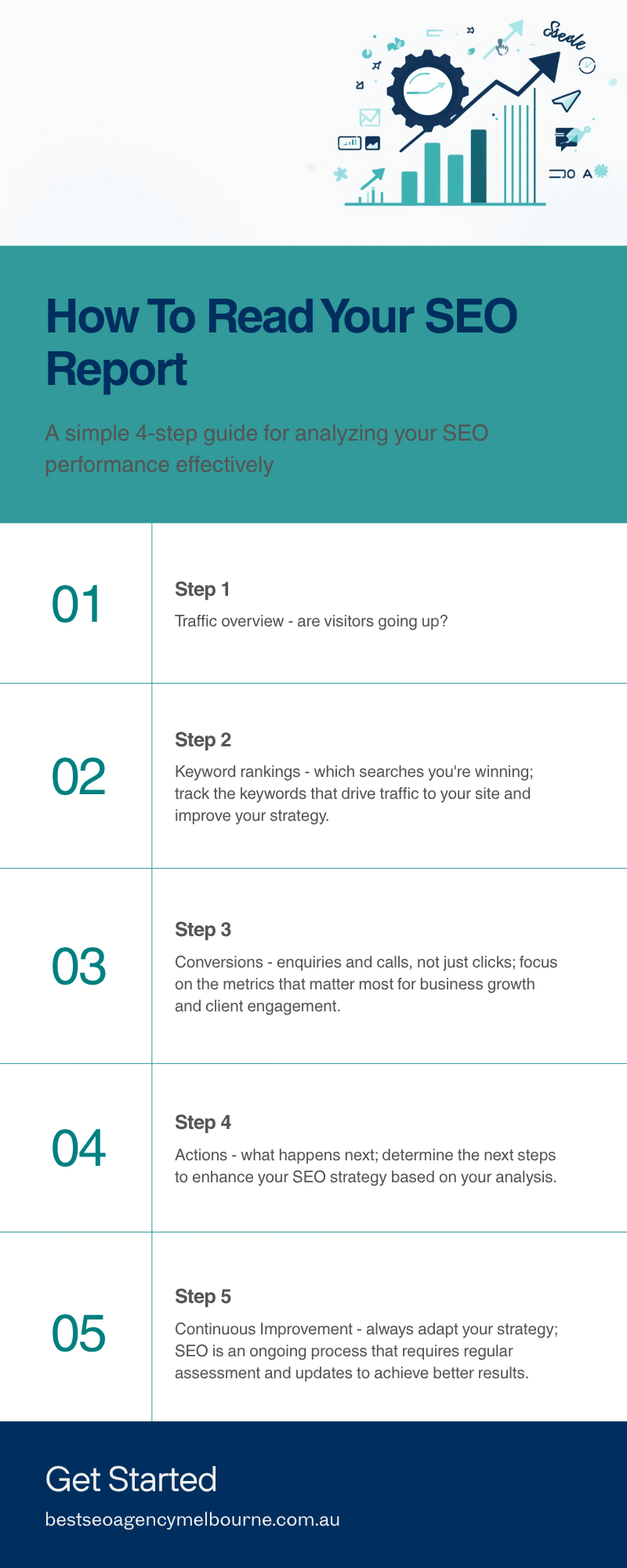
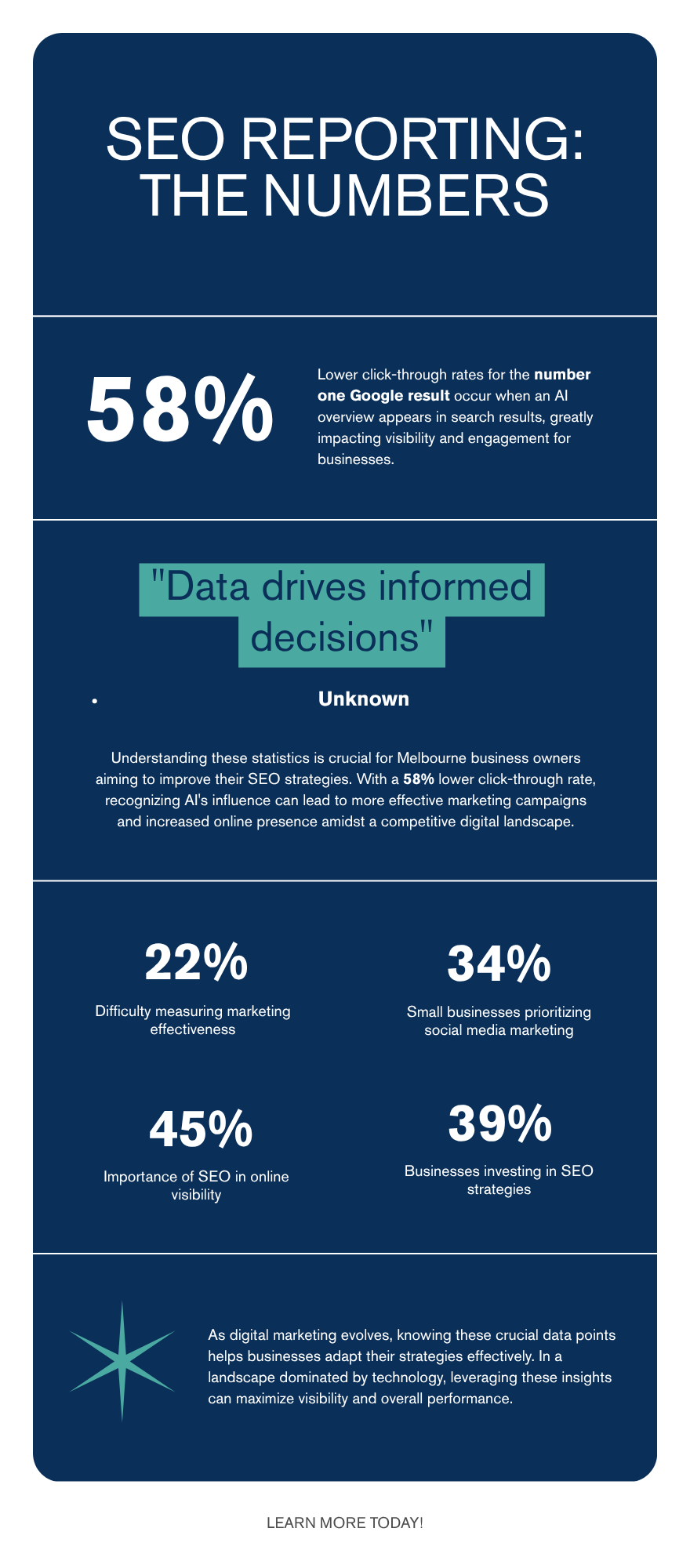
    Your SEO agency has just sent through this fortnight’s report. It runs to twelve pages, full of graphs and terms like organic sessions and keyword rankings, and you’ve got about four minutes before your next meeting. If you’ve ever nodded along on a reporting call without actually knowing whether the numbers were good or bad, you’re not alone. Nearly a quarter of Australian small business owners, 22%, say it’s difficult to tell what’s working in their marketing, according to a 2026 Constant Contact survey. This guide breaks an SEO report down into the four numbers that actually matter, shows you what a proper report should include, and flags the warning signs that separate a strategy that’s working from one that’s quietly going nowhere. None of it requires a marketing degree, just a clear idea of what each number is actually telling you.

    What should actually be in your SEO report

    A proper SEO report isn’t a folder of screenshots with a logo stuck on the cover. It should answer one plain question: is the money you’re spending on search engine optimisation turning into phone calls and enquiries? At a minimum, look for four things every time, whether your agency reports monthly or, like ours, fortnightly. If a report only ever shows the numbers that make last month look good, that’s a sign to start asking questions.

    What to check What it actually means Good sign Warning sign
    Organic traffic How many people found your site through an unpaid Google search Steady growth month on month, even if slow Traffic up but nothing else moves
    Keyword rankings Where your pages sit in Google for the searches your customers use Rankings improving for terms with buyer intent, such as “plumber Richmond” Rankings for random or branded terms only
    Conversions Enquiries, calls or form fills that came from organic search A visible link between traffic and enquiries No mention of enquiries at all
    Technical health Whether Google can actually crawl, read and load your site properly Issues flagged with a fix date given Same unresolved issues, report after report

    If your current report is missing any of these four, that’s not necessarily a red flag on its own, but it does mean you’re only getting part of the picture.

    Not sure if your current report stacks up? Book a free 30-minute consultation and site audit with our Melbourne team. There’s no obligation, and you’ll walk away knowing exactly where you stand, even if you don’t become a client.

    The four numbers that actually matter

    Once you know what should be in the report, the next skill is reading it in the right order. Here’s the sequence we walk clients through every fortnight.

    Infographic showing the four steps to read an SEO report: traffic overview, keyword rankings, conversions and next actions, for Melbourne business owners

    1. Start with traffic direction, not the exact number

    Don’t get hung up on whether you had 812 or 840 visitors last month. What matters is the trend over three to six months. A Melbourne trades business we work with in Port Melbourne cared less about the raw number and more about the line trending up, quarter on quarter, once seasonal dips around Christmas and the mid-year slowdown were accounted for. A single month rarely tells you anything on its own.

    2. Check rankings for terms that actually pay the bills

    Ranking first for your own business name is not a win, you’d rank for that anyway. Look for movement on the searches a real customer would type before they’re ready to buy, things like “family lawyer Southbank” or “emergency electrician Brunswick”.

    3. Follow traffic through to conversions

    This is the step most reports skip, and it’s the one that matters most. Traffic without enquiries usually means the wrong pages are ranking, the content doesn’t answer the reader’s actual question, or there’s a trust issue further down the page. We’ve written before about why a blog can get traffic but no enquiries, and the fix is rarely more traffic, it’s usually a content or page-level problem.

    4. Read the actions, not just the outcomes

    A report without a “what happens next” section is really just a screenshot dump. Every fortnightly report should end with two or three specific actions, who’s doing them, and roughly when you’ll see the result.

    Why a number one ranking doesn’t mean what it used to

    Rankings alone used to be the whole story. In 2026, they’re not. Google now shows an AI-generated summary, called an AI Overview, above the traditional results for a large share of everyday searches. Ahrefs analysed 300,000 keywords using Google Search Console data and found that when an AI Overview appears, the click-through rate for the page ranking first drops by 58% compared with a normal search results page, in research published in February 2026. In plain terms, for every 100 clicks a page used to earn from sitting at position one, it now earns roughly 42.

    Infographic showing two 2026 statistics for reading an SEO report: a 58 percent drop in click-through rate when Google shows an AI Overview, and 22 percent of Australian small business owners who say it is hard to tell what is working

    That doesn’t mean SEO stopped working. It means a fortnightly report showing “still ranking number one” isn’t enough on its own. Ask your agency to show actual clicks and impressions from Google’s own Search Console Performance report alongside the ranking position, so you can see whether that top spot is still delivering visits.

    If your fortnightly report only shows rankings and doesn’t break down clicks, impressions or enquiries, it’s worth asking why. Request a free report review and our Melbourne team will walk you through what your current numbers are actually telling you, at no cost.

    Red flags: when a report is hiding a problem

    Most SEO reports aren’t dishonest, they’re just incomplete, and incomplete can hide a problem for months if you don’t know what to look for. Watch for these five patterns.

    • Vanity metrics only. Impressions, a “visibility score”, or social shares with no mention of enquiries.
    • No month-on-month comparison. A single snapshot tells you nothing about direction.
    • Jargon with no plain-English explanation. If you need a glossary to read your own report, ask for a rewrite.
    • Technical issues that never get fixed. The same broken pages flagged report after report, with no resolution date.
    • No named next action. Every report should end with what’s being done next, not just what happened last fortnight.

    This matters more than it might seem. The ACCC has flagged manipulative or misleading conduct in digital markets, including advertising and reporting claims, as an enforcement priority for 2026. A reputable agency has nothing to hide behind a chart, and should be happy to explain any number in your report in one sentence, without you having to ask twice.

    What this costs, how long it takes, and what goes wrong

    Cost. Melbourne SEO retainers commonly range from around $800 to $3,500 a month, depending on how competitive your industry is and how much content and technical work is involved. Be wary of anything priced far below that range, it usually means thin, templated work rather than a strategy built around your actual customers.

    Timeframe. Most Melbourne businesses see the first ranking movement within 60 to 90 days, with noticeable traffic and enquiry growth by months four to six. Anyone promising page-one rankings in two weeks is either exaggerating or planning something Google will eventually penalise.

    What goes wrong. The most common failure isn’t a bad strategy, it’s a bad contract. Locking into 12 months with an agency you can’t easily leave removes your ability to act on a report that isn’t delivering. A close second is an agency reporting on keywords nobody actually searches for, padding out the rankings table to look busy while the numbers that matter go quietly unmentioned. We’ve covered agency selection in more detail in how to choose an SEO agency in Melbourne without signing a 12-month mistake, including the six questions worth asking before you sign anything.

    Quick questions about SEO reporting

    How often should I actually receive a report?

    Fortnightly is a good middle ground for most small businesses, frequent enough to catch problems early, not so frequent that you’re paying for admin instead of results. Monthly is acceptable if the report is genuinely thorough.

    What if my traffic is up but enquiries aren’t moving?

    That’s usually a page or content problem rather than a traffic problem, see the section above on following traffic through to conversions.

    Can I ask my current agency to explain a report line by line?

    Yes, and you should. Any agency worth paying will walk you through their reporting without charging extra for the conversation. For more on what to expect, see our frequently asked questions.

    The takeaway

    A good SEO report should leave you more confident, not more confused. Ask for the four numbers, traffic, rankings, conversions and next actions, expect plain language over jargon, and treat a top ranking as one signal among several rather than the whole scorecard. If you’d like someone to sit down and walk through your own report line by line, free of charge and with no lock-in contract, get in touch for a free, obligation-free chat. For more plain-English guides written for Melbourne business owners rather than marketers, visit our blog and read the next one on your lunch break instead of scrolling.