Blog

  • Internal Linking Strategy for Large Product Catalogues: A 2026 Guide for Melbourne Online Stores

    A Melbourne homewares store we looked at recently had 2,400 products live and Google had indexed 900 of them. The rest weren’t broken, banned or duplicated, they were simply orphaned, buried four or five clicks from the homepage with no other page on the site linking to them. Internal linking is the least glamorous part of e-commerce SEO and the one large catalogues get wrong most often. This guide covers how to structure links across hundreds or thousands of products so Google can find and rank them, what that work costs and takes, and the mistakes that quietly bury inventory for months.

    Why internal links make or break a large product catalogue

    Google finds new and updated pages by following links, and a product page with no internal links pointing to it is, for practical purposes, invisible no matter how good the page itself is. Online shopping in Australia has kept growing regardless: Australians spent a record $82.6 billion online in 2025, up 14% year on year, with 9.8 million households now shopping online (Australia Post eCommerce Report). That growth means more competition for every category and product search, and the stores winning that competition are usually the ones whose entire catalogue is actually crawlable, not just the handful of hero products linked from the homepage.

    Not sure how much of your catalogue Google can actually see? Our free 30-minute audit will show you, even if you never become a client. Book a free consultation.

    The three-layer structure that works for big Melbourne stores

    Google’s own guidance is straightforward: pages need to be reachable through crawlable links, not just a sitemap, for Google to reliably find and understand them (Google Search Central). For a catalogue of any real size, that means building three deliberate layers rather than relying on a single mega-menu: category pages that group related products and link out to every product in that group, cross-links between related or complementary products on each product page, and a handful of curated collection or guide pages that pull together products around a use case, gift idea or season. The table below compares this to the flat structure most stores default to without meaning to.

    Structure How shoppers find products How Google finds products
    Flat (homepage → search bar only) Only if they already know what they want Poorly, relies almost entirely on the sitemap
    Category-only Browsing within one category Reasonably, but cross-category products get missed
    Three-layer (category + cross-links + collections) Browsing, related-product prompts, and curated guides Well, every product has multiple paths leading to it
    The three-layer internal linking structure A diagram showing homepage linking to category pages, category pages linking to product pages, product pages cross-linking to related products, and collection pages pulling products together across categories. The three-layer linking structure Homepage Category A Category B Collection page Product 1 Product 2 Product 3 Product 4 Dashed teal lines = related-product cross-links between product pages bestseoagencymelbourne.com.au
    Infographic: how category pages, product pages and collection pages link together to make every product reachable.

    What it costs, how long it takes, and where large catalogues go wrong

    For a store in the low thousands of SKUs, a proper internal linking overhaul, category page rebuilds, related-product modules and a set of collection pages, typically runs $2,500 to $6,000 depending on how much of it can be templated in your platform versus built by hand, and takes four to eight weeks. The upside is meaningful: analysis of e-commerce sites shows that putting a systematic internal linking structure in place can lift organic traffic by around 67% within 90 days while cutting bounce rates by roughly a third, because shoppers who land on one product are shown a genuine path to the next one (Digital Applied, Internal Linking Strategy 2026). On the flip side, an estimated 41% of even top-performing e-commerce sites are still underusing internal links, and roughly a quarter of product pages on a typical large catalogue receive no internal links at all, which is exactly how a $150 product can sit unsold for a year despite being exactly what someone searched for.

    If a chunk of your catalogue looks like it’s sitting in the “orphaned” pile, fixing the worst of it is usually a two-week first pass. Talk to our Melbourne team about what that would look like for your store.

    The most common mistake is treating the mega-menu as the whole strategy. A dropdown menu helps human visitors but Google discounts navigation links far more heavily than links inside actual content, so category descriptions, buying guides and related-product blocks matter more than most store owners assume. The second mistake is auto-generated “related products” widgets that just show four random items from the same category, which technically link but add nothing useful to either the shopper or the search engine.

    The state of internal linking on e-commerce sites Three statistics: 41 percent of top ecommerce sites underuse internal links, 25 percent of product pages have zero internal links, 67 percent traffic lift within 90 days from a systematic internal linking structure. The state of e-commerce internal linking 41% of top e-commerce sites underuse internal links 25% of product pages have zero internal links 67% traffic lift within 90 days after fixing the structure Source: Digital Applied, Internal Linking Strategy 2026 · bestseoagencymelbourne.com.au
    Infographic: how much organic traffic large catalogues typically leave on the table through weak internal linking.

    A practical starting checklist

    Start by pulling a list of pages Google hasn’t indexed from Search Console and checking how many clicks each one is from your homepage. Anything past three clicks is a strong candidate for a new cross-link or collection page. From there, add a genuine “related products” block based on shared attributes (material, use case, price bracket) rather than just category, and write two or three seasonal or gift-guide collection pages that link across categories your main navigation keeps separate. If your product images are also part of the slow-page problem, our guide on optimising product images for search and speed covers that alongside this. And if you’re on Shopify specifically, our Shopify SEO checklist covers several structural fixes that pair well with the linking work here. You can see the fuller version of how we run this process on our process page.

    Frequently asked questions

    How many internal links should a single product page have?
    There’s no fixed number, but as a rough guide, a category link, three to six genuinely related products, and a mention in at least one collection or guide page is a reasonable minimum for a page you want to rank.

    Will this work on Shopify, or do I need a custom-built site?
    It works on Shopify, WooCommerce and Magento. The templates differ but the underlying structure, category, cross-link, collection, is platform-independent.

    Do out-of-stock products need to keep their links?
    If the product will come back in stock, yes, keep the page and its links live rather than deleting it, since removing and recreating pages repeatedly damages the ranking history you’ve already built.

    A large catalogue with weak internal links is inventory Google can’t see and shoppers can’t find. Fixing the structure is one of the highest-leverage changes available for a Melbourne online store. Book your free consultation. No lock-in contracts, a Melbourne-based team, reply within 24 hours. More guides like this are on our blog.

  • How to Optimise Product Images for Search and Speed

    On most online stores, product photos are the single biggest reason the site loads slowly — and slow product pages are one of the fastest ways to lose a sale on mobile. Images now make up roughly half of the average page’s total weight, and on around 85% of desktop pages the largest single element on screen is an image. For a Melbourne retailer with hundreds of product photos, that means image optimisation isn’t a nice-to-have finishing touch. It’s one of the highest-leverage fixes available, and one of the easiest to get wrong. Here’s what it actually involves, and what it should cost to fix properly in 2026.

    Why product images are usually the biggest speed problem on your store

    A typical desktop page now carries around 2.3MB of data, and images account for close to half of that on their own. Product galleries make this worse than most page types, because a single product page might load a hero photo, four to six thumbnails, and a handful of lifestyle shots, all before a shopper has scrolled past the fold. If those images are uncompressed JPEGs straight out of a camera or supplier feed, that page can easily carry five to ten times more image data than it needs to.

    It’s also worth noting that this problem tends to grow quietly. A store that launches with a lean, well-optimised catalogue can end up carrying years of accumulated bloat as new product lines get added by different staff, agencies or supplier feeds, each with their own habits around file size and format. By the time it’s noticeable in day-to-day browsing, it’s usually already affecting Core Web Vitals scores and, by extension, how Google evaluates the page experience of your store.

    The real cost of slow, unoptimised product images

    The numbers here are hard to ignore. Every extra second of load time costs an estimated 7% in conversions, and 53% of mobile shoppers abandon a page that takes more than a few seconds to load. Brands that fully implement responsive images — serving the right image size for each device rather than one large file to everyone — see an average 24% improvement in mobile conversion rate and a 31% reduction in mobile bounce rate compared with stores serving the same oversized image to every visitor. For an online store already spending on traffic, that gap sits entirely on the table: the shoppers already arrived, they just left before the page finished loading.

    Format Typical size vs. JPEG Browser support in 2026
    JPEG Baseline Universal
    WebP ~25–35% smaller ~97–98% of browsers
    AVIF ~50% smaller ~93% of browsers

    Google’s own web.dev guide to WebP images is a useful practical reference here — it’s the same guidance Chrome’s own performance auditing tool, Lighthouse, checks your site against.

    What “optimising” a product image actually means

    Optimisation isn’t just running images through a compressor once and moving on. A proper approach covers:

    • Format — serving WebP or AVIF to browsers that support them, with a JPEG fallback for the few that don’t.
    • Correct dimensions — generating multiple sizes (a “srcset”) so a phone downloads a phone-sized image, not a desktop-sized one shrunk down in the browser.
    • Compression level — finding the quality setting where file size drops significantly with no visible loss for a shopper deciding whether to buy.
    • Lazy loading — only loading images as a shopper scrolls to them, rather than every image on the page loading immediately.
    • Descriptive alt text and filenames — which affects accessibility and image search visibility as much as it affects speed.
    Image format file size comparison Bar chart comparing typical file size of a product photo in JPEG, WebP and AVIF formats, showing WebP around 30 percent smaller than JPEG and AVIF around 50 percent smaller than JPEG. Same Product Photo, Three Formats JPEG (original) 1.0 MB WebP ~0.67 MB AVIF ~0.5 MB Best SEO Agency Melbourne · illustrative, based on 2026 industry benchmarks
    Figure 1: The same product photo shrinks significantly just by changing format, before any other optimisation.

    Alt text and filenames: the SEO half of the equation

    Image optimisation isn’t only about speed — it’s also a genuine traffic source in its own right. Google Images drives a meaningful share of all web search traffic, and product pages where the alt text and filename directly match the product name and key attributes see roughly 47% higher image impression rates than generic filenames like “IMG_4021.jpg”. Stores that optimise this consistently across their catalogue report around 40% higher traffic from Google Images specifically. Google’s own Image SEO best practices documentation covers this in detail — the short version is that alt text should describe what’s actually in the photo (for example, “navy blue merino wool jumper, front view” rather than just “jumper” or the product SKU).

    Not sure how much of your catalogue still needs this? Book a free consultation and we’ll show you exactly where your product images are costing you speed and search visibility.

    A practical workflow for optimising product images

    For a Melbourne store working through an existing catalogue, this is usually the most efficient order of operations:

    1. Keep a high-resolution master file for every product, stored separately from what actually gets uploaded to the site.
    2. Batch-export web versions in WebP (and AVIF where your platform supports it), with a JPEG fallback generated automatically.
    3. Generate at least three sizes per image for responsive serving — mobile, tablet and desktop — rather than one fixed size for everyone.
    4. Set lazy loading for every image below the first screen of content.
    5. Write specific, descriptive alt text for each product image as part of the product listing process, not as an afterthought.
    6. Submit an image sitemap so Google can discover and index your product photos directly.
    Product image optimisation workflow Six-step workflow diagram for optimising product images: keep master files, batch-export WebP and AVIF, generate responsive sizes, enable lazy loading, write descriptive alt text, and submit an image sitemap. Product Image Optimisation Workflow 1 Keep masterfiles 2 Export WebP/ AVIF 3 Responsivesizes 4 Lazy loadbelow fold 5 Descriptivealt text 6 Imagesitemap Best SEO Agency Melbourne
    Figure 2: The six-step workflow we run through a Melbourne store’s product catalogue.

    Have a big catalogue and no time to do this manually? See how our e-commerce SEO service handles this at scale.

    What this costs and how long it takes for a Melbourne store

    For a small catalogue (under 100 products), a one-off image optimisation pass is typically a few days of work, often bundled into a broader technical SEO fix. For a larger store running into the thousands of product images, expect a proper project rather than a quick task — batch processing tools handle the bulk conversion, but responsive sizing, alt text and sitemap work still need a human check to avoid generic, unhelpful descriptions being applied automatically across the board. The upside is that unlike a lot of SEO work, the return here is measurable almost immediately: page speed scores and Core Web Vitals results improve as soon as the images go live, well before any ranking changes show up.

    Ongoing maintenance matters just as much as the initial clean-up. New product photos are usually the ones that slip back into old habits first, particularly when they come from a supplier feed or a photographer who isn’t briefed on your site’s format and sizing standards. Building a short checklist into your product upload process — format, size, alt text — is a small process change that prevents most of the problem from creeping back in over the following twelve months.

    How this fits into your wider e-commerce SEO

    Image optimisation is one piece of a broader technical picture for online stores. We covered several other quick wins — duplicate URLs, title tags, product schema, category pages and broken links — in our Shopify SEO checklist for Melbourne online retailers, which is worth working through alongside this if you haven’t already. Our e-commerce SEO service covers image optimisation as a standard part of an ongoing technical health check for growing stores.

    Frequently asked questions

    Will optimising my images actually improve my Google rankings, or just my page speed?
    Both, though through different mechanisms. Faster pages improve the Core Web Vitals signals Google uses as part of page experience, while descriptive alt text and filenames make your product photos discoverable through Google Images search directly — a separate traffic source most Melbourne stores barely tap into.

    Do I need to manually optimise every single product photo?
    No. Format conversion, compression and responsive sizing can all be automated through your platform or a plugin. The one part that genuinely benefits from a human — writing specific, accurate alt text — is worth doing properly rather than automating with generic templates, since generic alt text captures very little of the search benefit.

    What’s a realistic file size target for a product photo?
    As a rough guide, aim for well under 200KB per product image after optimisation, even for a large, detailed hero shot — modern compression and formats like WebP and AVIF make this achievable without a visible drop in quality on a typical product page.

    Can I just install a compression plugin and call it done?
    A compression plugin handles part of the job well — usually format conversion and basic compression — but it won’t fix generic alt text, missing responsive sizes, or a missing image sitemap on its own. Treat a plugin as one step in the workflow above rather than a complete solution, and check its output on a handful of product pages after installing it to confirm image quality still looks right at typical zoom levels.

    Ready to see where your store is losing speed? Book your free consultation →

  • Shopify SEO Checklist for Melbourne Online Retailers: 6 Fixes Before You Spend on Ads

    Most Melbourne online stores are leaking traffic they already paid to earn. A customer finds a product on Google, the page takes four seconds to load, and they bounce back to the results before your add-to-cart button even renders. That is not a marketing problem. It is an SEO problem, and on Shopify it is usually one of six fixable things.

    This checklist is written for Melbourne retailers running Shopify stores who want more sales from organic search without adding to their ad spend. We will walk through what to fix, roughly what it costs to fix it, and how long the results take to show up.

    Not sure where your own store stands? Our free 30-minute audit will tell you exactly which of these six items is costing you the most, even if you never become a client. Book a free consultation.

    1. Fix duplicate product and collection URLs

    Shopify creates more than one URL for the same product the moment it sits in two collections, which is common for stores selling anything with variants (size, colour, bundle). Google sees two web addresses showing near-identical content and has to guess which one matters. Often it picks neither, and both versions rank worse than a single clean page would.

    The fix is a canonical tag pointing every duplicate back to one preferred URL, plus a tidy-up of your collection structure so a product is not filed in five places at once. For a mid-sized catalogue (200 to 800 products) this is usually a half-day to full-day job. You can spot the problem yourself by searching site:yourstore.com.au "product name" in Google and checking whether more than one result comes back for what should be a single page.

    2. Get images loading in under two seconds

    Product photography sells the item, but an oversized image file slows the whole page down, and speed is now a ranking factor as well as a conversion one. Pages that load in under two seconds bounce at around 9%; pages that take five seconds or more bounce at closer to 38%, according to 2026 page speed benchmark data.

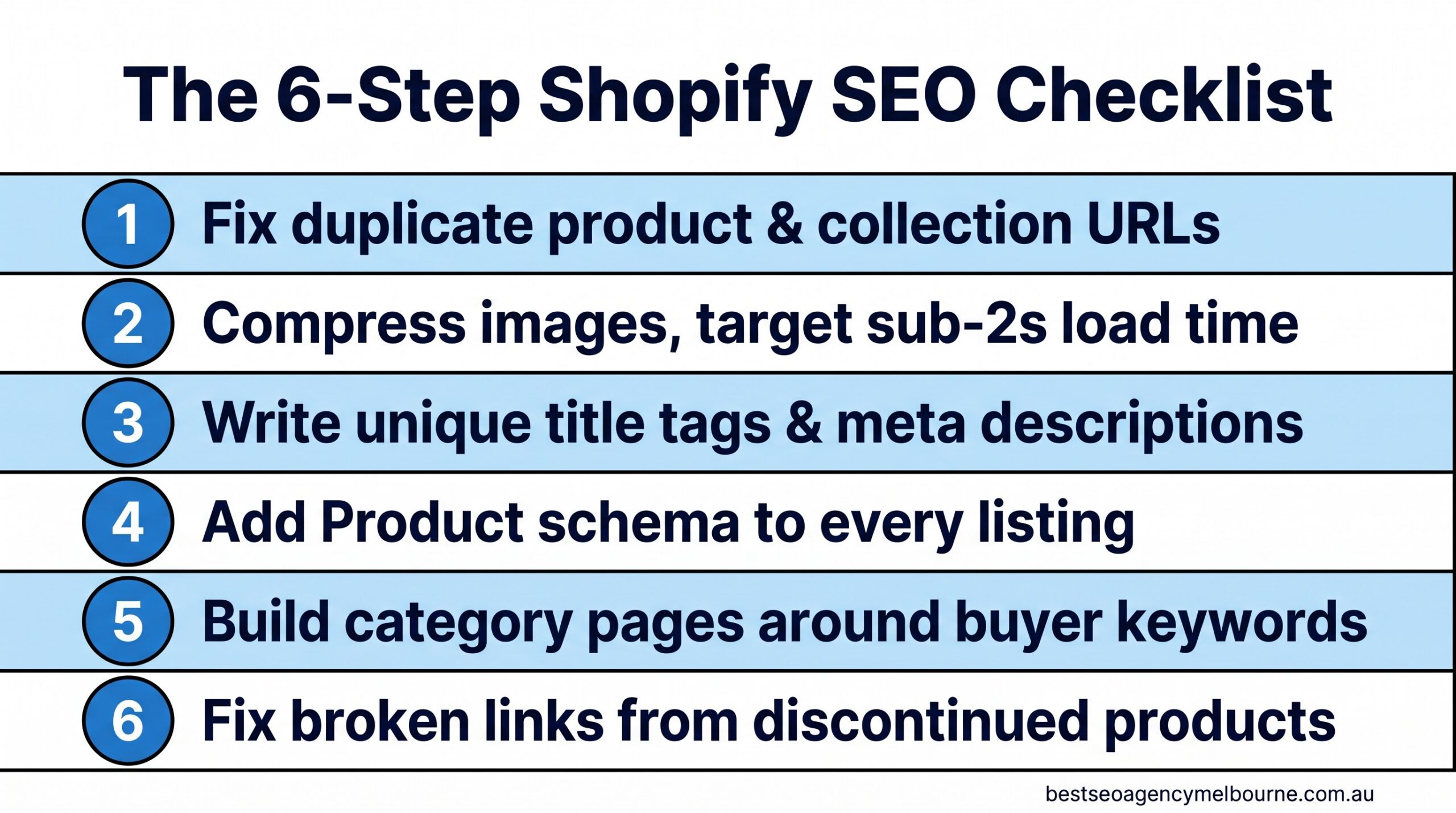
    Six-step Shopify SEO checklist infographic showing fixes for duplicate URLs, image compression, title tags, product schema, category pages and broken links for Melbourne online retailers

    The six fixes in this checklist, in the order we recommend tackling them.

    Compressing product images (Shopify apps like TinyIMG or built-in image optimisation can do this without a developer) and switching to next-gen formats such as WebP typically claws back one to two seconds of load time on a store that has never had this done before.

    3. Write title tags and meta descriptions that are not the product name twice

    The single most common Shopify SEO fault we see in Melbourne stores is a title tag that just repeats the product name with no context: “Blue Cotton Shirt – Blue Cotton Shirt”. Google uses the title tag to decide what a page is about and to write the blue clickable headline in search results. A better pattern includes the product, a distinguishing detail, and the brand: “Blue Cotton Shirt – Breathable Summer Fit | Store Name Melbourne”.

    This is a content task, not a technical one, and it is the cheapest item on this list to fix. A store with 300 products can realistically rewrite its top 50 highest-traffic title tags and meta descriptions in a week. Start with the products that already get traffic but few sales; a stronger title and description often lifts the click-through rate on a page Google already ranks, which is faster than trying to rank a brand-new page from nothing.

    4. Add Product schema to every listing

    Schema markup (also called structured data) is a small block of code that tells Google specific facts about a page: this is a product, it costs this much, it is in stock, and it has this star rating. Without it, Google has to infer those details from the page text, which it does imperfectly. With it, your listing can show a price, a rating and stock status directly in the search result, which is proven to lift click-through rate.

    What Product schema can add to a Shopify listing
    Element Shown in search results without schema Shown in search results with schema
    Price No Yes, as a visible line
    Star rating No Yes, if reviews are present
    Stock status No Yes (“In stock”)
    Typical CTR uplift Baseline 20-30% higher, per structured data research

    If your Google Business Profile listing or product pages look like the plain “before” example in that table, talk to our Melbourne team — adding Product schema across a Shopify catalogue is usually a two-week job, not a rebuild.

    5. Build category pages around what buyers actually search for

    Product pages rank for specific items. Category (collection) pages are what rank for the broader, higher-volume searches like “women’s linen shirts Melbourne” or “waterproof dog beds Australia”. A collection page with no written content beyond a product grid gives Google almost nothing to work with, so it under-ranks for exactly the searches that bring the most traffic.

    Adding 150 to 300 words of genuinely useful buying-guide content above or below the product grid, built around the terms real customers use, is one of the highest-return fixes on this list because it targets searches with real commercial intent.

    Bar chart showing organic search drives 33 to 43 percent of Australian ecommerce traffic and converts at 2.5 to 3.5 percent, higher than the 1.4 percent site-wide average

    Organic search is the highest-converting channel most Melbourne Shopify stores have, and it does not stop working when you pause spending.

    Australians spent a record $82.6 billion shopping online in 2025, with 24% of all retail spend now happening online, according to the Australia Post eCommerce Report 2026. Organic search conversion rates on Shopify typically sit between 2.5% and 3.5%, well above the 1.4% site-wide average, according to Shopify’s own 2026 conversion benchmark data. Every category page you improve is competing for a genuinely large and growing pool of buyers.

    6. Fix broken links from discontinued products

    Every retailer discontinues stock, and every discontinued product page that is simply deleted becomes a dead link, a 404 error for anyone who had it bookmarked, shared it, or found it in a search result that has not updated yet. Dead links waste the ranking value that page had built up and create a poor experience for shoppers who arrive expecting to buy something that no longer exists.

    The fix is a 301 redirect from the old product URL to its closest live replacement or the relevant category page, set up every time a product is discontinued rather than in an annual clean-up.

    What this costs, how long it takes, and what goes wrong

    For a Melbourne store with 200 to 500 products, working through all six items typically costs somewhere between a solo freelancer’s day rate for a light pass and a few thousand dollars for a full technical and content overhaul, depending on how much of the catalogue needs rewriting. Expect the technical fixes (schema, redirects, canonical tags) to show up in Google Search Console within two to four weeks, and the content fixes (title tags, category pages) to move rankings over eight to twelve weeks as Google re-crawls and re-evaluates the pages.

    The most common mistake we see is stores treating this as a once-off project rather than an ongoing habit. New products get added every month without title tags being checked, and by month six half the catalogue has drifted back into the same problems. Building these six checks into your product upload process is what actually protects the ranking gains.

    Quick FAQ

    Do I need a developer to fix Shopify SEO issues? Most of this checklist (title tags, image compression, category content) can be done inside Shopify’s standard editor or with well-reviewed apps. Schema markup and canonical tag clean-ups usually benefit from a specialist, particularly on larger catalogues. See our full FAQ for more on how engagements typically run.

    Will this work for a store with under 50 products? Yes, smaller catalogues actually see faster results because there is less to fix and Google can re-crawl the whole site more quickly.

    Should I fix all six at once or one at a time? If budget is tight, start with title tags and image compression first. Both are quick to implement and tend to move rankings fastest, which makes it easier to justify tackling the remaining items afterwards.

    If you are still comparing agencies before committing budget to any of this, our guide on how to choose an SEO agency in Melbourne without signing a 12-month mistake covers the questions worth asking before you sign anything. And if product page copywriting is your bigger gap than the technical side, our guide to writing for humans and Google at the same time is a useful next read.

    None of these six fixes require a full site rebuild, and none of them require pausing your ad spend while you sort them out. They are the groundwork that makes every other marketing dollar you spend work harder, because a store that ranks well and loads fast converts better regardless of where the visitor came from.

    Book your free consultation. No lock-in contracts, reply within 24 hours, Melbourne-based team. Get started.

  • How to Write Blog Titles That People Actually Click: A Melbourne Business Owner’s Guide

    Melbourne business owners don’t need a marketing degree to notice this: the blog post you spent three hours writing goes online, and almost nobody clicks it. Meanwhile a competitor’s post on the same topic, sometimes covering less ground than yours, sits near the top of the results and gets read every day. The difference is rarely the writing inside the article. It’s the eight or ten words above it, the title, that decides whether a reader in Brunswick or Box Hill bothers to open the page at all. Fewer organic clicks are up for grabs on Google than there were two years ago, which makes a strong title matter more, not less. This guide sets out practical, testable ways to write blog titles that earn the click, with real examples and an honest look at what a genuinely useful title costs to produce.

    What actually makes a Melbourne reader click

    A clickable title does three things in its first few words: it tells the reader what they’ll get, who it’s for, and why it matters right now. A vague title like “SEO Tips for Business” loses to a specific one like “5 SEO Fixes a Richmond Cafe Made Before Christmas” because the second one answers the question sitting in every reader’s head: is this actually about me?

    Local business owners scrolling on their phone between jobs are scanning, not reading closely. Give them:

    • A clear benefit stated in plain words, not “optimise your digital presence” but “get found on Google Maps”
    • A number when one genuinely exists in the article, such as 5 steps, 3 mistakes or 12 months
    • A timeframe or point of comparison, because “before you sign a 12-month contract” tells a reader more than “an SEO buying guide”
    • The suburb, industry or situation, where it’s true, because Melbourne readers respond to Melbourne specifics rather than generic claims

    None of this works if the title overpromises. A title that says “the fastest way” for a process that actually takes four months will cost you the reader’s trust by the second paragraph, and it can cost you in search rankings too, since pages that readers quickly click away from tend to lose ground over time. This is the same checklist our team runs through with every client before a post goes live, as part of the ongoing SEO content strategy work we do for over 500 Melbourne businesses.

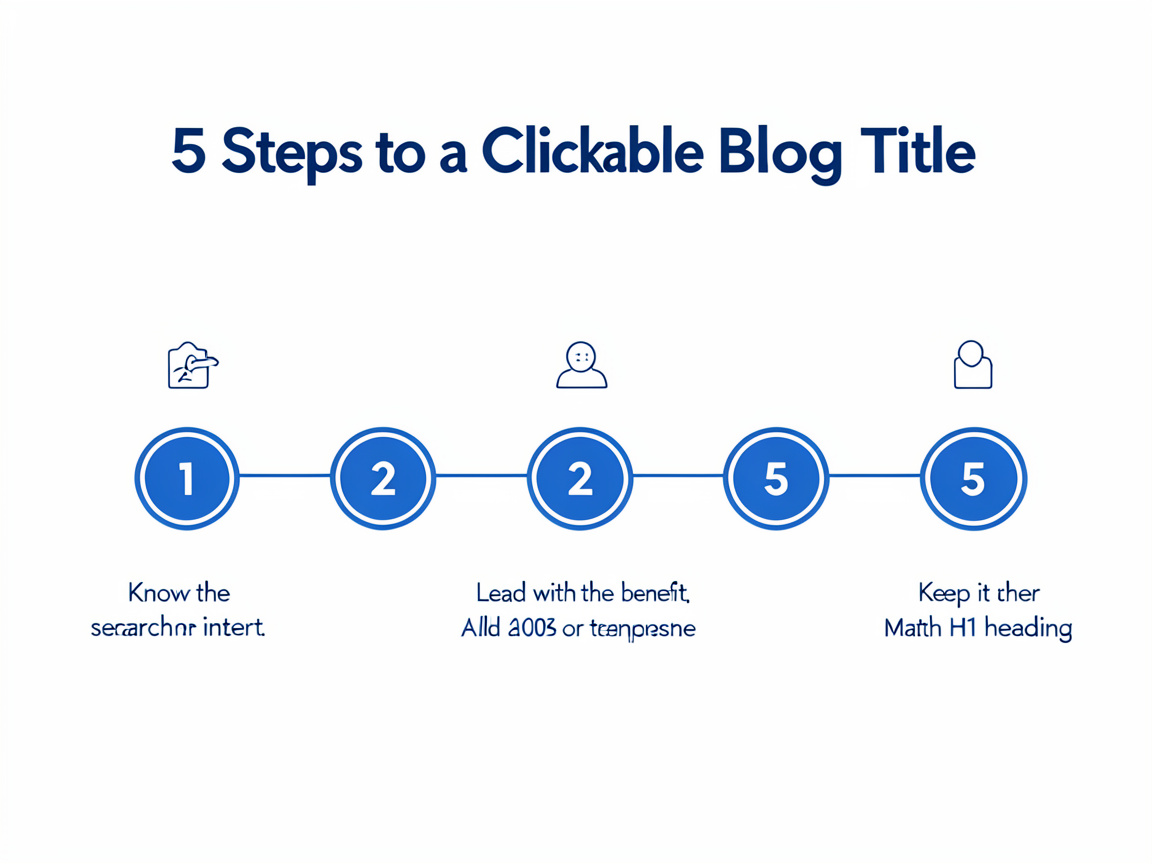
    Infographic showing 5 steps to write blog titles that people actually click: know the search intent, lead with the benefit, add a number or timeframe, keep it under 60 characters, match the H1 heading.
    Five practical steps for writing blog titles that people actually click.

    If you’re not sure whether your last few post titles are actually working for you, that’s an easy thing to check. We offer a free 30-minute audit where we’ll look at your existing blog titles and tell you honestly which ones are likely costing you clicks, and why. Book your free 30-minute audit and we’ll reply within 24 hours.

    Weak titles versus titles that earn the click

    Small wording changes make a measurable difference to whether a Melbourne reader stops scrolling. Here’s how the same topic can be written two very different ways.

    Weak title Why it falls flat Stronger title Why it works
    SEO Tips for Small Business Too broad, no clear benefit, sounds like every other post on the topic 5 Google Business Profile Fixes for a Fitzroy Retailer in Under an Hour Specific, numbered, states the benefit and the time needed
    Why You Need a Website States the obvious and offers no new information What a New Website Actually Cost a South Yarra Physio in 2026 Real number, current year, genuine curiosity
    About Our Plumbing Services Internal, business-first language that nobody searches for How Much Does an Emergency Plumber Cost in Melbourne? A 2026 Price Guide Matches what people actually type into Google
    Marketing Advice Generic, no audience, could belong to any industry 3 Marketing Mistakes We See Every Week from Melbourne Cafes Specific audience, a number, and implied credibility

    Why the fight for the click just got harder

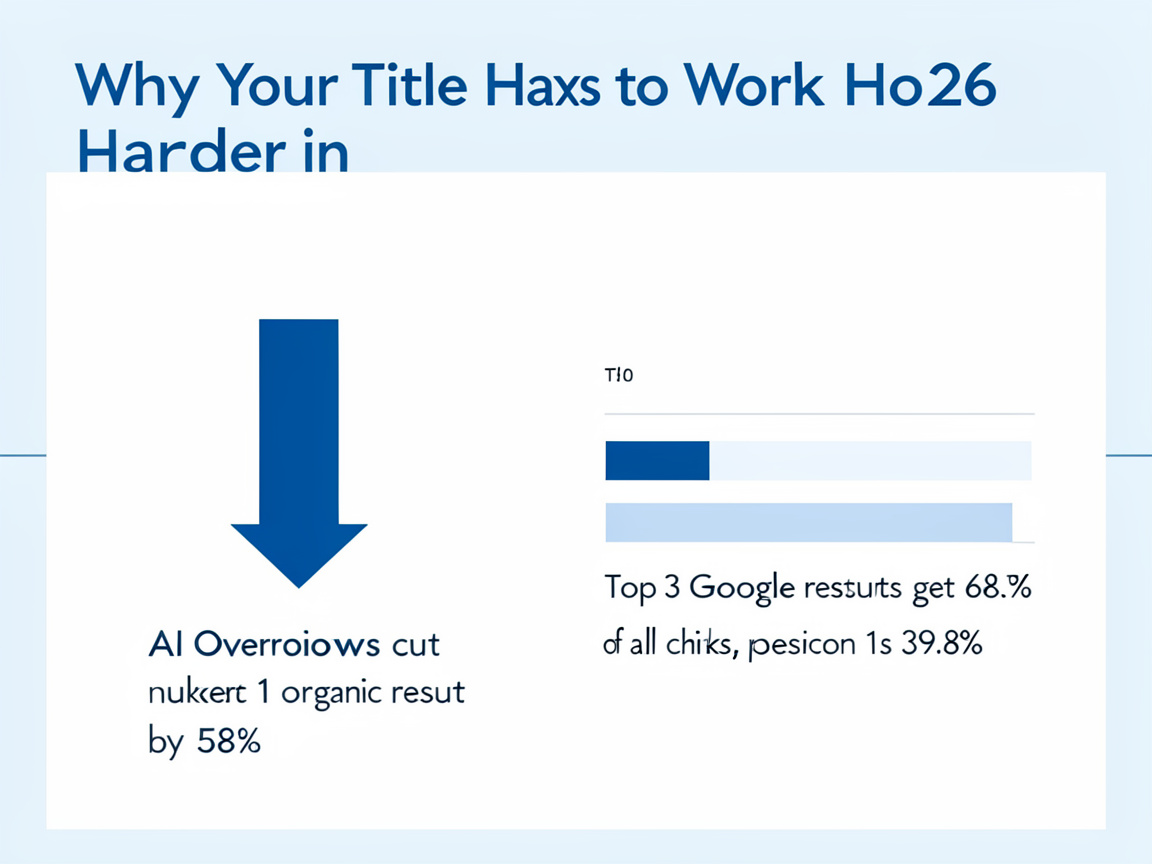
    It isn’t only about ranking well any more. Google’s AI Overviews, the short AI-written summaries that now appear above the normal search results for many queries, are already answering a large share of questions before a reader even sees the list of blue links. Ahrefs analysed 300,000 keywords and found that when an AI Overview appears, the click-through rate for the number one organic result falls by 58 per cent, a much sharper drop than the 34.5 per cent measured back in April 2025 (Ahrefs, 2026).

    Ranking position still matters enormously within what’s left. First Page Sage’s 2026 report on click-through rates found that the top three organic results capture 68.7 per cent of all clicks on a typical results page, and the number one result on a “clean” page, one without an AI Overview or map pack, still attracts 39.8 per cent of clicks on its own (First Page Sage, 2026). In plain terms: there are fewer clicks in the pool than there used to be, and the title is one of the few things you fully control in the fight for the ones that remain.

    Data infographic on why blog titles matter more in 2026, showing AI Overviews cutting clicks to the top Google result by 58 percent and the top 3 results getting 68.7 percent of all clicks.
    Why a strong blog title matters more in 2026: AI Overviews and search position data.

    Because fewer clicks are up for grabs than there used to be, it’s worth knowing exactly how your current pages are performing before you write another word. We can pull your Google Search Console data and show you, page by page, which of your existing titles are underperforming their ranking position. Ask for a free title and click-through review and we’ll walk you through the numbers in plain language, the same way we do in our fortnightly client reports.

    What this costs, how long it takes, and what goes wrong

    Writing a strong title takes minutes once you know the formula, but getting a whole content plan right takes longer. If you’re doing it yourself, budget 15 to 20 minutes per post to draft five or six title options and pick the strongest, ideally after a colleague who isn’t close to the business reads them cold. If you’re paying an agency or freelancer, expect blog content (research, writing, on-page optimisation and a title that’s actually been tested against alternatives) to run from roughly $250 to $600 per article in Melbourne, depending on length and technical complexity. A fully outsourced content strategy, covering keyword research, a content calendar and monthly publishing, typically starts from around $1,500 to $2,500 a month with an established local agency.

    Most Melbourne business blogs that underperform aren’t let down by bad writing. They’re let down by titles that were an afterthought, bolted on after the article was finished rather than planned before it. Three mistakes come up again and again: keyword stuffing (repeating “Melbourne plumber” three times in one title, which looks spammy to readers and to Google), titles so long they get cut off in search results, and titles that overpromise a result the article can’t back up. Google will also sometimes rewrite your title in its results if it decides your original doesn’t reflect the page content well, so keeping your title and your main heading aligned and accurate is one of the simplest ways to keep control of it (Google Search Central).

    Frequently asked questions

    Does my blog title have to match my H1 heading exactly?
    Not word for word, but they should say the same thing. When the two are aligned, Google is far less likely to rewrite what shows up in the search results.

    How long should a blog title be?
    Aim for roughly 50 to 60 characters so the whole thing displays in Google without being cut off. Slightly longer is fine if the extra words are doing real work.

    Can a great title fix a weak article?
    No, and it shouldn’t try to. A title’s job is to earn an honest click. If the article doesn’t deliver on it, readers leave quickly, which tends to hurt rather than help your rankings over time. Our guide on why your blog gets traffic but no enquiries covers what happens after the click.

    Writing titles that earn the click is a skill any Melbourne business owner can learn, and the formulas above will get you most of the way there on your own. If you’d rather not test it by trial and error on your own site, our in-house Melbourne team has been doing exactly this, along with the writing, research and reporting behind it, since 2012. We work on a month-to-month basis with no lock-in contract, so there’s no risk in finding out what a stronger set of titles could do for your blog. If turning a single customer question into a full article sounds useful too, our guide on turning one customer question into a blog article is a good next read. Book a free, no-obligation consultation and we’ll reply within 24 hours, free and with no strings attached.

  • How to Write an FAQ Page That Actually Ranks

    How to Write an FAQ Page That Actually Ranks

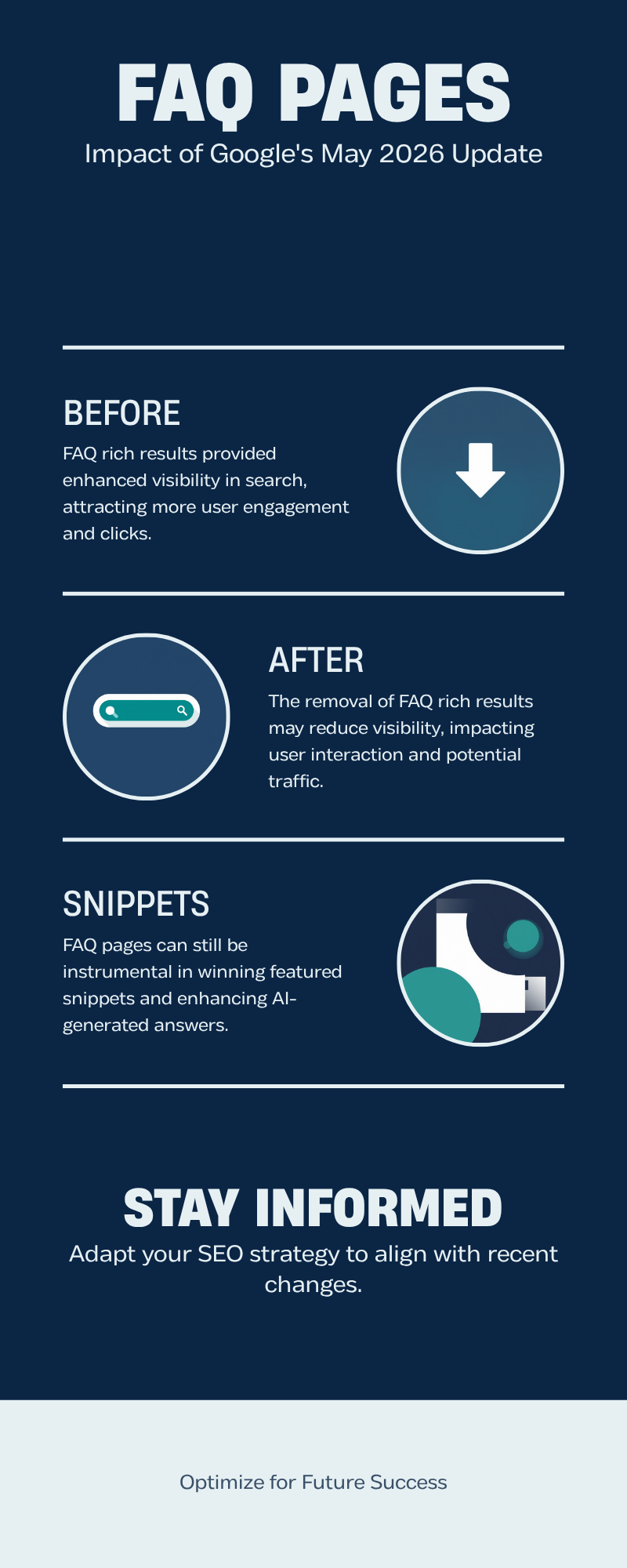
    For years, the advice on FAQ pages was simple: add FAQ schema, get an expandable dropdown under your listing in Google, win extra space on the results page. That advice is now out of date. Google confirmed the change to its Search Central documentation, and Search Engine Journal reported that FAQ rich results stopped appearing in Google Search from 7 May 2026. So does a Melbourne business still need an FAQ page? Yes, for reasons that have nothing to do with the dropdown you have lost, and arguably more important ones now that AI-generated answers are becoming a real source of enquiries.

    What actually changed in May 2026

    Google’s own FAQPage structured data documentation now carries a deprecation notice. FAQ schema no longer produces the expandable dropdown result it used to, and there is no direct click-through boost from adding the markup itself. If you were adding FAQ schema purely to chase that visual real estate, that specific reason to bother is gone.

    What has not changed is the underlying value of a well-written FAQ page as content. Google still needs to understand what a page is about and whether it answers a real question well, and an FAQ page structured around genuine customer questions remains one of the clearest ways to signal that. The graphic below shows exactly what changed and what did not.

    Before-and-after infographic showing that FAQ pages lost expandable rich result dropdowns in Google Search after May 2026, but still help pages win featured snippets and AI-generated answers.

    Not sure whether your FAQ content is pulling its weight? Our free 30-minute consultation will show you exactly where your FAQ page stands, even if you never become a client. Book a free consultation.

    Why a genuinely useful FAQ page still ranks

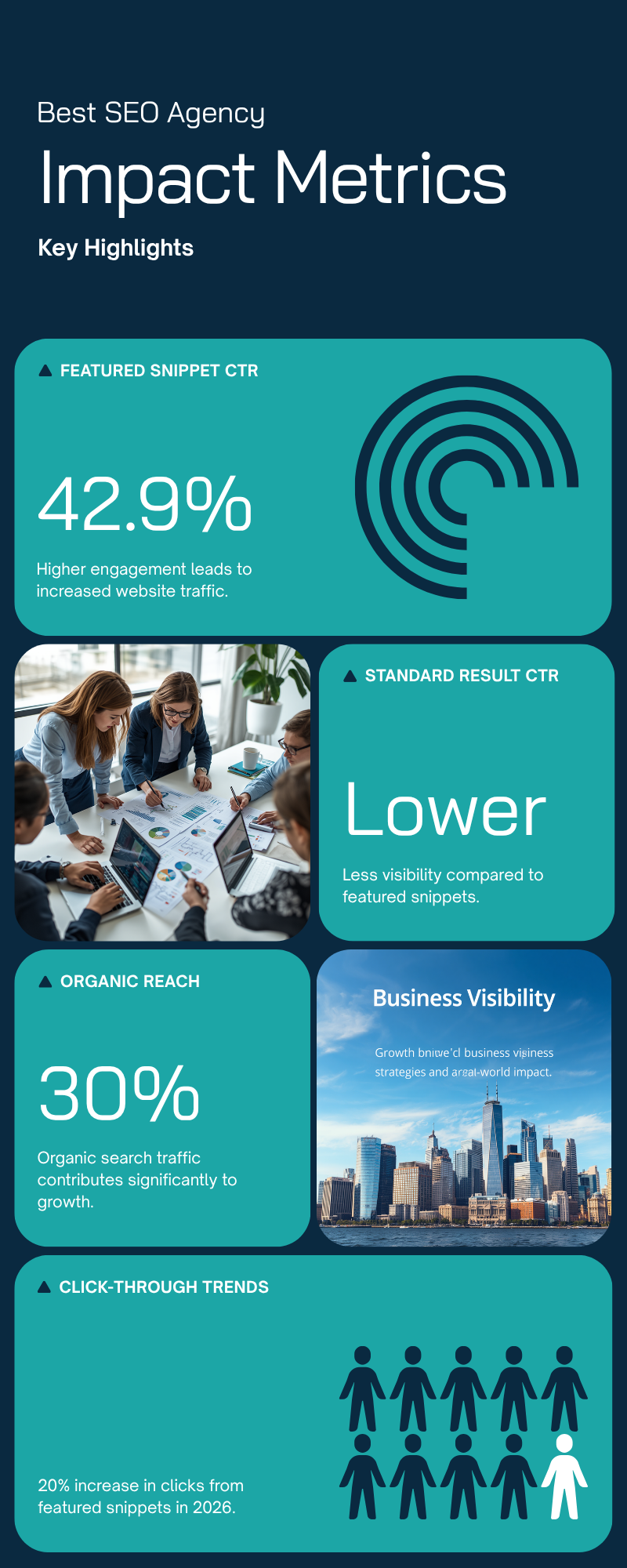
    Two things replaced the old rich-result incentive, and both matter more for a Melbourne business than the dropdown ever did. First, a well-structured FAQ page is still a strong candidate for a featured snippet, the answer box that appears above the standard organic results. According to First Page Sage’s 2026 click-through rate benchmarks, a featured snippet in first position earns roughly a 42.9% click-through rate, noticeably higher than a standard first-position listing with no snippet above it. Second, pages that answer questions clearly and concisely are more likely to be pulled into Google’s AI-generated overviews and cited in AI chat answers, which is quickly becoming its own source of enquiries.

    Bar chart infographic showing featured snippets earn a 42.9 percent click-through rate, higher than a standard number one search result, based on 2026 industry CTR research.

    Neither of these depends on the FAQ schema markup itself. They depend on the quality of the answers. Our own guide on turning one customer question into a blog article covers the same underlying skill: starting from a real question a Melbourne customer actually asked, rather than a list a business owner invents at their desk.

    There is a third audience worth writing for now too: AI assistants themselves. When someone asks ChatGPT, Google’s AI Overviews or a similar tool “how much does an SEO agency cost in Melbourne”, those systems are drawing on published web content to construct an answer, and pages with clear, well-labelled questions and concise answers are easier for them to lift accurately. A rambling paragraph gets paraphrased poorly or skipped altogether. A tight two-sentence answer to a specific question is far more likely to be quoted correctly, sometimes with your business named as the source.

    How to actually write one that ranks

    Start with real questions, not guesses. Pull them from your enquiry emails, your call logs, the questions your reception team fields every single week, and the “People also ask” box on Google for your main service keyword. A question phrased the way a real customer types it, such as “how much does it cost” rather than “pricing information”, matches search intent far better than corporate phrasing ever will.

    Answer the question directly in the first sentence, then add supporting detail underneath. Google, and any AI system reading the page, favours a direct answer up front over a paragraph of throat-clearing before the actual information appears. Keep each answer to two or three sentences where possible. Long, rambling answers dilute the very clarity that makes a page snippet-worthy in the first place.

    Group related questions under a short heading rather than listing thirty questions in one undifferentiated block. A visitor scanning for pricing information should be able to jump straight to a “Costs and payment” heading without reading through unrelated questions about scheduling or service areas first. This same grouping helps Google understand which questions belong to which topic, which in turn helps the right answer surface for the right search.

    Do this Not this
    Use the customer’s own wording as the question Rewrite it into formal marketing language
    Answer in the first sentence, then explain Build up to the answer over a full paragraph
    Group related questions under a clear heading List every question in one long undifferentiated block
    Update answers when prices or policies change Leave outdated answers live for years
    Link each answer to the relevant service page Leave every answer as a dead end with no next step

    If your FAQ page still reads like a legal disclaimer rather than a real answer to a real question, talk to our Melbourne team. Rewriting an existing FAQ page properly is usually a one to two week job, not a full site rebuild.

    Where FAQ content fits on the page, and what it costs to get right

    An FAQ page performs best as both a standalone page and as a section woven into your key service pages, answering the two or three most common objections right where a customer is deciding whether to enquire. For a Melbourne business, a properly researched and written FAQ section, standalone page plus service page inserts, typically costs between $600 and $1,800 depending on how many services you offer, and takes 1 to 3 weeks from research to publish. The main thing that goes wrong is treating it as a one-off task. Customer questions change as your services, pricing and policies change, so an FAQ page needs the same periodic review as your pricing page, not a “set and forget” mentality.

    The other common mistake is writing FAQ content for search engines instead of for the person asking. A page stuffed with keyword variations of the same question reads awkwardly to a human and rarely earns the featured snippet it was chasing, because Google’s systems are specifically tuned to reward content that reads naturally. Our piece on writing for humans and Google at the same time goes into more depth on striking that balance across your whole site, not just the FAQ page.

    A less obvious cost is opportunity cost. Every FAQ answer is a chance to link to a service page, a case study, or a booking form at the exact moment a visitor’s specific objection has just been addressed. An FAQ page that answers questions but never points anywhere is a dead end. A well-built one turns “how much does this cost” into a direct path to a quote request, which is the difference between a page that ranks and a page that actually grows the business.

    Common questions

    Should I remove my FAQ schema now that it doesn’t produce rich results? No. Google’s documentation confirms the markup causes no harm even though it no longer changes how your listing looks. Leaving it in place costs nothing, is a normal part of good technical housekeeping, and may still help automated systems parse your content correctly.

    How many questions should an FAQ page have? Fewer than you think. Five to ten genuinely useful, well-answered questions outperform thirty shallow ones padded out to look comprehensive. See our process page for how we research and prioritise which questions are worth answering first.

    Does this apply to service pages too, or only a dedicated FAQ page? Both. A short, well-answered FAQ block at the bottom of a service page often outperforms a generic standalone FAQ page, because it answers the objection at the exact moment a customer is deciding whether to enquire about that specific service.

    Will this help with voice search too? Yes, indirectly. Voice assistants tend to read out the same kind of short, direct answer that wins a featured snippet, so a well-written FAQ page is doing double duty even though voice search is not something you can optimise for separately in any meaningful way.

    The dropdown is gone, but the underlying opportunity, winning the featured snippet and being cited in AI-generated answers, is arguably more valuable to a Melbourne business today than the old rich result ever was. Book a free consultation with our Melbourne team and we will show you which of your pages are FAQ-ready and which need a rewrite. No lock-in contracts, real people, real results. Free Consultation, or read more guides on our blog.

  • Why your blog gets traffic but no enquiries

    A Melbourne business owner checks their analytics and sees the blog is working. Visits are up, a few posts are ranking on page one, time on page looks healthy. Then they check the enquiry form and it tells a different story. Nothing has moved. This gap between traffic and enquiries is one of the most common and most frustrating problems in small business SEO, and it almost never gets fixed by writing more content, no matter how tempting that feels when the numbers are not moving.

    This guide covers where blog readers actually drop out of the funnel, why the drop-off usually has nothing to do with word count or keywords, and what to fix instead.

    The funnel most blogs are missing

    A blog post has to do four things in order: get visited, get read, earn trust, and prompt an enquiry. Most SEO advice focuses entirely on the first step, getting visited, because that is the part search engines measure and reward. But a visit that never turns into trust was never going to turn into an enquiry, no matter how well the post ranks.

    Most agencies, and most business owners writing their own content, skip straight from “reads to the end” to “submits an enquiry” without noticing there is a step missing between them. It is an easy step to miss precisely because it does not show up in analytics as its own metric. There is no “trust score” in Google Analytics, so a business can watch traffic and time on page climb for months without ever seeing the one number that would explain why enquiries are not following.

    Our own guide on writing for humans and Google at the same time covers the first two stages, getting found and getting read. This article picks up where that one leaves off: what happens, or does not happen, after someone has actually read the post.

    Funnel stage What it looks like Where most blogs fail
    Visits the post Ranks, gets clicked from search Rarely the problem once a post ranks
    Reads to the end Clear structure, answers the question fast Buried lead, padded intro
    Trusts the business Real proof, specific detail, a face behind the words Generic claims with nothing to back them up
    Submits an enquiry Obvious next step, low-friction form No clear call to action anywhere on the page

    Not sure where your blog is losing readers? Our free 30-minute audit will tell you, even if you never become a client. Book a free consultation.

    Where the trust step breaks down

    Trust is the stage almost every underperforming blog skips, and it is also the hardest to fake. A post that says “we’re Melbourne’s most trusted provider” without a single specific detail behind it reads as marketing, not proof, and readers scroll past it without registering a word.

    What actually builds trust inside a blog post: a named example (a real suburb, a real problem, a real outcome), a statistic with its source shown rather than just asserted, and evidence that a real person wrote it, not a template. The ACCC’s own guidance on online reviews exists precisely because generic, unverifiable claims have become so common that regulators had to step in. If your blog reads like it could have been published on a competitor’s site with the suburb name swapped, it is not going to earn the trust it needs to convert.

    Google has moved the same direction. Its guidance on creating helpful, people-first content specifically rewards content written from real experience over content that could have been written by anyone about anything. The posts that rank and convert are increasingly the same posts, because both readers and Google are now looking for the same signal: a real business, saying something specific.

    A before and after example

    Generic version: “Our team has years of experience helping Melbourne businesses succeed online, and we pride ourselves on delivering outstanding results for every client we work with.” This sentence could sit on any of a thousand agency websites unchanged. It asserts trust rather than earning it, and most readers have learned to skim straight past sentences shaped like this one.

    Specific version: “A Richmond cafe came to us with a Google Business Profile that had not been updated since 2022. We rebuilt the listing, added current photos and fixed the trading hours, and their map pack visibility improved within three weeks.” The second version names a suburb, a problem and a timeframe. It reads as something that actually happened, because it did, and it gives a reader something concrete to judge rather than a claim to simply accept or reject.

    The difference between these two paragraphs is not length or polish, it is specificity. A blog that runs on the first style throughout will keep generating traffic that quietly leaves, and swapping even two or three of these generic sentences for specific ones is often enough to shift how an entire post reads.

    What the data says about content that converts

    Content marketing works when it is done properly, and the current data backs that up. Websites, blogs and SEO are the top-performing marketing channel for 2026, with marketers reporting the strongest return on investment from that channel above any other, according to HubSpot’s 2026 State of Marketing report. The same report found that businesses publishing 16 or more posts a month generate 4.5 times more leads than those publishing less often, and that inbound content generates three times more leads than outbound marketing at 62% lower cost.

    None of that works, though, if the content stops at the visit. Volume without a trust step and a clear next action just produces more traffic that leaves without enquiring, which is often more frustrating for a business owner than having no traffic at all, because it looks like the strategy is working while the enquiry numbers say otherwise.

    If your blog looks like this, our 5-step guide to turning a customer question into a blog article is a good next read, since it builds trust into the structure of a post from the first paragraph rather than trying to bolt it on afterward.

    If this sounds like your blog, talk to our Melbourne team. A content audit that pinpoints exactly where readers are dropping off usually takes about a week. Talk to our Melbourne team.

    What this costs, how long it takes, and what goes wrong

    Fixing a traffic-without-enquiries problem is usually cheaper than the content strategy that created it, because it is an editing job on existing posts rather than a program of new ones. A focused pass through your ten best-performing posts, adding proof, tightening the trust section and clarifying the call to action, typically takes one to two weeks.

    What goes wrong most often is treating this as a writing problem when it is a structure problem. A business owner reads a flat-performing post, decides it needs to be longer or more detailed, and adds more words to a section that was never the issue. The fix is usually not more content, it is moving the trust-building detail earlier in the post and making the next step unmistakable, not adding another paragraph at the end.

    The second common mistake is having only one call to action, buried at the very bottom of a long post. A reader who is convinced halfway through has nowhere to go and often just leaves. See our process page for how we structure calls to action through a piece of content rather than saving them all for the end.

    A third, quieter mistake is measuring the wrong thing. A business that only tracks traffic has no way of noticing a trust problem exists, because traffic keeps climbing even while enquiries stay flat. Tracking enquiries by source, not just visits by source, is what actually surfaces this issue, and it usually only takes setting up one extra piece of form tracking to start seeing it clearly.

    Frequently asked questions

    How do I know if my blog has a trust problem specifically? Compare your best-ranking post’s bounce rate and average time on page against your enquiry numbers for that same post. High traffic and low time on page together usually point to a trust or structure issue, not a ranking one. Our FAQ page covers more diagnostic questions like this one.

    Should I rewrite old posts or just write new ones? Rewrite first. A post that already ranks and gets traffic just needs the trust and action steps fixed, which is faster and lower risk than hoping a brand new post ranks as well.

    How many calls to action should one blog post have? Three is a reasonable target for a 1,500 word post: one early for readers who are already convinced, one mid-article tied to what is being discussed, and one at the close for everyone who read to the end.

    Traffic without enquiries is not a content failure, it is usually a missing step in the middle of the funnel. Book your free consultation. No lock-in contracts, reply within 24 hours, Melbourne-based team. Get started.

    For more guides like this one, visit our SEO blog.

    Sources: HubSpot 2026 State of Marketing report; ACCC guidance on online reviews and testimonials; Google Search Central on creating helpful, people-first content.

  • How to turn one customer question into a blog article: a 5-step Melbourne guide

    Somewhere in your inbox, your call log or your last Saturday at the counter is a question a customer asked you last week. Probably more than one customer, if you think about it. Most Melbourne small business owners answer the same six or seven questions on repeat and never write a word of it down, while their website sits there with a generic “About Us” page and nothing that actually answers what people want to know. This guide sets out a five-step method for turning one real customer question into a blog article that helps the next person who asks it and gives Google a genuine reason to show your site. It also covers what this costs in time, how long it takes, and where businesses usually get it wrong.

    Why a real question beats a keyword list

    Most small business content plans start with a keyword tool. Someone types in the business category, gets a spreadsheet of search terms, and writes an article for each one. The problem is that nobody in Melbourne asked for that article. It exists because a tool said the term gets searches, not because a real person needed an answer, and readers can tell within a sentence or two when a page was written for a search engine rather than for them.

    A customer question works differently because it already proves demand. If three people rang your Brunswick joinery workshop this month asking whether a custom wardrobe is cheaper than flat-pack, that is not a guess about what Melbourne customers want to know, it is evidence. Write the honest answer, with your own prices and your own trade-offs, and you have a page nobody else has, because nobody else had that exact conversation with that exact customer.

    Not sure whether your own site is missing this kind of content, or whether it is quietly repeating what twenty competitors already say? Our free 30-minute audit will tell you exactly where the gaps are, even if you never become a client. Book a free consultation.

    The 5-step process, start to finish

    This is the process our own content team runs for clients, and it works just as well without an agency involved. It usually takes two to three hours from a blank page to something ready to publish.

    Five-step process for turning a customer question into a blog article, from capturing the question through to publishing it, for Melbourne small businesses.

    1. Capture the question in the customer’s own words. Not your tidied-up version. If someone asks “can you fix a hot water system on the same day”, write that down verbatim. Their phrasing is usually closer to how the next person will search than any phrase a marketer would choose.

    2. Check it is genuinely common. One odd question from one unusual customer is not a blog post, it is an email reply. Look back through the last month of calls, texts and enquiry forms. If three or more people have asked a version of the same thing, it clears the bar.

    3. Answer it in plain English first. Before adding any background or context, write the direct answer in two or three sentences, as if the customer were standing in front of you. Everything else in the article supports that answer, it does not replace it.

    4. Add your own proof. This is the step most businesses skip, and it is the one that actually makes the page worth ranking. Real prices, real timeframes, a photo of the actual job, the specific suburb it happened in. A page built on your own numbers cannot be copied by a competitor, no matter how good their writer is.

    5. Publish it and link it to something useful. Add the article to your blog, then link it from the relevant service page and, where it fits, from one other article on your site. A page with no links pointing to it is much harder for Google, and for customers, to find.

    Not every question deserves a full article

    Some questions are worth five hundred words. Others are worth one line on an FAQ page. The table below is a rough guide to sorting them, based on where the question usually comes from.

    Where the question came from Worth a full article? Why
    Asked by 3+ customers this quarter Yes Proven, repeated demand
    Comes up at the quoting stage every time Yes Answering it publicly pre-qualifies leads
    A one-off, unusual situation No, reply directly No repeat search demand behind it
    A simple yes/no (do you service Werribee) FAQ entry, not an article Too short to sustain a full page
    Involves cost, timeframe or a common mistake Yes These are exactly what Melbourne customers search for

    If you already have a page along these lines, it is worth checking your draft against the structure and tone covered in our guide on writing for humans and Google at the same time, since a good customer question can still be undone by a page that reads like it was written for a search engine.

    Why this approach is paying off right now

    This is not a hunch. Small businesses that are already leaning into this kind of content are seeing it show up in the numbers. Small businesses are 23% more likely than the average business to see a return from their blog posts, according to HubSpot’s 2026 State of Marketing report. Separately, more than three in five small business decision-makers, 62%, either started creating content or increased their investment in it over the past year, per Verizon Business’s 2025 State of Small Business Survey.

    Bar chart of 2025-2026 small business content marketing statistics showing blogging ROI likelihood and content investment growth, relevant to turning a customer question into a blog article.

    Google’s own guidance backs up why customer-question content specifically performs well: its ranking systems are built to reward pages created primarily to help a real reader, not pages built to attract search traffic, a standard it calls people-first content in its documentation on creating helpful, reliable content. A page answering an actual customer’s actual question, in your own words, with your own numbers, is about as people-first as content gets. It is also the kind of groundwork a proper SEO content strategy is meant to build on, rather than a one-off post written in isolation. Clients who keep this up consistently are the ones showing real movement on our results page, not from any single article but from dozens of them compounding over a year or two.

    If you are not sure which of your own customer questions are worth turning into an article, or how to prioritise them against everything else on your plate, talk to our Melbourne content team about it. Get in touch and we will look at a few with you.

    What this costs, how long it takes, and what goes wrong

    Done yourself, this costs nothing but time. Budget two to three hours per article once you have the question and the proof points in hand: half an hour to draft the plain-English answer, an hour to add real detail and check it reads naturally, and the rest for formatting, images and internal links. Businesses that turn one customer question into an article roughly every fortnight tend to have a genuinely useful blog within six months.

    If it gets handed to a Melbourne agency instead, expect it priced as part of an ongoing content engagement rather than sold as single articles, since consistency is what actually moves rankings, not any one page. Our guide on how to choose an SEO agency in Melbourne without signing a 12-month mistake covers what that kind of engagement should cost and the questions worth asking before you commit. Our process page sets out how an engagement typically runs.

    The most common mistake is not a bad answer, it is never publishing at all. Business owners draft half an article, decide it needs to be perfect, and it sits in a folder for eight months. A plain, honest answer published today beats a polished answer published never. The second mistake is answering the question you wish customers asked instead of the one they actually asked, which produces a page that reads well internally and helps nobody searching for the real thing.

    Frequently asked questions

    How long should one of these articles be?
    Long enough to answer the question properly and no longer. That is often 700 to 1,200 words once you include real detail, but a genuinely thorough answer to a narrow question can be shorter. Padding a page to hit a word count is exactly the kind of search-engine-first habit to avoid.

    What if the same question keeps coming up with slightly different wording?
    Write one article that answers the core question well, then use the different wordings as subheadings inside it.

    Do I need to be a confident writer to do this myself?
    No. The plain-English answer from step three is usually close to how you already talk to customers on the phone, which tends to read better than something more formal. Our FAQ section covers more questions like this if you want to see the same principle applied to a full site.

    Start with the next question you get asked

    You do not need a twelve-month content calendar to get started, you need the next question a customer asks you, written down before you forget the exact words they used. Run it through the five steps above, publish it, and link it from the page it belongs on. Do that consistently and you will have a blog built entirely out of things Melbourne customers actually wanted to know, which is a stronger foundation than any keyword spreadsheet. For more practical guides like this one, visit our SEO blog.

    Book your free consultation. No lock-in contracts, we reply within 24 hours, and it is a Melbourne-based team on the other end. Get started.

  • Writing for humans and Google at the same time: a guide for Melbourne businesses

    Most Melbourne business websites fall into one of two traps. Either the copy sounds like it was written for a person, warm and specific, but it never turns up in a Google search. Or it sounds like it was written for a search engine, stuffed with suburb names and the same three keywords, and customers bounce off it fast. Writing for humans and Google at the same time is not a trick or a piece of software. It is a learnable way of structuring and wording a page so a real customer gets what they need and Google’s systems can tell that they did. This guide sets out how to do it, with the costs, timeframes and mistakes most Melbourne businesses hit along the way.

    What writing for humans and Google at the same time actually means

    Google calls this “people-first content”: content built to satisfy a real reader’s need first, with search visibility as the result of doing that well rather than the goal itself. Its own guidance offers a simple test: would you be comfortable telling someone a real person wrote this page for people who wanted to read it, according to Google Search Central’s documentation on creating helpful, reliable, people-first content.

    Underneath that sits a framework Google’s quality raters use called E-E-A-T: experience, expertise, authority and trust. In plain terms: has the writer actually done the thing they describe, do they know the subject, would other reputable sources vouch for them, and is the information accurate and current. None of that requires jargon. It requires specifics: real prices, real timeframes, a named author, and claims that are not vague enough to apply to any business in any city.

    Not sure whether your own site leans human or leans search-engine? Our free 30-minute audit will tell you exactly where the gaps are, even if you never become a client. Book a free consultation.

    Start with what someone is actually trying to do, not the keyword

    Search intent is the reason someone typed a phrase into Google, and it decides almost everything about what the page should say. Someone searching “bathroom renovation cost Melbourne” wants a number, not company history. Someone searching “bathroom renovation Brunswick” is closer to booking and wants to see your work in that suburb specifically. Write the wrong page for the wrong intent and no amount of keyword placement fixes it, because Google is increasingly good at detecting when a page does not actually answer the question behind the search.

    A quick check before writing: search the exact phrase yourself and look at what already ranks. If the top results are price guides, write a price guide. If they are photo galleries, a wall of text will not compete. This groundwork is exactly what a proper SEO content strategy is meant to cover before a single sentence gets written.

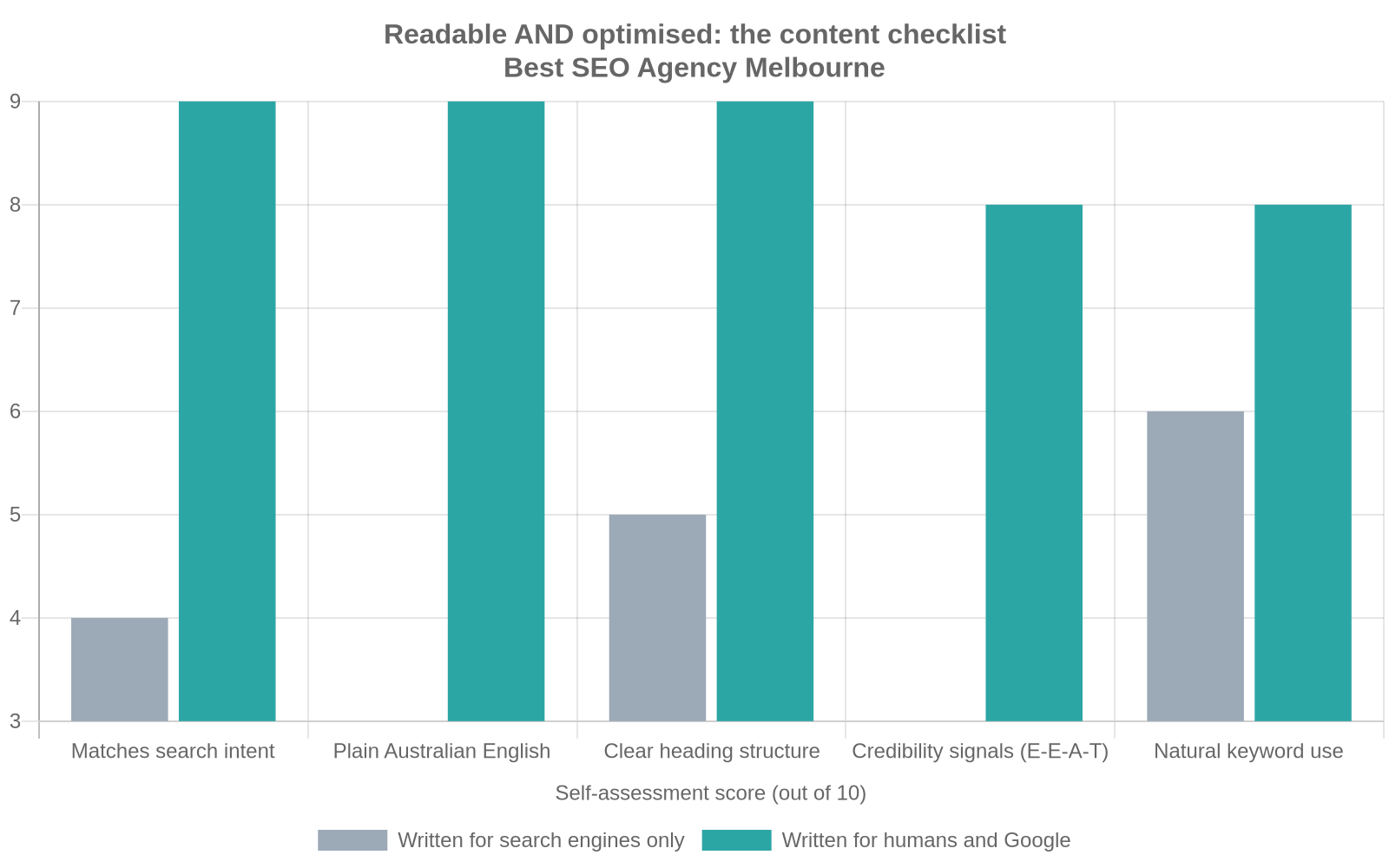
    Checklist comparing content written only for search engines with content that succeeds at writing for humans and Google at the same time, for Melbourne businesses.

    The chart above is a self-assessment we use with clients, scoring a page against five practical checks rather than treating “SEO” and “readable” as opposites.

    Structure the page so both a scanning customer and Google can follow it

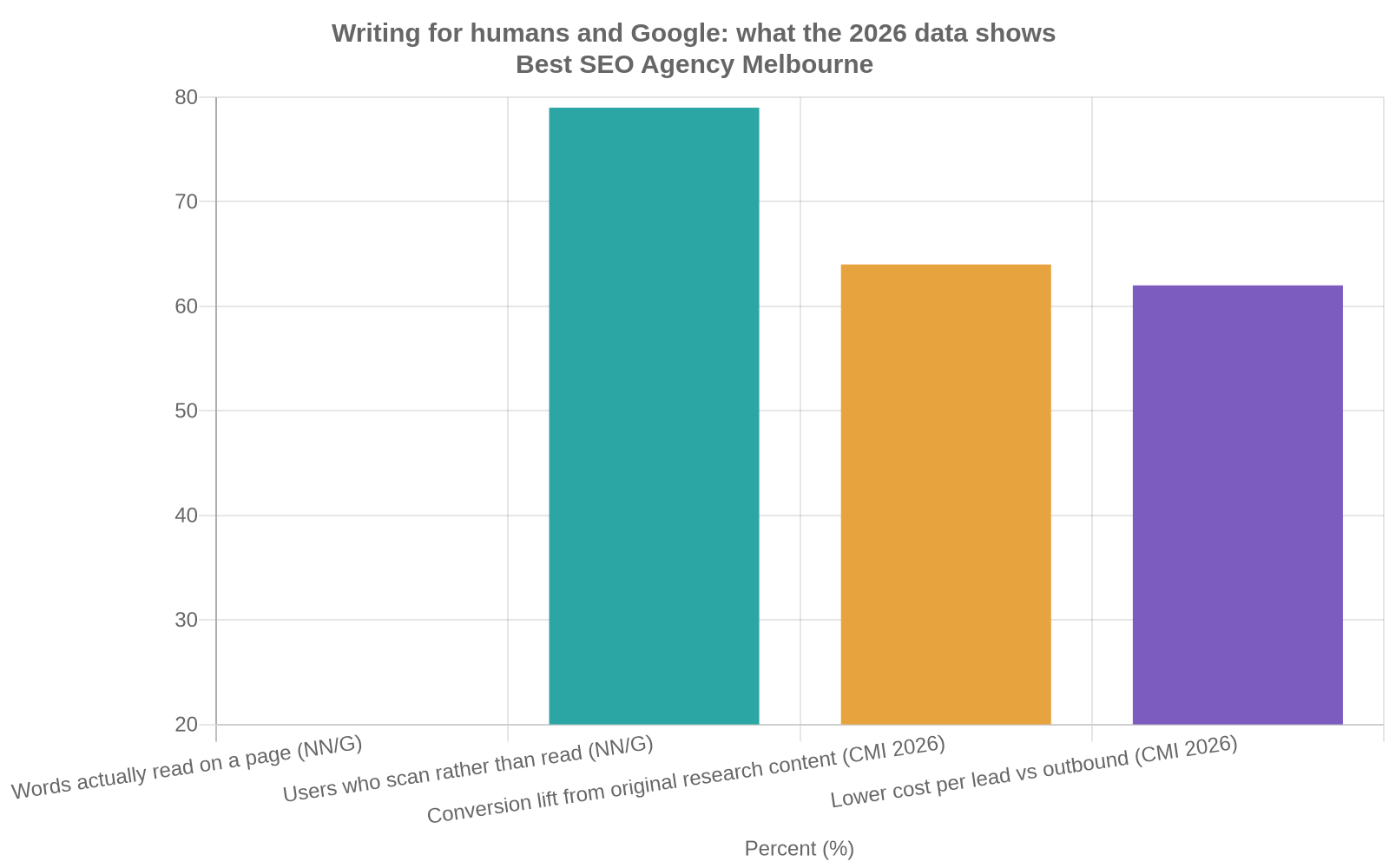
    Nielsen Norman Group first documented this in 1997 and still cites the same pattern today: most visitors scan a new page rather than reading it line by line, and on an average page a visitor gets through only around a fifth of the words before moving on, according to Nielsen Norman Group’s research on how users read on the web. Google’s crawlers read differently to a human, but reward the same structural habits: clear headings that describe what follows, short paragraphs, and content broken into sections a reader can jump between.

    The table below is a quick reference for the practical differences between the two approaches.

    Element Written for search engines only Written for humans and Google
    Headings Keyword repeated in every heading Describes the actual question the section answers
    Paragraph length Long blocks, hard to scan Two to four sentences, one idea each
    Keyword use Exact phrase repeated unnaturally Phrase and natural variations used where they fit
    Evidence Vague claims, no sources Specific numbers, named sources, real examples
    Author Unnamed or generic “admin” Named person with real, checkable expertise

    Use the keyword the way Google rewards in 2026, not the way it did in 2012

    Keyword stuffing, repeating an exact phrase over and over to signal relevance, stopped working years ago and now risks a manual penalty. The modern approach reads more like writing naturally about a topic and its related terms. If your primary phrase is “bathroom renovation Melbourne”, a well-written page will also use “renovating a bathroom”, “ensuite renovation”, suburb names where genuinely relevant, and the practical questions customers actually ask, such as cost and timeframe. Google’s systems match meaning, not just exact strings, so a page that reads naturally and covers the topic properly will usually outperform one built around a single repeated phrase.

    A useful habit: read your draft aloud. If a sentence sounds like something you would never actually say to a customer standing in front of you, rewrite it. That single check catches most keyword-stuffing problems before they start.

    Want a second opinion on whether your own pages read naturally or sound over-optimised? That is exactly what we check in a free consultation. Get in touch and we will walk through a page or two with you.

    Build the trust signals both customers and Google are looking for

    Trust is a set of specific, checkable things: a real name and photo on an author bio, an ABN and service area listed clearly, genuine customer reviews (including the occasional less-than-perfect one with a considered reply), photos of actual work rather than stock imagery, and dates on articles that get updated when the information changes.

    Chart of 2026 statistics showing why writing for humans and Google at the same time matters, including reading behaviour and content conversion data.

    The conversion figures above come from Content Marketing Institute’s 2026 B2B research, which found that marketers publishing original data and proprietary research saw meaningfully higher conversion rates than those publishing generic, unsourced content, and that content marketing overall produced leads at a lower cost per lead than outbound channels, according to Content Marketing Institute’s 2026 B2B content marketing trends research. In practice, a page built around your own project numbers and your own customer outcomes will usually beat a page built around generic industry claims, on both fronts at once.

    Readability itself is not a direct Google ranking factor. A 2021 analysis of over 750,000 ranking pages by digital agency Portent found an average reading level around Year 11, with no measurable correlation between reading level and ranking position, according to Portent’s study on how content readability affects SEO and rankings. Google is not marking you down for writing simply. The reason to write in plain Australian English is that it keeps an actual customer reading long enough to enquire, book, or buy, which is the whole point of the page.

    What this costs, how long it takes, and what goes wrong

    Rewriting an existing page properly, research, a structure pass, and a rewrite with real evidence, typically takes three to six hours depending on how technical the topic is. Done as part of an ongoing SEO content strategy with a Melbourne agency, expect content to be priced within a broader monthly engagement rather than sold as one-off articles, since a single optimised page rarely moves rankings without the technical and authority work underneath it. See the kind of outcomes that combination produces on our results page.

    The most common mistake is not bad writing, it is inconsistency: one genuinely good page surrounded by twenty thin ones written to hit a monthly content quota. Google’s people-first guidance specifically flags content produced primarily to attract search traffic, at volume, as a pattern its systems are built to devalue. The second most common mistake is writing a page once and never touching it again; a page with 2023 pricing sitting on a 2026 website damages trust the moment a reader notices. If you are still comparing how a Melbourne agency prices this kind of work, our guide on how to choose an SEO agency in Melbourne without signing a 12-month mistake covers the questions worth asking before you commit.

    Frequently asked questions

    Will simplifying my website copy hurt my rankings?
    No. As the Portent research above shows, reading level has no measurable link to ranking position. Plain language keeps customers reading, which supports the engagement signals Google does care about.

    How many keywords should I use on one page?
    One primary phrase and two or three natural variations is usually enough. Trying to rank one page for a dozen unrelated phrases is a common reason content ends up sounding unnatural. Our FAQ section covers more questions like this.

    Should every blog post link back to a service page?
    Where genuinely relevant, yes. A forced link reads as spammy, but a link that helps a reader take the next logical step is good for both the reader and the page.

    Short on your next topic? Our guide on how to turn one customer question into a blog article sets out a simple way to find it.

    Getting the balance right

    Writing for humans and Google at the same time comes down to one habit more than any other: answer the real question a real Melbourne customer has, in plain language, backed by specifics they can check. Keyword placement and heading structure matter, but they are the scaffolding, not the point. Get the substance right first and the technical side becomes far easier to fit around it.

    Book your free consultation. No lock-in contracts, we reply within 24 hours, and it is a Melbourne-based team on the other end. Get started here. For more practical guides like this one, visit our SEO blog.

  • Google Business Profile checklist for Melbourne businesses: 12 steps to get found on Google

    If a Melbourne customer searches for a business like yours right now, what comes up? For most local searches, the answer is a Google Business Profile long before it’s a website. Google’s own local pack, the map and three-listing block that sits above the regular results, runs almost entirely on the information in that free profile. Get it right and you show up when someone nearby is ready to buy. Leave it half-filled and Google has little reason to trust you over the shop two suburbs over.

    This checklist walks through exactly what to set up, in what order, what it costs in time rather than dollars, and where Melbourne business owners most often trip up. It also links to the primary sources behind every statistic, so you can check the numbers yourself.

    What a Google Business Profile actually does for your business

    A Google Business Profile (GBP) is the free listing that shows your business name, address, phone number, hours, reviews and photos on Google Search and Google Maps. It’s not a website and it’s not the same as Local SEO Melbourne as a whole, but it’s usually the single biggest lever for local visibility because Google leans on it heavily to decide who appears in the map pack.

    Google is explicit about how it ranks profiles: results are based mainly on relevance (how well your profile matches what someone searched for), distance (how close you are to the searcher or the area they searched), and prominence (how well known and well reviewed your business is), according to Google Business Profile Help. A complete, accurate, regularly updated profile influences all three, which is why it’s worth doing properly rather than claiming it once and forgetting it.

    Google Business Profile setup timeline for Melbourne businesses

    Day 1 Claim or create your listing at google.com/business
    Days 1-5 Verify your business (phone, email, video or postcard, depending on your category)
    Week 1 Complete every section: category, hours, service areas, description, attributes
    Week 2 Add photos, your first posts, and set up messaging or booking links
    Ongoing Reply to reviews, post updates, and refresh photos every month

    Google Business Profile checklist for Melbourne businesses: a five-step setup and verification timeline from claiming the listing through to ongoing maintenance.

    Not sure where your site and profile currently stand? Our free 30-minute audit will tell you, even if you never become a client. Book a free consultation.

    The Google Business Profile checklist

    Work through this in order. Most of it takes minutes per item, but Google can take one to five business days to verify a new listing, so start early.

    Checklist item Why it matters
    Claim and verify the listing Unverified profiles rarely show in the map pack at all
    Correct business name (no keyword stuffing) Adding suburbs or services to your name breaches Google’s guidelines and risks suspension
    Accurate address and service area Distance is one of Google’s three core ranking signals
    Correct primary and secondary categories Category is the single strongest relevance signal Google uses
    Phone number and website matching your site exactly Mismatched details erode trust and confuse Google’s data sources
    Business hours, including public holiday hours Wrong hours are one of the biggest drivers of customer complaints
    A plain-language business description Explains what you do and to whom, without jargon
    At least 10 recent, genuine photos Profiles with more photos consistently rank and convert better
    A review generation habit Reviews affect both rankings and whether people call you
    Replies to every review, good and bad Shows Google and customers that the profile is actively managed
    Monthly posts or offers Signals an active business and gives customers a reason to click through
    Messaging or booking enabled Lowers the barrier between a search and an actual enquiry

    How to optimise your profile once it’s live

    Ticking every box once is the easy part. The profiles that consistently sit in Melbourne’s map pack, whether that’s a Richmond dentist or a Dandenong plumber, treat the profile as something to maintain weekly, not set once and ignore.

    Start with your category. Choosing a broad category like “Business service” instead of the specific one, say “Family law attorney” or “Plumber,” is one of the most common and most costly mistakes we see. Get as specific as Google allows, then add secondary categories only where they’re genuinely accurate.

    Write your description for a person, not a search engine. Explain what you do, who you serve, and what makes the experience different, in plain words. Avoid stacking suburb names into every sentence; Google can read that as an attempt to game the system rather than a genuine description.

    Photos matter more than most business owners expect. Listings ranking in the top three local positions average around 250 photos, well ahead of listings sitting further down the page, according to industry benchmarking summarised by BrightLocal’s 2026 local SEO statistics. You don’t need a professional shoot. Recent, genuine photos of your premises, team and work beat stock imagery every time.

    Ready to fix the gaps in yours? Book a free consultation and we’ll run through your profile against this exact checklist.

    Reviews deserve a system, not a one-off request. In the same BrightLocal research, 97% of consumers say they read reviews for local businesses and 71% use Google specifically to do it. Ask every satisfied customer directly, ideally with a direct link, and reply to every review within a few days. A reply to a negative review, handled calmly, often does more for trust than another five-star rating.

    This is also where a wider strategy pays off. If your Google Business Profile is strong but your website’s technical SEO or content is weak, you’ll rank in the map pack but lose the click once someone visits your site. The two need to work together, which is the whole point of a coordinated SEO process rather than a one-off fix.

    Common mistakes that hold Melbourne profiles back

    The biggest mistake is simple neglect. Australia had 2.73 million actively trading businesses as of June 2025, with 97.3% of them classed as small businesses according to the Australian Small Business and Family Enterprise Ombudsman, yet only around a third of SMBs have claimed a Google Business Profile at all, per BrightLocal’s SMB Marketing Report. That’s a genuine gap for anyone willing to put in the setup time.

    Other recurring mistakes: letting hours drift out of date around Christmas and Easter, ignoring messages sent through the profile for days at a time, using a PO box address for a service-area business, and duplicating listings after a rebrand or a move instead of updating the original.

    Why a complete Google Business Profile matters

    2.7x
    more likely to be seen as reputable
    70%
    more likely to get a visit
    50%
    more likely to be considered for a purchase

    Google Business Profile checklist for Melbourne businesses: data showing that a complete profile makes customers more likely to trust, visit and buy from a business, compared with an incomplete one. Source: Google Business Profile Help, 2025.

    What this costs, how long it takes, and what goes wrong

    Setting up and fully optimising a Google Business Profile yourself costs nothing but time, roughly two to four hours spread over the first fortnight, then 20 to 30 minutes a week after that for photos, posts and review replies. There’s no fee to Google at any point; be wary of anyone implying otherwise.

    If you’d rather hand it to a Melbourne team, expect it to be bundled into a broader local SEO engagement rather than sold alone, since a profile on its own rarely moves the needle without matching website content and citations. Our own results page shows what that combination can do over six to twelve months. If you’re still comparing providers, our guide on how to choose an SEO agency in Melbourne without signing a 12-month mistake covers the pricing and contract questions worth asking before you commit.

    What goes wrong most often isn’t the setup, it’s the maintenance. Profiles get handed to whoever’s free, updates stop after month one, and six months later the hours are wrong and the reviews are unanswered. Treat it like a shopfront window, not a form you fill in once.

    Frequently asked questions

    Do I need a physical shopfront to have a Google Business Profile?
    No. Service-area businesses, like electricians or mobile groomers, can list a service area instead of a public address, as long as they follow Google’s guidelines for that business type.

    How long does verification take?
    Usually one to five business days by phone or email, though some categories require a video call or a postcard, which can take one to two weeks.

    Can I manage more than one location?
    Yes, each location needs its own verified profile. For questions like this specific to your situation, our FAQ section covers timelines, contracts and cost in more detail.

    Blogging tip: the fastest way to find your next topic is to look at what customers already ask you. Our guide on how to turn one customer question into a blog article sets out a simple 5-step process for doing it.

    Getting started

    A Google Business Profile is one of the few genuinely free levers left in local search, and most Melbourne businesses are still leaving it half-finished. Work through the checklist above, commit to a few minutes of upkeep each week, and you’ll be ahead of a large share of the competition sitting in your suburb right now.

    Book your free consultation. No lock-in contracts, we reply within 24 hours, and it’s a Melbourne-based team on the other end. Get started. For more practical guides like this one, visit our SEO blog.

  • How to choose an SEO agency in Melbourne without signing a 12 month mistake

    How to choose an SEO agency in Melbourne without signing a 12 month mistake

    Search “SEO agency Melbourne” and you get about forty companies saying the same four things. Data driven. Proven results. Transparent reporting. No lock in contracts. The wording is close to interchangeable, so the search results tell you almost nothing about who is any good.

    We are one of those forty, which is worth keeping in mind while you read this. The checklist below is still the one we would want a client to run us through before they hand anyone a card.

    Work out what you are buying before you take the first call

    Most proposals are priced against activity. Eight blog posts a month, forty backlinks, a technical audit in the first fortnight. All of that is real work, and it is only loosely connected to the phone ringing.

    So write down one number before you talk to anybody. How many enquiries a month would make the spend obviously worth it? If your average job is $350 you need volume, and you need it soon. If you fit out commercial kitchens and one job is worth $60,000, four decent enquiries a quarter changes your year. That number sets your budget, your timeline, and the honest answer to whether SEO is even the right channel yet. Sometimes it is not. A new trades business with no reviews and no site history will usually see money faster from Google Ads while the SEO work builds underneath it.

    What SEO actually costs around Melbourne

    Almost nobody publishes this, so here is the range we see quoted in this market. Treat it as a sanity check rather than a price list.

    Anything under about $700 a month is one junior splitting their week across twenty accounts. You get template blog posts and a monthly PDF. It is not really a scam, it is arithmetic. At that price nobody can afford to think about your business for more than an hour or two.

    Somewhere between $1,500 and $3,000 a month is where a single location business starts getting work that moves: someone who actually knows your service area, content written against real search demand, technical fixes that get deployed rather than listed in a report.

    Above $4,000 you are in multi location, ecommerce or genuinely contested territory. Conveyancing, personal injury, cosmetic clinics, anything anchored to the CBD. If you sit in one of those categories and someone quotes you $900 a month, they have not opened your competitors’ sites.

    Six questions that sort the field fast

    Ask these on the first call. How quickly the answers arrive tells you as much as the answers.

    1. “Show me a client in a similar market, and tell me what their enquiries looked like before you started.” A traffic chart pointing up is not an answer. Traffic climbs while phones stay quiet all the time, and an agency that has never watched that happen has not been paying attention.
    2. “Who does the work, and where do they sit?” Offshore production is not automatically a problem, because plenty of very good work happens overseas. Finding out after you sign is the problem, since it usually means the person you liked in the meeting will not touch your account again.
    3. “What happens if I leave in month four?” You want the Google Business Profile, the Analytics property, the Search Console account and the website login sitting in your own name. Ask who owns the content that gets written, too. Some agencies rent it back to you.
    4. “What have you tried recently that did not work?” Anyone doing this seriously has a story here. The core updates of the last two years flattened plenty of sites that were doing everything by the book. An agency with no failures has either been going six months or is not telling you the truth.
    5. “What is your plan for AI answers?” This is the live question in 2026. When someone asks ChatGPT or an AI overview to recommend a supplier, your business either gets named or it does not, and what earns a mention is not identical to what earns a blue link. A blank look here is disqualifying.
    6. “What would you not do for me?” You want to hear something declined. An agency that says yes to every add on is selling hours.

    The contract terms that decide what you keep

    Read the exit clause before the deliverables. A 12 month term is not automatically a red flag, since results on a competitive term rarely show inside three months and month to month pricing usually carries a premium for the risk. What matters is what you walk out holding.

    Check four things. Whether the notice period is one month or three. Whether the accounts are registered to your email address or the agency’s. Whether the content and the site changes stay live after you go. And whether the monthly report counts calls and form fills, or only sessions and keyword positions.

    Melbourne is not one market

    A plumber in Brunswick and a plumber in Frankston are not competing for anything. The map pack is drawn tight around wherever the searcher is standing, so a business in Richmond can own a suburb three kilometres away and be invisible six kilometres out. This is why “we will get you to number one in Melbourne” means nothing as a promise. Number one for someone in Docklands, or someone in Werribee?

    Ask any agency you are considering to name the suburbs they would go after first, and why those ones. If they cannot answer that in the first meeting they have not looked at your service area, your competitors or your review count, which means the proposal in front of you was written for somebody else.

    What to do this week

    Pick three agencies. Run the six questions past each of them, then ask all three for a 90 day plan specific enough that you could hand it to a different agency and have it executed. Two of them will not be able to produce it. The one that can is worth a second meeting.

    If you would rather see that 90 day plan for your own site before you talk to anyone, get in touch and we will put one together for you.