Tag: SEO Melbourne

  • The Biggest SEO Mistakes Melbourne Small Businesses Make (And How to Fix Them in 2026)

    Most Melbourne small businesses that “do SEO” are not failing because of some deep technical mystery. They are losing customers to five ordinary, fixable mistakes, repeated across thousands of local websites. A cafe in Brunswick and a plumber in Dandenong usually trip over the same five things: a site Google cannot read properly on a phone, page content copied between locations, keywords chosen for ego instead of intent, a Google Business Profile nobody has touched since 2023, and technical debt nobody budgeted time to fix. This article walks through each mistake, what it actually costs you, and what to do about it.

    Why these mistakes cost more in 2026 than they used to

    Search behaviour has shifted enough in the last two years that mistakes which used to be a minor drag are now a direct hit to enquiries. Google has used the mobile version of a website as the primary basis for indexing and ranking since completing its rollout of mobile-first indexing, and mobile devices now account for roughly 65% of all Google searches. Around 46% of all Google searches carry local intent, meaning the person typing already wants a business near them, not a national brand. And according to the Australian Bureau of Statistics, only 32% of Australian businesses received orders online in the 2024-25 financial year, barely up from 30% three years earlier. Translation: most of your competitors still have not fixed their online presence, which means the businesses that do fix these five mistakes have an unusually open field.

    ๐Ÿ“Š Infographic: Why these mistakes matter in 2026 (65% mobile searches, 46% local intent, 32% online orders)

    (Branded data graphic โ€” pending upload to media library)

    Mistake 1: Treating mobile like an afterthought

    Plenty of Melbourne business sites were originally built for desktop, with mobile bolted on later. The signs are easy to spot once you know to look: buttons too small to tap accurately, text that requires pinch-zooming, forms that break on iPhone Safari, or a phone number that is not a clickable link. None of this is cosmetic. If Google’s mobile crawler cannot read your content properly, your desktop site being beautiful will not save you, because the mobile version is what gets indexed. Test your own site on a phone right now, on real mobile data rather than office wifi, and time how long the homepage takes to load. If it is over three seconds, you are losing visitors before they see anything.

    Not sure where your site stands? Our free 30-minute audit will tell you, even if you never become a client. Book a free consultation.

    Mistake 2: Copying or thin content across service pages

    This is the mistake we see most often in multi-suburb or multi-service businesses. A business offering, say, plumbing across five Melbourne suburbs creates five nearly identical pages, each with the suburb name swapped in and nothing else changed. Google reads this as duplicate content and often will not bother ranking any of the copies well. In Search Console, these pages often show up as crawled but not indexed, and our guide to fixing crawled currently not indexed pages shows what to do. The fix is not complicated, it just takes actual writing: each page needs specific detail relevant to that suburb or service, real examples, and content that would not still be true if you copied it onto a competitor’s site. “We service Brunswick” is filler. “We’ve cleared blocked drains on the terrace-house plumbing common around Sydney Road, where old cast iron pipes cause more callouts than anywhere else in the inner north” is not.

    The same problem shows up in product and service descriptions lifted straight from a supplier catalogue or a template agency handed every client. If a sentence on your site would still be true word for word on a competitor’s page, it is not finished. We ask clients to name an actual price range, an actual suburb, an actual timeframe, something a generic writer three states away could not have guessed. It takes longer to write. It also happens to be exactly what both Google and a genuine local customer are looking for.

    Mistake 3: Chasing broad, expensive keywords

    Business owners often want to rank for the biggest, broadest term in their industry, assuming more search volume automatically means more customers. It rarely works out that way. Broad terms are harder to rank for, and the person searching them is often still comparing options rather than ready to buy. Locally modified, specific phrases convert better and are realistic to win.

    Broad keyword Local intent alternative Why it converts better
    SEO agency SEO agency Fitzroy Signals a real local buyer, not a researcher
    Plumbing services Emergency plumber Parramatta Road Urgent intent, ready to call today
    Dentist Melbourne Dentist near South Yarra station Location-specific, easier to rank, higher show-up rate
    Accountant Small business tax accountant Richmond Matches a specific, high-value service need

    ๐Ÿ“Š Infographic: The 5 SEO mistakes costing Melbourne small businesses customers

    (Branded checklist graphic โ€” pending upload to media library)

    If your Google Business Profile looks like the “before” example above, talk to our Melbourne team โ€” fixing it is usually a two-week job.

    Mistake 4: A neglected Google Business Profile

    Around 76% of people who perform a local search visit a business within 24 hours, and roughly 28% of local searches lead to a purchase in that same window. A Google Business Profile with outdated hours, no recent photos, and three unanswered one-star reviews from 2024 is actively costing you those visits. This is usually the fastest mistake to fix on this list: update your hours, add current photos of your actual premises and work, and reply to every review, good or bad, within a few days. Businesses that respond to reviews and post updates regularly are rewarded with better Map Pack visibility, because Google reads recent activity as a signal the business is genuinely operating and engaged.

    Mistake 5: Ignoring technical site health

    Slow-loading pages, broken internal links, missing image descriptions, and pages with no structured data are quiet problems. Nothing visibly “breaks”, so they get ignored for years. But they cap how well even great content can rank, because Google is weighing your site against competitors whose technical foundations are cleaner. A basic quarterly check, broken link audit, page speed test, and a scan for duplicate title tags, catches most of this before it compounds into a bigger rebuild. If your traffic fell suddenly, our guide on why your Google rankings dropped after a core update walks through the checks. If your whole site vanished overnight, read our guide to what to do when your site disappeared from Google, and if spam pages are showing under your name, see our guide to fixing a hacked website’s Google search results.

    If you are wondering whether a new file such as llms.txt belongs on this list, it does not: read whether your website needs an llms.txt file before you spend money on it.

    We regularly find sites carrying dozens of broken internal links from old page restructures nobody cleaned up, or images with file names like “IMG_4021.jpg” instead of a description Google or a screen reader can use. Individually, small. Together, they tell Google your site is not well maintained, and that impression is hard to shake once it forms.

    What fixing these mistakes costs and how long it takes

    The honest answer is: it depends on how deep the mistakes go, but most Melbourne businesses see the first movement in rankings within 60 to 90 days of fixing the basics, with meaningful traffic and enquiry growth by months four to six. Mobile fixes and Google Business Profile cleanup are usually cheap and fast, often a week or two of focused work. Rewriting thin or duplicate content across a site takes longer, generally four to eight weeks depending on how many pages need attention. Technical fixes vary the most, a small site might need two days, a large e-commerce catalogue might need a genuine structured audit and phased rollout. What we do not recommend is guessing. A proper audit tells you which of these five mistakes is actually costing you the most before you spend a dollar fixing the wrong one.

    Frequently asked questions

    How do I know which of these mistakes is hurting my business the most?
    Run a free audit rather than guessing. Our process starts with exactly this, a full technical, content and local-search review, so you know your biggest opportunity before spending anything.

    Can I fix these myself, or do I need an agency?
    Mobile checks and Google Business Profile updates are genuinely DIY-friendly. Thin content rewrites and technical fixes usually need more time than a busy owner has, which is where a dedicated local SEO team earns its fee.

    What results have Melbourne businesses actually seen from fixing these?
    Our results page covers real examples, including a Melbourne CBD law firm that grew organic traffic 412% after exactly this kind of clean-up. See our FAQ for cost and contract questions.

    Before you hire anyone to fix these mistakes, it is worth knowing what a genuinely trustworthy agency looks like versus one making the same mistakes on your behalf. Our guide on red flags to watch for when hiring an SEO agency in Melbourne and our piece on how to choose an SEO agency without signing a 12-month mistake are both worth ten minutes before you sign anything.

    None of these five mistakes are exotic, and none require a marketing degree to understand. They are the same avoidable errors, repeated across most Melbourne small business websites, and fixing even two or three of them tends to move the needle faster than most owners expect. Book your free consultation. No lock-in contracts, reply within 24 hours, Melbourne-based team. Get started. For more guides like this one, visit our blog.

  • What Is a Backlink and Why Does It Still Matter in 2026?

    A backlink is simply another website linking to yours. That is the whole definition, and if you have heard it described as anything more complicated, someone was probably trying to sell you something. What matters is not the definition, though — it is that backlinks remain one of the strongest signals Google uses to decide which Melbourne business deserves to rank above another, even after years of algorithm updates aimed at penalising the shortcuts businesses use to get them. Ahrefs’ 2026 analysis of ranking correlations found that the number of referring domains linking to a page has the strongest correlation with rankings of any factor studied, and that pages sitting in Google’s number one spot have on average 3.8 times more backlinks than pages ranked two through ten (Ahrefs, 2026). Here is what a backlink actually does, why the rules changed, and how a Melbourne business builds them properly in 2026.

    Not sure how your backlink profile compares to your competitors? Our free 30-minute audit will tell you, even if you never become a client. Book a free consultation

    What a backlink actually is, in plain English

    Think of a backlink as a vote of confidence from one website to another. When a Melbourne newspaper links to your law firm in an article about local business, or a supplier links to your online store from their partner page, that is a backlink. Google reads the web this way in part because it mirrors how trust works among people: if enough credible sources point to you, you are probably credible too. Not every link carries equal weight. A link from a well-known, relevant Australian publication counts for far more than dozens of links from low-quality directories, which is why chasing link quantity over link quality is the single most common mistake we see Melbourne businesses make.

    It helps to separate backlinks from internal links, since business owners often mix the two up. An internal link is one page on your own site linking to another page on your own site — useful for navigation and for spreading authority around, but not a vote of confidence from anyone else. A backlink has to come from a genuinely separate website. That distinction matters because some agencies pad reports with internal linking activity and call it link building, which is a bit like counting the times you compliment yourself as a character reference.

    Backlinks and Google rankings in 2026 Bar chart comparing the average number of backlinks for pages ranked number one versus pages ranked two through ten, showing number one pages have 3.8 times more backlinks. Backlinks vs Google Ranking Position (2026) #1 position — 3.8x more backlinks Positions 2–10 — baseline Referring domains have the strongest correlation with rankings of any factor studied Source: Ahrefs, 2026 SEO ranking correlation study
    Infographic: how backlink volume compares between the number one Google result and everything below it. Reference filename: backlinks-vs-google-ranking-melbourne-2026.svg

    Why backlinks still matter after years of algorithm crackdowns

    Google has spent the past two years specifically targeting manipulated links. Its spam policies now treat large-scale link buying, link exchange schemes and AI-generated guest-post farms as a domain-level risk rather than a one-off penalty, with any paid or exchanged link required to carry a rel="sponsored" or rel="nofollow" tag to stay compliant (Google Search Central, spam policies). None of that means backlinks stopped mattering. It means the easy, low-quality tactics that used to work — directory spam, link farms, bulk guest posts on irrelevant sites — now actively damage a site instead of helping it. Genuine, editorially earned links from relevant, trusted sources are worth more relative to spam than they have ever been, precisely because Google can now tell the difference at scale.

    Legitimate link building vs risky, penalty-prone tactics
    Approach Legitimate Risky or penalty-prone
    Guest posts Genuine article on a relevant, real-readership site Mass-produced AI content on link farms
    Paid placements Disclosed, tagged rel=”sponsored” Undisclosed paid links passed off as editorial
    Directories Reputable, industry-specific Australian directories Bulk submission to hundreds of low-quality directories
    Source of links Journalists, industry bodies, genuine partners and suppliers Private blog networks and link exchange groups

    If a previous agency built your backlinks through directories or exchanges you don’t recognise, talk to our Melbourne team — a link profile audit usually takes less than a week.

    How a genuine Melbourne link building campaign actually runs

    Real link building, the kind covered by our authority link building service, follows the same four-stage discovery-to-execution approach as the rest of our SEO process, starting with research rather than outreach. We map which Australian publications, industry bodies and complementary local businesses already link to competitors, then build something genuinely worth linking to — original data, a useful local guide, or a case study a journalist could actually cite. Outreach follows, pitched to a real person at a relevant site rather than blasted to a generic contact list, and every placement is tracked so we know which links are still live six months later, because links do get removed and a proper campaign checks for that rather than assuming a link earned once lasts forever.

    A legitimate link building campaign, step by step Four-stage process: research and target list, asset creation, outreach and pitching, and placement tracking with ongoing monitoring. 1. Research & targets 2. Build the asset 3. Outreach & pitch 4. Track & monitor
    Infographic: the four-stage process behind a legitimate Melbourne link building campaign. Reference filename: link-building-campaign-process-melbourne.svg

    A worked example makes the difference concrete. Two Melbourne accounting firms compete for the same clients. Firm A has 40 backlinks, all from the same three low-quality directories submitted years ago by an old agency. Firm B has 12 backlinks: one from a local business association it is a genuine member of, one from a client’s supplier page, one from a Herald Sun article a partner was quoted in, and the rest from industry-specific finance directories with real editorial standards. Firm B will consistently outrank Firm A, despite having a third of the links, because Google is not counting links — it is weighing trust, relevance and the likelihood that a real person put that link there on purpose.

    What this costs, how long it takes, and what goes wrong

    Genuine link building is slower and more expensive than the shortcuts it replaced, and any agency promising fifty links a month for a flat low fee is describing exactly the kind of link farm activity Google now penalises. Expect a proper campaign to run as an ongoing monthly retainer rather than a one-off purchase, with the first handful of quality placements landing within four to eight weeks and a measurably stronger backlink profile, tracked against the results our clients see, building over six to twelve months.

    The most common mistake is treating link building as a numbers game, buying volume from marketplaces that sell placements on low-quality, unrelated sites. The second is ignoring anchor text diversity, so every link uses the exact same keyword phrase, which itself is a pattern Google’s spam systems are tuned to notice. The third is never checking whether older links are still live — sites get redesigned, pages get deleted, and a backlink profile that looked strong two years ago can quietly lose a third of its value without anyone noticing. Building your own site’s worth linking to matters too: our guide to internal linking for large product catalogues covers the on-site half of link equity, and if the traffic those backlinks send isn’t converting once it arrives, our piece on why your blog gets traffic but no enquiries is worth reading alongside this one.

    Quick answers

    How many backlinks does a Melbourne business actually need? There is no fixed number. What matters is relevance and authority relative to your specific competitors — ten links from genuinely authoritative, relevant Australian sources will usually outperform a hundred from low-quality ones.

    Are nofollow links worthless? No. They don’t pass the same direct ranking signal as a followed link, but they still send referral traffic, build brand awareness, and are part of what a natural-looking link profile is supposed to contain. A profile made up entirely of followed links can itself look manipulated.

    Can I lose rankings from bad backlinks? Yes, if you built them yourself or a previous agency did. Google’s current spam systems assess a domain’s entire link profile, so a history of low-quality links can hold a site back even if recent work has been clean. See our FAQ for how we handle a link disavow if it’s ever genuinely needed.

    What is anchor text and why does it matter? Anchor text is the clickable words in a link, and it gives Google context about what the linked page is about. Natural anchor text varies — sometimes your brand name, sometimes a general phrase like “this Melbourne accountant”, sometimes just the URL — because that is how real people actually link. A profile where every single link uses the identical keyword phrase looks engineered, which is exactly the pattern Google’s spam detection is built to catch.

    Backlinks have not stopped mattering, they have simply stopped rewarding shortcuts. A handful of genuinely earned links from relevant Australian sources will do more for a Melbourne business in 2026 than a hundred bought placements ever will, and building that kind of profile is a well-defined, trackable process rather than a mystery. Book a free consultation and we will show you exactly where your current backlink profile stands, with no obligation either way. Get started. For more Melbourne SEO guides like this one, visit our blog.
  • How to Recover Rankings After a Shopify Replatform: A 2026 Guide for Melbourne Stores

    Your Melbourne store just moved to Shopify and the numbers are heading the wrong way. Search Console shows fewer impressions, the phone has gone quiet, and someone in the business is asking why the new site “broke” everything the old one used to rank for. This is one of the most common calls our team takes, and the good news is that a replatform does not have to mean a lasting ranking loss. Most of the damage comes from a small, fixable set of mistakes: missing redirects, rewritten product URLs, and metadata that never made the trip across. This guide covers why rankings drop after a Shopify migration, how long recovery genuinely takes, and the fixes that get a Melbourne store back to where it was, and often further ahead.

    Not sure whether your Shopify move is actually recoverable or something more serious? Our free 30-minute audit will tell you, even if you never become a client. Book a free consultation

    Why rankings drop after a Shopify replatform

    A replatform changes more than the shopfront. Product, collection and blog URLs are usually rebuilt around Shopify’s own structure, which means a page that ranked for three years at one address can suddenly live at another. If the old address returns a 404 instead of forwarding visitors and Google to the new one, every backlink and every scrap of ranking history pointing at it goes to waste.

    Metadata is the second casualty. Title tags, meta descriptions and structured data that were fine-tuned over months are easy to lose in a rebuild, especially when a theme swap or app installation overwrites them by default. Page speed can move in either direction too. Shopify’s hosting is generally fast, but a heavy theme, unoptimised images or a stack of speed-draining apps will undo that advantage quickly. Anyone weighing up a migration is really weighing up a technical SEO project, not just a platform swap, and it pays to treat it that way from the start.

    Internal linking is the quiet one. Old sites accumulate links between related products, categories and guides over years. Rebuild the site structure and those internal pathways often vanish, which makes it harder for Google, and shoppers, to find the pages that used to convert well.

    How much traffic loss is normal, and when it signals a real problem

    Some wobble is expected. A temporary dip of 10 to 15 percent in the first couple of weeks is considered normal while Google recrawls and re-indexes the new site, according to 2026 analysis from Search Engine Journal. A sustained drop beyond 30 percent, on the other hand, is treated as a sign of a genuine technical problem rather than a normal transition. Separate 2026 research from SEO.Domains puts it in sharper terms: 60 to 80 percent of all site migrations produce measurable traffic loss, and only around one in ten migrations ends with rankings actually improving.

    The scale of the drop tracks directly with execution quality. A 2026 AI-driven analysis reported by MarTech Cube links poorly executed migrations to a 20 to 40 percent loss in organic traffic, and separate figures show that badly handled moves can shed 20 to 60 percent of traffic within days when redirects are missing or broken. Nearly half of poorly executed migrations never fully recover their previous traffic levels. The table below summarises what a normal transition looks like next to a migration that has gone wrong.

    Signal Normal transition Migration gone wrong
    Traffic dip in week 1-2 10-15%, then recovering 30%+ and still falling
    Search Console coverage report Old URLs shown as redirected Old URLs shown as “not found (404)”
    Ranking movement by week 6 Back near pre-migration positions Still 10+ positions lower
    Backlink profile Redirected to new equivalent pages Pointing at dead or generic pages

    The recovery timeline you should expect

    With a complete, clean redirect map, Shopify’s own migration guidance puts ranking normalisation at four to six weeks, and Google’s Search Central documentation on site moves describes a similar four to twelve week window for a well-executed move, noting explicitly that “301 and other permanent redirects don’t cause a loss in PageRank.” Stores that plan the move properly typically see a dip of 10 percent or less and recover somewhere between one and six months, depending on how many pages and how much non-branded search traffic the store relies on.

    Infographic: the Shopify replatform SEO recovery timeline

    What Melbourne stores can expect after moving platforms, from redirect to full recovery.

    Weeks 1-2
    Crawling and indexing fluctuate as Google finds the new URLs
    Weeks 4-8
    Rankings stabilise where the 301 redirect map is complete
    Months 1-3
    Well-executed moves are usually fully recovered
    Months 6-12
    Poorly executed moves may still be clawing back lost rankings

    Source: Shopify SEO Migration Guide 2026; Google Search Central site move documentation 2026.

    If your Search Console graph looks like the “months 6-12” box above, talk to our Melbourne team โ€” fixing a broken migration is usually a two to four week job, not a rebuild.

    The redirect and metadata checklist that actually protects rankings

    Partial redirect maps are the single biggest cause of migration traffic loss, according to Google’s Search Central guidance on site moves. Every URL that carried ranking value on the old site needs a permanent 301 redirect to its closest equivalent on Shopify, with no chains and no temporary redirects standing in for the real thing. If your store already has a solid product catalogue, our guide on internal linking strategy for large product catalogues is worth reading alongside this one, since a migration is the moment those internal pathways are most likely to break.

    Checklist item Why it matters
    Full 301 redirect map, old URL to new Passes ranking signals and link equity across, per Google’s own guidance
    Title tags and meta descriptions carried over Prevents Google re-evaluating pages from scratch
    Product and collection schema reinstated Keeps star ratings, price and stock showing in results
    Updated XML sitemap submitted in Search Console Speeds up discovery of the new URL structure
    Redirects kept live for at least 12 months Google needs repeated crawls, and old backlinks keep pointing at the old address

    Infographic: traffic impact by migration quality

    Organic traffic loss ranges reported for well-executed versus poorly executed Shopify migrations.

    Well-executed migration (clean 301s)2-10%
    Poorly executed migration (missed redirects)20-60%

    Source: SEO.Domains migration recovery analysis 2026; MarTech Cube SEO migration risk study 2026.

    What this costs, how long it takes, and what goes wrong

    A proper migration audit and redirect map for a mid-sized Melbourne store, somewhere in the range of 200 to 2,000 products, typically takes two to four weeks of dedicated work before launch, plus another four to eight weeks of monitoring afterwards. Stores that skip the audit and redirect their homepage only, hoping Shopify will “figure out” the rest, are the ones we see with the 20 to 60 percent traffic drops described above.

    The most common mistakes we see in Melbourne stores that have already replatformed: redirecting every old URL to the new homepage instead of its true equivalent, which Google treats as a soft 404; forgetting that collection page URLs changed structure entirely; and losing product schema because a new theme does not support it out of the box. Every one of these is fixable without another full rebuild, which is the part most business owners do not realise until someone tells them. It is also worth reviewing your Shopify SEO checklist for Melbourne online retailers, since several of the same fixes apply whether you are launching fresh on Shopify or repairing a migration that already happened.

    Our own case work backs this up. One Melbourne retailer we work with grew organic revenue from $310,000 to $2.1 million within 14 months, largely through the kind of category architecture and redirect discipline described here. You can see the detail on our results page, and the same principles apply just as much to fixing a migration as to growing from scratch. Our process for a recovery project starts with the same free audit as any new engagement, so you know exactly what broke before anyone touches your store.

    Common questions about Shopify migration SEO

    Will my rankings ever fully recover? In most cases, yes, provided the redirect map is complete and stays live. The exception is when competitors have moved into the ranking gap during the recovery window, which is why speed matters. See our full FAQ for more on typical SEO timelines.

    Should I redirect every old URL to my new homepage? No. A blanket homepage redirect is one of the most common causes of lasting ranking loss, because Google treats it as a sign the original page no longer exists in any real form.

    How do I know if my migration was done properly? Check Search Console’s Coverage report for your old URLs. If they show as redirected, that is a good sign. If they show as “not found,” you have gaps to fix.

    A Shopify replatform does not have to cost you the rankings you spent years building. Most of the damage traces back to a handful of fixable gaps: missing redirects, lost metadata and broken internal links, and every one of them has a known fix with a realistic timeline attached. If your store is still waiting on recovery, get a second set of eyes on it. Book your free consultation โ€” no lock-in contracts, a reply within 24 hours, and a Melbourne-based team who has fixed this exact problem before. For more guides like this one, visit our blog.
  • How to Write Product Titles That Rank and Convert: A Melbourne Online Store’s Guide

    A Melbourne homewares store we looked at recently had a product called simply “Vase” on its category page. Type “ceramic vase Melbourne” into Google and that product was nowhere to be found, not because the vase was wrong for the search, but because the title never told Google, or the shopper, what made it worth clicking.

    A product title has to do two jobs at once: tell Google exactly what the product is so it matches the right searches, and tell a shopper enough in the first few words to make them click instead of scrolling past. Get both right and the same product starts showing up for searches it was invisible to before. This guide covers what actually goes into a title that does both.

    Most Melbourne stores never touch product titles after the initial site build, because the platform generates something reasonable by default and nobody thinks to revisit it. That default is rarely wrong, but it is rarely optimised either, and the gap between reasonable and optimised is exactly where the extra traffic sits.

    What Google actually needs from a product title

    There are two different “titles” worth knowing about. The page title (or SEO title) is what shows as the blue link in ordinary Google search results. The product title is a separate field used in Google Shopping and Merchant Center listings, and it has its own rules. Google’s own product data specification allows up to 150 characters, but only around the first 70 characters reliably show on a Shopping ad or free listing, so the most important words need to come first. Google also strictly disallows promotional language in the title itself, phrases like “sale” or “free shipping” belong in a different field, not the title, or the product risks disapproval.

    Google also asks for the distinguishing detail of each variant, colour, size, material, to sit inside the title itself rather than being left to the product description. Two t-shirts that differ only by colour need two different titles, not one generic title covering both, otherwise Google struggles to tell shoppers apart and may treat the listings as duplicates of each other.

    Infographic · product-title-formula-melbourne-ecommerce

    The anatomy of a title that ranks and converts

    Brand
    e.g. Nordic Home

    Product
    e.g. Ceramic Vase

    Attributes
    e.g. Handmade, Matte

    Size / Colour
    e.g. 30cm, Sand

    Alt text: Diagram showing the four-part product title formula for e-commerce SEO — brand, product, key attributes, and size or colour, in that order.

    Not sure whether your own product titles are working against you? Our free 30-minute consultation includes a live look at how your current titles are performing, even if you never become a client.

    What the best product titles actually do differently

    Store Growers analysed 151 product titles from 120 advertisers who were already ranking in the top 5–10 results for competitive search terms, giving a genuinely useful picture of what “good” looks like in practice rather than theory. The original research found the average title length among top performers was 70 characters, with the sweet spot sitting between 75 and 100. Just as tellingly, 81% of these advertisers used a different title in their product feed to the one shown on the actual product page, meaning the “set and forget” approach most Melbourne stores default to leaves real performance on the table.

    The research also found that titles longer than 70 characters, while less visible in full, still helped: Google reads the entire 150-character field even when a shopper only sees the front portion, so the extra words widen the range of searches a product can match without ever being seen directly. This is why a title built purely to “look nice” at 40 characters often underperforms one that runs longer but stays readable throughout.

    Title element How many top advertisers use it Why it matters
    Capitalise Each Word 97% Reads as a proper product name rather than a sentence fragment
    Digits instead of spelled-out numbers 97% Saves characters and matches how people actually search (“3 pack”, not “three pack”)
    Symbols to separate details (– / |) 70% Breaks the title into scannable chunks instead of one dense phrase
    Brand name included 44% Useful when shoppers search by brand, less useful for unbranded generic products
    Extra descriptive keywords beyond the core name 32% Widens the net of searches the product can match without misrepresenting it

    This is exactly the kind of detail our e-commerce SEO service works through product-by-product for Melbourne Shopify and WooCommerce stores, because a formula that works for one category rarely transfers cleanly to another.

    Infographic · product-title-changes-impressions-clicks-2026

    What happened when one store rewrote its top product titles

    Impressions
    +39%

    Clicks
    +38%

    Alt text: Bar chart showing a one-week before-and-after result from rewriting product titles — impressions up 39% and clicks up 38%, from Store Growers’ 2026 product title optimisation case study.

    Results like that will not carry over automatically. If your titles are already close to best practice, our client results show the bigger gains usually come from combining title fixes with the category and internal linking structure around them.

    What this costs, how long it takes, and what goes wrong

    Rewriting product titles is one of the lowest-cost SEO jobs available to a Melbourne online store, because it touches existing content rather than requiring new pages, images or design work. A store with under 100 products can usually have titles rewritten and tested within a week. Larger catalogues need a formula and a feed rule rather than manual edits product by product, which is a short technical setup rather than an ongoing cost, similar to the structure we cover in our Shopify SEO checklist for Melbourne retailers. If your catalogue runs into the thousands of products, talk to our team about setting up feed rules rather than trying to rewrite each one by hand.

    Movement in Google Shopping and organic search can appear within days of a title change, since product feeds refresh far more often than a page needs to be re-crawled, though a fuller picture of organic ranking movement usually takes three to six weeks, in line with what we walk through during our audit and strategy process.

    The most common mistake is stuffing every possible keyword into the title until it reads like a list rather than a product name; Google’s own guidance is to describe the product clearly, not maximise keyword count. The second is leaving every product in a range with an identical title except for a colour swapped at the very end, buried past the 70-character cut-off where nobody sees it. The third is copying the on-page product title straight into the Shopping feed without checking whether it still fits the 150-character limit once modifiers are added, which causes the listing to be truncated mid-word. A fourth, less obvious mistake is changing titles constantly to chase small ranking shifts; Google needs time to re-evaluate a listing after a change, so testing one meaningful version for a few weeks beats rewriting a title every few days.

    Common questions

    Should my Shopify product title and my Google Shopping title be identical?
    Not necessarily. Store Growers found 81% of top advertisers use a different title in their Shopping feed than on the product page itself, usually because the feed title is built for search matching first.

    How long should a product title actually be?
    Aim for 75–100 characters as a sweet spot; the front 70 characters are what most shoppers actually see, so the most important words need to sit there.

    Will better titles alone fix poor product page rankings?
    They help significantly, but titles work best alongside solid internal linking between related products and clean category structure; see our FAQ for the full picture on e-commerce SEO scope and pricing.

    Do I need special software to manage product titles at scale?
    Not for a small catalogue; Merchant Center’s built-in attribute rules handle most formula-based changes. Larger stores with thousands of SKUs often benefit from a dedicated feed management tool once manual edits become impractical.

    Getting product titles working harder

    A product title is one of the few pieces of SEO copy a Melbourne store owner can rewrite this afternoon and plausibly see movement within days. Lead with the brand and product name, add the attributes a shopper actually filters by, keep the important words inside the first 70 characters, and resist the urge to stuff in every keyword a product could theoretically match.

    Book a free, no-obligation consultation with a Melbourne SEO expert. We will review your product titles alongside the rest of your store and give you an honest picture of what is worth fixing first. Get a free consultation, or browse more guides on the Best SEO Agency Melbourne blog.

  • Internal Linking Strategy for Large Product Catalogues: A 2026 Guide for Melbourne Online Stores

    A Melbourne homewares store we looked at recently had 2,400 products live and Google had indexed 900 of them. The rest weren’t broken, banned or duplicated, they were simply orphaned, buried four or five clicks from the homepage with no other page on the site linking to them. Internal linking is the least glamorous part of e-commerce SEO and the one large catalogues get wrong most often. This guide covers how to structure links across hundreds or thousands of products so Google can find and rank them, what that work costs and takes, and the mistakes that quietly bury inventory for months.

    Why internal links make or break a large product catalogue

    Google finds new and updated pages by following links, and a product page with no internal links pointing to it is, for practical purposes, invisible no matter how good the page itself is. Online shopping in Australia has kept growing regardless: Australians spent a record $82.6 billion online in 2025, up 14% year on year, with 9.8 million households now shopping online (Australia Post eCommerce Report). That growth means more competition for every category and product search, and the stores winning that competition are usually the ones whose entire catalogue is actually crawlable, not just the handful of hero products linked from the homepage.

    Not sure how much of your catalogue Google can actually see? Our free 30-minute audit will show you, even if you never become a client. Book a free consultation.

    The three-layer structure that works for big Melbourne stores

    Google’s own guidance is straightforward: pages need to be reachable through crawlable links, not just a sitemap, for Google to reliably find and understand them (Google Search Central). For a catalogue of any real size, that means building three deliberate layers rather than relying on a single mega-menu: category pages that group related products and link out to every product in that group, cross-links between related or complementary products on each product page, and a handful of curated collection or guide pages that pull together products around a use case, gift idea or season. The table below compares this to the flat structure most stores default to without meaning to.

    Structure How shoppers find products How Google finds products
    Flat (homepage → search bar only) Only if they already know what they want Poorly, relies almost entirely on the sitemap
    Category-only Browsing within one category Reasonably, but cross-category products get missed
    Three-layer (category + cross-links + collections) Browsing, related-product prompts, and curated guides Well, every product has multiple paths leading to it
    The three-layer internal linking structure A diagram showing homepage linking to category pages, category pages linking to product pages, product pages cross-linking to related products, and collection pages pulling products together across categories. The three-layer linking structure Homepage Category A Category B Collection page Product 1 Product 2 Product 3 Product 4 Dashed teal lines = related-product cross-links between product pages bestseoagencymelbourne.com.au
    Infographic: how category pages, product pages and collection pages link together to make every product reachable.

    What it costs, how long it takes, and where large catalogues go wrong

    For a store in the low thousands of SKUs, a proper internal linking overhaul, category page rebuilds, related-product modules and a set of collection pages, typically runs $2,500 to $6,000 depending on how much of it can be templated in your platform versus built by hand, and takes four to eight weeks. The upside is meaningful: analysis of e-commerce sites shows that putting a systematic internal linking structure in place can lift organic traffic by around 67% within 90 days while cutting bounce rates by roughly a third, because shoppers who land on one product are shown a genuine path to the next one (Digital Applied, Internal Linking Strategy 2026). On the flip side, an estimated 41% of even top-performing e-commerce sites are still underusing internal links, and roughly a quarter of product pages on a typical large catalogue receive no internal links at all, which is exactly how a $150 product can sit unsold for a year despite being exactly what someone searched for.

    If a chunk of your catalogue looks like it’s sitting in the “orphaned” pile, fixing the worst of it is usually a two-week first pass. Talk to our Melbourne team about what that would look like for your store.

    The most common mistake is treating the mega-menu as the whole strategy. A dropdown menu helps human visitors but Google discounts navigation links far more heavily than links inside actual content, so category descriptions, buying guides and related-product blocks matter more than most store owners assume. The second mistake is auto-generated “related products” widgets that just show four random items from the same category, which technically link but add nothing useful to either the shopper or the search engine.

    The state of internal linking on e-commerce sites Three statistics: 41 percent of top ecommerce sites underuse internal links, 25 percent of product pages have zero internal links, 67 percent traffic lift within 90 days from a systematic internal linking structure. The state of e-commerce internal linking 41% of top e-commerce sites underuse internal links 25% of product pages have zero internal links 67% traffic lift within 90 days after fixing the structure Source: Digital Applied, Internal Linking Strategy 2026 · bestseoagencymelbourne.com.au
    Infographic: how much organic traffic large catalogues typically leave on the table through weak internal linking.

    A practical starting checklist

    Start by pulling a list of pages Google hasn’t indexed from Search Console and checking how many clicks each one is from your homepage. Anything past three clicks is a strong candidate for a new cross-link or collection page. From there, add a genuine “related products” block based on shared attributes (material, use case, price bracket) rather than just category, and write two or three seasonal or gift-guide collection pages that link across categories your main navigation keeps separate. If your product images are also part of the slow-page problem, our guide on optimising product images for search and speed covers that alongside this. And if you’re on Shopify specifically, our Shopify SEO checklist covers several structural fixes that pair well with the linking work here. You can see the fuller version of how we run this process on our process page.

    Frequently asked questions

    How many internal links should a single product page have?
    There’s no fixed number, but as a rough guide, a category link, three to six genuinely related products, and a mention in at least one collection or guide page is a reasonable minimum for a page you want to rank.

    Will this work on Shopify, or do I need a custom-built site?
    It works on Shopify, WooCommerce and Magento. The templates differ but the underlying structure, category, cross-link, collection, is platform-independent.

    Do out-of-stock products need to keep their links?
    If the product will come back in stock, yes, keep the page and its links live rather than deleting it, since removing and recreating pages repeatedly damages the ranking history you’ve already built.

    A large catalogue with weak internal links is inventory Google can’t see and shoppers can’t find. Fixing the structure is one of the highest-leverage changes available for a Melbourne online store. Book your free consultation. No lock-in contracts, a Melbourne-based team, reply within 24 hours. More guides like this are on our blog.

  • How to Optimise Product Images for Search and Speed

    On most online stores, product photos are the single biggest reason the site loads slowly โ€” and slow product pages are one of the fastest ways to lose a sale on mobile. Images now make up roughly half of the average page’s total weight, and on around 85% of desktop pages the largest single element on screen is an image. For a Melbourne retailer with hundreds of product photos, that means image optimisation isn’t a nice-to-have finishing touch. It’s one of the highest-leverage fixes available, and one of the easiest to get wrong. Here’s what it actually involves, and what it should cost to fix properly in 2026.

    Why product images are usually the biggest speed problem on your store

    A typical desktop page now carries around 2.3MB of data, and images account for close to half of that on their own. Product galleries make this worse than most page types, because a single product page might load a hero photo, four to six thumbnails, and a handful of lifestyle shots, all before a shopper has scrolled past the fold. If those images are uncompressed JPEGs straight out of a camera or supplier feed, that page can easily carry five to ten times more image data than it needs to.

    It’s also worth noting that this problem tends to grow quietly. A store that launches with a lean, well-optimised catalogue can end up carrying years of accumulated bloat as new product lines get added by different staff, agencies or supplier feeds, each with their own habits around file size and format. By the time it’s noticeable in day-to-day browsing, it’s usually already affecting Core Web Vitals scores and, by extension, how Google evaluates the page experience of your store.

    The real cost of slow, unoptimised product images

    The numbers here are hard to ignore. Every extra second of load time costs an estimated 7% in conversions, and 53% of mobile shoppers abandon a page that takes more than a few seconds to load. Brands that fully implement responsive images โ€” serving the right image size for each device rather than one large file to everyone โ€” see an average 24% improvement in mobile conversion rate and a 31% reduction in mobile bounce rate compared with stores serving the same oversized image to every visitor. For an online store already spending on traffic, that gap sits entirely on the table: the shoppers already arrived, they just left before the page finished loading.

    Format Typical size vs. JPEG Browser support in 2026
    JPEG Baseline Universal
    WebP ~25โ€“35% smaller ~97โ€“98% of browsers
    AVIF ~50% smaller ~93% of browsers

    Google’s own web.dev guide to WebP images is a useful practical reference here โ€” it’s the same guidance Chrome’s own performance auditing tool, Lighthouse, checks your site against.

    What “optimising” a product image actually means

    Optimisation isn’t just running images through a compressor once and moving on. A proper approach covers:

    • Format โ€” serving WebP or AVIF to browsers that support them, with a JPEG fallback for the few that don’t.
    • Correct dimensions โ€” generating multiple sizes (a “srcset”) so a phone downloads a phone-sized image, not a desktop-sized one shrunk down in the browser.
    • Compression level โ€” finding the quality setting where file size drops significantly with no visible loss for a shopper deciding whether to buy.
    • Lazy loading โ€” only loading images as a shopper scrolls to them, rather than every image on the page loading immediately.
    • Descriptive alt text and filenames โ€” which affects accessibility and image search visibility as much as it affects speed.
    Image format file size comparison Bar chart comparing typical file size of a product photo in JPEG, WebP and AVIF formats, showing WebP around 30 percent smaller than JPEG and AVIF around 50 percent smaller than JPEG. Same Product Photo, Three Formats JPEG (original) 1.0 MB WebP ~0.67 MB AVIF ~0.5 MB Best SEO Agency Melbourne ยท illustrative, based on 2026 industry benchmarks
    Figure 1: The same product photo shrinks significantly just by changing format, before any other optimisation.

    Alt text and filenames: the SEO half of the equation

    Image optimisation isn’t only about speed โ€” it’s also a genuine traffic source in its own right. Google Images drives a meaningful share of all web search traffic, and product pages where the alt text and filename directly match the product name and key attributes see roughly 47% higher image impression rates than generic filenames like “IMG_4021.jpg”. Stores that optimise this consistently across their catalogue report around 40% higher traffic from Google Images specifically. Google’s own Image SEO best practices documentation covers this in detail โ€” the short version is that alt text should describe what’s actually in the photo (for example, “navy blue merino wool jumper, front view” rather than just “jumper” or the product SKU).

    Not sure how much of your catalogue still needs this? Book a free consultation and we’ll show you exactly where your product images are costing you speed and search visibility.

    A practical workflow for optimising product images

    For a Melbourne store working through an existing catalogue, this is usually the most efficient order of operations:

    1. Keep a high-resolution master file for every product, stored separately from what actually gets uploaded to the site.
    2. Batch-export web versions in WebP (and AVIF where your platform supports it), with a JPEG fallback generated automatically.
    3. Generate at least three sizes per image for responsive serving โ€” mobile, tablet and desktop โ€” rather than one fixed size for everyone.
    4. Set lazy loading for every image below the first screen of content.
    5. Write specific, descriptive alt text for each product image as part of the product listing process, not as an afterthought.
    6. Submit an image sitemap so Google can discover and index your product photos directly.
    Product image optimisation workflow Six-step workflow diagram for optimising product images: keep master files, batch-export WebP and AVIF, generate responsive sizes, enable lazy loading, write descriptive alt text, and submit an image sitemap. Product Image Optimisation Workflow 1 Keep masterfiles 2 Export WebP/ AVIF 3 Responsivesizes 4 Lazy loadbelow fold 5 Descriptivealt text 6 Imagesitemap Best SEO Agency Melbourne
    Figure 2: The six-step workflow we run through a Melbourne store’s product catalogue.

    Have a big catalogue and no time to do this manually? See how our e-commerce SEO service handles this at scale.

    What this costs and how long it takes for a Melbourne store

    For a small catalogue (under 100 products), a one-off image optimisation pass is typically a few days of work, often bundled into a broader technical SEO fix. For a larger store running into the thousands of product images, expect a proper project rather than a quick task โ€” batch processing tools handle the bulk conversion, but responsive sizing, alt text and sitemap work still need a human check to avoid generic, unhelpful descriptions being applied automatically across the board. The upside is that unlike a lot of SEO work, the return here is measurable almost immediately: page speed scores and Core Web Vitals results improve as soon as the images go live, well before any ranking changes show up.

    Ongoing maintenance matters just as much as the initial clean-up. New product photos are usually the ones that slip back into old habits first, particularly when they come from a supplier feed or a photographer who isn’t briefed on your site’s format and sizing standards. Building a short checklist into your product upload process โ€” format, size, alt text โ€” is a small process change that prevents most of the problem from creeping back in over the following twelve months.

    How this fits into your wider e-commerce SEO

    Image optimisation is one piece of a broader technical picture for online stores. We covered several other quick wins โ€” duplicate URLs, title tags, product schema, category pages and broken links โ€” in our Shopify SEO checklist for Melbourne online retailers, which is worth working through alongside this if you haven’t already. Our e-commerce SEO service covers image optimisation as a standard part of an ongoing technical health check for growing stores.

    Frequently asked questions

    Will optimising my images actually improve my Google rankings, or just my page speed?
    Both, though through different mechanisms. Faster pages improve the Core Web Vitals signals Google uses as part of page experience, while descriptive alt text and filenames make your product photos discoverable through Google Images search directly โ€” a separate traffic source most Melbourne stores barely tap into.

    Do I need to manually optimise every single product photo?
    No. Format conversion, compression and responsive sizing can all be automated through your platform or a plugin. The one part that genuinely benefits from a human โ€” writing specific, accurate alt text โ€” is worth doing properly rather than automating with generic templates, since generic alt text captures very little of the search benefit.

    What’s a realistic file size target for a product photo?
    As a rough guide, aim for well under 200KB per product image after optimisation, even for a large, detailed hero shot โ€” modern compression and formats like WebP and AVIF make this achievable without a visible drop in quality on a typical product page.

    Can I just install a compression plugin and call it done?
    A compression plugin handles part of the job well โ€” usually format conversion and basic compression โ€” but it won’t fix generic alt text, missing responsive sizes, or a missing image sitemap on its own. Treat a plugin as one step in the workflow above rather than a complete solution, and check its output on a handful of product pages after installing it to confirm image quality still looks right at typical zoom levels.

    Ready to see where your store is losing speed? Book your free consultation โ†’

  • Shopify SEO Checklist for Melbourne Online Retailers: 6 Fixes Before You Spend on Ads

    Most Melbourne online stores are leaking traffic they already paid to earn. A customer finds a product on Google, the page takes four seconds to load, and they bounce back to the results before your add-to-cart button even renders. That is not a marketing problem. It is an SEO problem, and on Shopify it is usually one of six fixable things.

    This checklist is written for Melbourne retailers running Shopify stores who want more sales from organic search without adding to their ad spend. We will walk through what to fix, roughly what it costs to fix it, and how long the results take to show up.

    Not sure where your own store stands? Our free 30-minute audit will tell you exactly which of these six items is costing you the most, even if you never become a client. Book a free consultation.

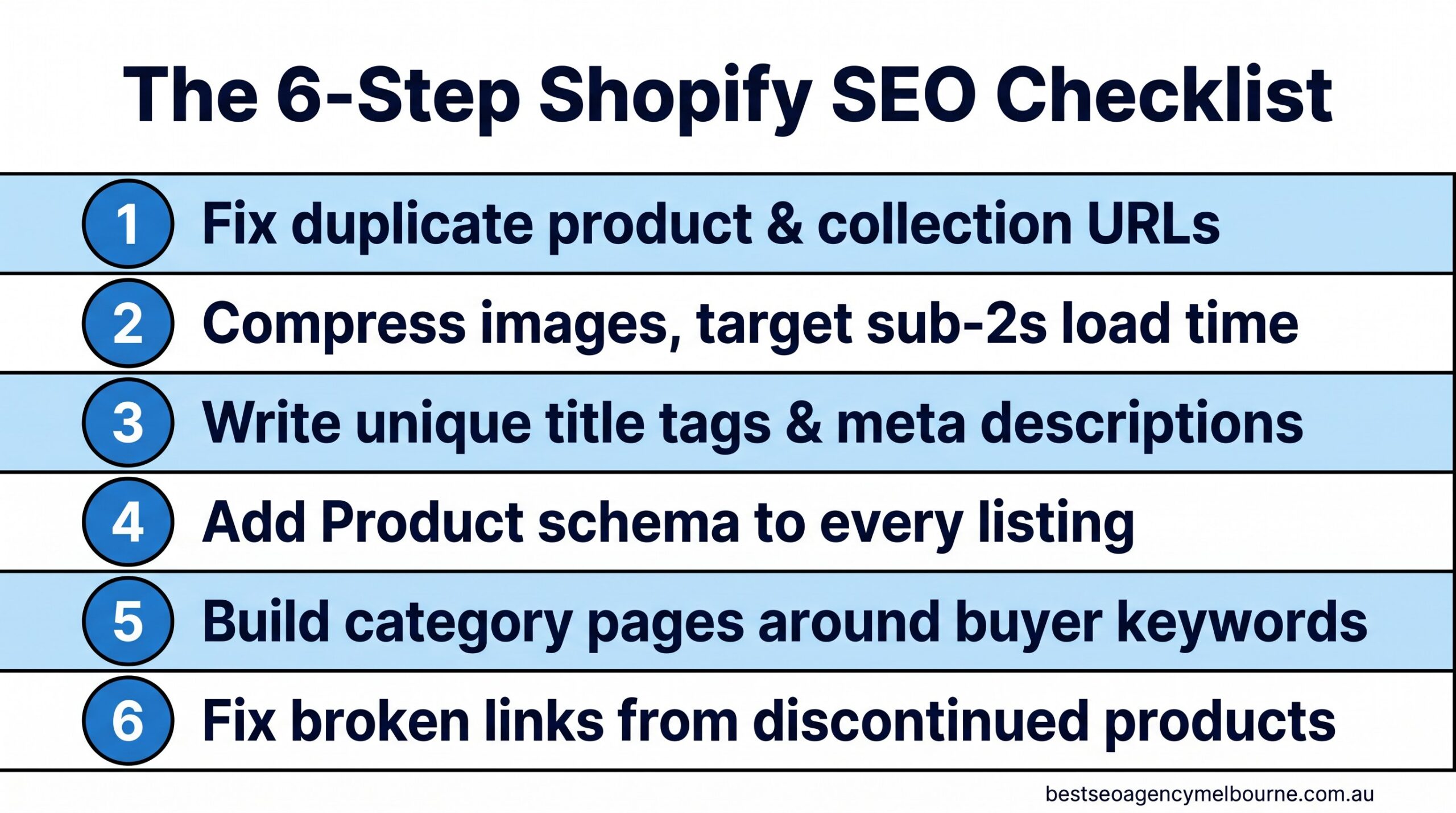
    1. Fix duplicate product and collection URLs

    Shopify creates more than one URL for the same product the moment it sits in two collections, which is common for stores selling anything with variants (size, colour, bundle). Google sees two web addresses showing near-identical content and has to guess which one matters. Often it picks neither, and both versions rank worse than a single clean page would.

    The fix is a canonical tag pointing every duplicate back to one preferred URL, plus a tidy-up of your collection structure so a product is not filed in five places at once. For a mid-sized catalogue (200 to 800 products) this is usually a half-day to full-day job. You can spot the problem yourself by searching site:yourstore.com.au "product name" in Google and checking whether more than one result comes back for what should be a single page.

    2. Get images loading in under two seconds

    Product photography sells the item, but an oversized image file slows the whole page down, and speed is now a ranking factor as well as a conversion one. Pages that load in under two seconds bounce at around 9%; pages that take five seconds or more bounce at closer to 38%, according to 2026 page speed benchmark data.

    Six-step Shopify SEO checklist infographic showing fixes for duplicate URLs, image compression, title tags, product schema, category pages and broken links for Melbourne online retailers

    The six fixes in this checklist, in the order we recommend tackling them.

    Compressing product images (Shopify apps like TinyIMG or built-in image optimisation can do this without a developer) and switching to next-gen formats such as WebP typically claws back one to two seconds of load time on a store that has never had this done before.

    3. Write title tags and meta descriptions that are not the product name twice

    The single most common Shopify SEO fault we see in Melbourne stores is a title tag that just repeats the product name with no context: “Blue Cotton Shirt โ€“ Blue Cotton Shirt”. Google uses the title tag to decide what a page is about and to write the blue clickable headline in search results. A better pattern includes the product, a distinguishing detail, and the brand: “Blue Cotton Shirt โ€“ Breathable Summer Fit | Store Name Melbourne”.

    This is a content task, not a technical one, and it is the cheapest item on this list to fix. A store with 300 products can realistically rewrite its top 50 highest-traffic title tags and meta descriptions in a week. Start with the products that already get traffic but few sales; a stronger title and description often lifts the click-through rate on a page Google already ranks, which is faster than trying to rank a brand-new page from nothing.

    4. Add Product schema to every listing

    Schema markup (also called structured data) is a small block of code that tells Google specific facts about a page: this is a product, it costs this much, it is in stock, and it has this star rating. Without it, Google has to infer those details from the page text, which it does imperfectly. With it, your listing can show a price, a rating and stock status directly in the search result, which is proven to lift click-through rate.

    What Product schema can add to a Shopify listing
    Element Shown in search results without schema Shown in search results with schema
    Price No Yes, as a visible line
    Star rating No Yes, if reviews are present
    Stock status No Yes (“In stock”)
    Typical CTR uplift Baseline 20-30% higher, per structured data research

    If your Google Business Profile listing or product pages look like the plain “before” example in that table, talk to our Melbourne team โ€” adding Product schema across a Shopify catalogue is usually a two-week job, not a rebuild.

    5. Build category pages around what buyers actually search for

    Product pages rank for specific items. Category (collection) pages are what rank for the broader, higher-volume searches like “women’s linen shirts Melbourne” or “waterproof dog beds Australia”. A collection page with no written content beyond a product grid gives Google almost nothing to work with, so it under-ranks for exactly the searches that bring the most traffic.

    Adding 150 to 300 words of genuinely useful buying-guide content above or below the product grid, built around the terms real customers use, is one of the highest-return fixes on this list because it targets searches with real commercial intent.

    Bar chart showing organic search drives 33 to 43 percent of Australian ecommerce traffic and converts at 2.5 to 3.5 percent, higher than the 1.4 percent site-wide average

    Organic search is the highest-converting channel most Melbourne Shopify stores have, and it does not stop working when you pause spending.

    Australians spent a record $82.6 billion shopping online in 2025, with 24% of all retail spend now happening online, according to the Australia Post eCommerce Report 2026. Organic search conversion rates on Shopify typically sit between 2.5% and 3.5%, well above the 1.4% site-wide average, according to Shopify’s own 2026 conversion benchmark data. Every category page you improve is competing for a genuinely large and growing pool of buyers.

    6. Fix broken links from discontinued products

    Every retailer discontinues stock, and every discontinued product page that is simply deleted becomes a dead link, a 404 error for anyone who had it bookmarked, shared it, or found it in a search result that has not updated yet. Dead links waste the ranking value that page had built up and create a poor experience for shoppers who arrive expecting to buy something that no longer exists.

    The fix is a 301 redirect from the old product URL to its closest live replacement or the relevant category page, set up every time a product is discontinued rather than in an annual clean-up.

    What this costs, how long it takes, and what goes wrong

    For a Melbourne store with 200 to 500 products, working through all six items typically costs somewhere between a solo freelancer’s day rate for a light pass and a few thousand dollars for a full technical and content overhaul, depending on how much of the catalogue needs rewriting. Expect the technical fixes (schema, redirects, canonical tags) to show up in Google Search Console within two to four weeks, and the content fixes (title tags, category pages) to move rankings over eight to twelve weeks as Google re-crawls and re-evaluates the pages.

    The most common mistake we see is stores treating this as a once-off project rather than an ongoing habit. New products get added every month without title tags being checked, and by month six half the catalogue has drifted back into the same problems. Building these six checks into your product upload process is what actually protects the ranking gains. Once they are in place, a Shopify blog set up for SEO is a good next step for reaching shoppers earlier in their search. If your store is not showing up on Google at all, start with our guide to why your Shopify store isn’t ranking. If your products are missing from Shopping results, work through our guide to products not showing in Google Shopping. Selling to New Zealand too? See Shopify Markets SEO for Australia and New Zealand.

    Quick FAQ

    Do I need a developer to fix Shopify SEO issues? Most of this checklist (title tags, image compression, category content) can be done inside Shopify’s standard editor or with well-reviewed apps. Schema markup and canonical tag clean-ups usually benefit from a specialist, particularly on larger catalogues. See our full FAQ for more on how engagements typically run.

    Does this checklist apply to WooCommerce? The ideas are the same, but the settings live in different places. See our WooCommerce SEO checklist for Melbourne stores for the exact menu paths.

    Will this work for a store with under 50 products? Yes, smaller catalogues actually see faster results because there is less to fix and Google can re-crawl the whole site more quickly.

    Should I fix all six at once or one at a time? If budget is tight, start with title tags and image compression first. Both are quick to implement and tend to move rankings fastest, which makes it easier to justify tackling the remaining items afterwards.

    If you are still comparing agencies before committing budget to any of this, our guide on how to choose an SEO agency in Melbourne without signing a 12-month mistake covers the questions worth asking before you sign anything. And if product page copywriting is your bigger gap than the technical side, our guide to writing for humans and Google at the same time is a useful next read.

    None of these six fixes require a full site rebuild, and none of them require pausing your ad spend while you sort them out. They are the groundwork that makes every other marketing dollar you spend work harder, because a store that ranks well and loads fast converts better regardless of where the visitor came from.

    Book your free consultation. No lock-in contracts, reply within 24 hours, Melbourne-based team. Get started.

  • How to Write Blog Titles That People Actually Click: A Melbourne Business Owner’s Guide

    Melbourne business owners don’t need a marketing degree to notice this: the blog post you spent three hours writing goes online, and almost nobody clicks it. Meanwhile a competitor’s post on the same topic, sometimes covering less ground than yours, sits near the top of the results and gets read every day. The difference is rarely the writing inside the article. It’s the eight or ten words above it, the title, that decides whether a reader in Brunswick or Box Hill bothers to open the page at all. Fewer organic clicks are up for grabs on Google than there were two years ago, which makes a strong title matter more, not less. This guide sets out practical, testable ways to write blog titles that earn the click, with real examples and an honest look at what a genuinely useful title costs to produce.

    What actually makes a Melbourne reader click

    A clickable title does three things in its first few words: it tells the reader what they’ll get, who it’s for, and why it matters right now. A vague title like “SEO Tips for Business” loses to a specific one like “5 SEO Fixes a Richmond Cafe Made Before Christmas” because the second one answers the question sitting in every reader’s head: is this actually about me?

    Local business owners scrolling on their phone between jobs are scanning, not reading closely. Give them:

    • A clear benefit stated in plain words, not “optimise your digital presence” but “get found on Google Maps”
    • A number when one genuinely exists in the article, such as 5 steps, 3 mistakes or 12 months
    • A timeframe or point of comparison, because “before you sign a 12-month contract” tells a reader more than “an SEO buying guide”
    • The suburb, industry or situation, where it’s true, because Melbourne readers respond to Melbourne specifics rather than generic claims

    None of this works if the title overpromises. A title that says “the fastest way” for a process that actually takes four months will cost you the reader’s trust by the second paragraph, and it can cost you in search rankings too, since pages that readers quickly click away from tend to lose ground over time. This is the same checklist our team runs through with every client before a post goes live, as part of the ongoing SEO content strategy work we do for over 500 Melbourne businesses.

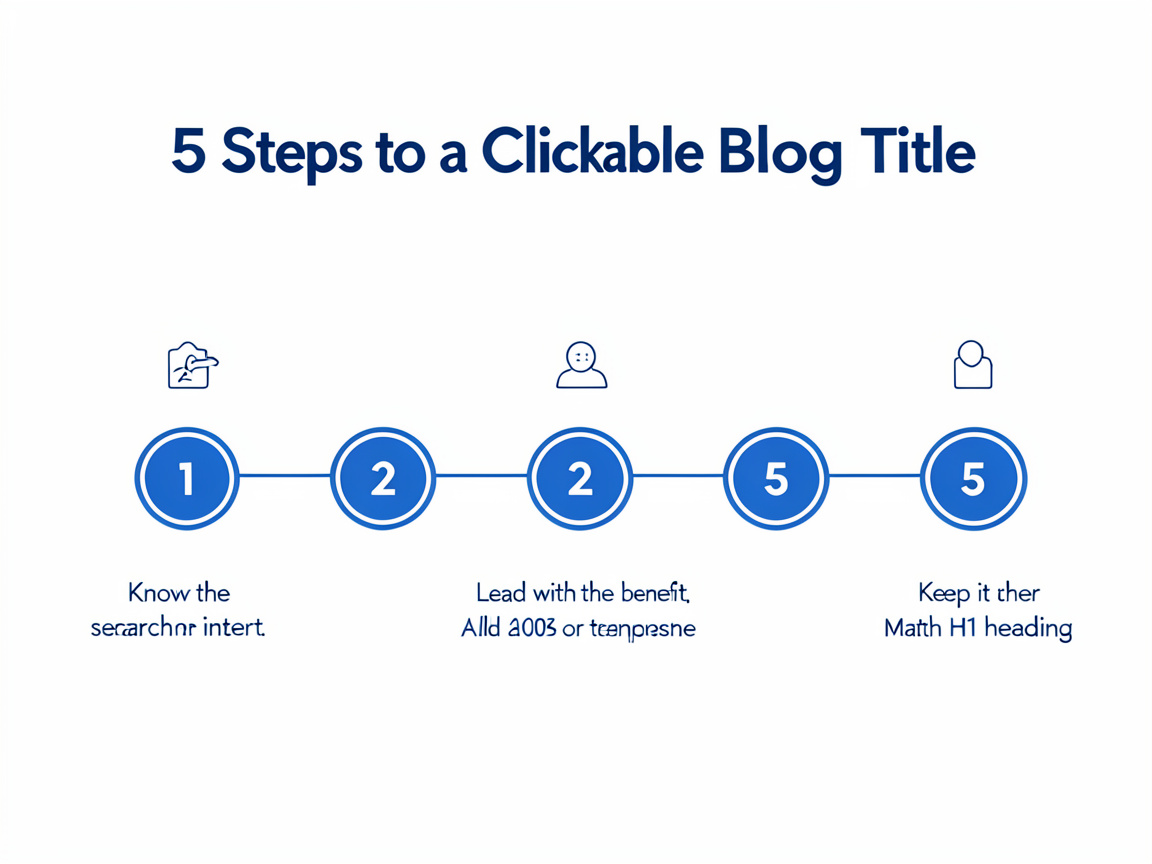
    Infographic showing 5 steps to write blog titles that people actually click: know the search intent, lead with the benefit, add a number or timeframe, keep it under 60 characters, match the H1 heading.
    Five practical steps for writing blog titles that people actually click.

    If you’re not sure whether your last few post titles are actually working for you, that’s an easy thing to check. We offer a free 30-minute audit where we’ll look at your existing blog titles and tell you honestly which ones are likely costing you clicks, and why. Book your free 30-minute audit and we’ll reply within 24 hours.

    Weak titles versus titles that earn the click

    Small wording changes make a measurable difference to whether a Melbourne reader stops scrolling. Here’s how the same topic can be written two very different ways.

    Weak title Why it falls flat Stronger title Why it works
    SEO Tips for Small Business Too broad, no clear benefit, sounds like every other post on the topic 5 Google Business Profile Fixes for a Fitzroy Retailer in Under an Hour Specific, numbered, states the benefit and the time needed
    Why You Need a Website States the obvious and offers no new information What a New Website Actually Cost a South Yarra Physio in 2026 Real number, current year, genuine curiosity
    About Our Plumbing Services Internal, business-first language that nobody searches for How Much Does an Emergency Plumber Cost in Melbourne? A 2026 Price Guide Matches what people actually type into Google
    Marketing Advice Generic, no audience, could belong to any industry 3 Marketing Mistakes We See Every Week from Melbourne Cafes Specific audience, a number, and implied credibility

    Why the fight for the click just got harder

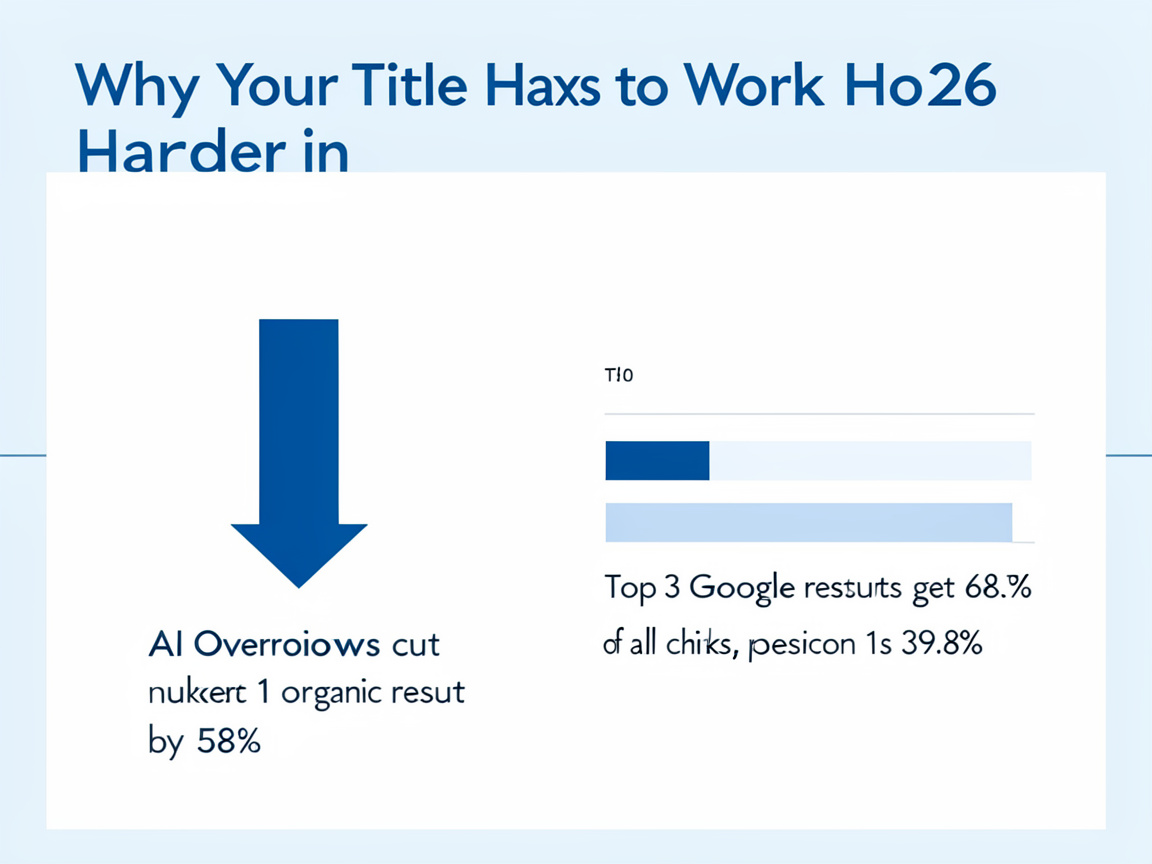
    It isn’t only about ranking well any more. Google’s AI Overviews, the short AI-written summaries that now appear above the normal search results for many queries, are already answering a large share of questions before a reader even sees the list of blue links. Ahrefs analysed 300,000 keywords and found that when an AI Overview appears, the click-through rate for the number one organic result falls by 58 per cent, a much sharper drop than the 34.5 per cent measured back in April 2025 (Ahrefs, 2026).

    Ranking position still matters enormously within what’s left. First Page Sage’s 2026 report on click-through rates found that the top three organic results capture 68.7 per cent of all clicks on a typical results page, and the number one result on a “clean” page, one without an AI Overview or map pack, still attracts 39.8 per cent of clicks on its own (First Page Sage, 2026). In plain terms: there are fewer clicks in the pool than there used to be, and the title is one of the few things you fully control in the fight for the ones that remain.

    Data infographic on why blog titles matter more in 2026, showing AI Overviews cutting clicks to the top Google result by 58 percent and the top 3 results getting 68.7 percent of all clicks.
    Why a strong blog title matters more in 2026: AI Overviews and search position data.

    Because fewer clicks are up for grabs than there used to be, it’s worth knowing exactly how your current pages are performing before you write another word. We can pull your Google Search Console data and show you, page by page, which of your existing titles are underperforming their ranking position. Ask for a free title and click-through review and we’ll walk you through the numbers in plain language, the same way we do in our fortnightly client reports.

    What this costs, how long it takes, and what goes wrong

    Writing a strong title takes minutes once you know the formula, but getting a whole content plan right takes longer. If you’re doing it yourself, budget 15 to 20 minutes per post to draft five or six title options and pick the strongest, ideally after a colleague who isn’t close to the business reads them cold. If you’re paying an agency or freelancer, expect blog content (research, writing, on-page optimisation and a title that’s actually been tested against alternatives) to run from roughly $250 to $600 per article in Melbourne, depending on length and technical complexity. A fully outsourced content strategy, covering keyword research, a content calendar and monthly publishing, typically starts from around $1,500 to $2,500 a month with an established local agency.

    Most Melbourne business blogs that underperform aren’t let down by bad writing. They’re let down by titles that were an afterthought, bolted on after the article was finished rather than planned before it. Three mistakes come up again and again: keyword stuffing (repeating “Melbourne plumber” three times in one title, which looks spammy to readers and to Google), titles so long they get cut off in search results, and titles that overpromise a result the article can’t back up. Google will also sometimes rewrite your title in its results if it decides your original doesn’t reflect the page content well, so keeping your title and your main heading aligned and accurate is one of the simplest ways to keep control of it (Google Search Central).

    Frequently asked questions

    Does my blog title have to match my H1 heading exactly?
    Not word for word, but they should say the same thing. When the two are aligned, Google is far less likely to rewrite what shows up in the search results.

    How long should a blog title be?
    Aim for roughly 50 to 60 characters so the whole thing displays in Google without being cut off. Slightly longer is fine if the extra words are doing real work.

    Can a great title fix a weak article?
    No, and it shouldn’t try to. A title’s job is to earn an honest click. If the article doesn’t deliver on it, readers leave quickly, which tends to hurt rather than help your rankings over time. Our guide on why your blog gets traffic but no enquiries covers what happens after the click.

    Writing titles that earn the click is a skill any Melbourne business owner can learn, and the formulas above will get you most of the way there on your own. If you’d rather not test it by trial and error on your own site, our in-house Melbourne team has been doing exactly this, along with the writing, research and reporting behind it, since 2012. We work on a month-to-month basis with no lock-in contract, so there’s no risk in finding out what a stronger set of titles could do for your blog. If turning a single customer question into a full article sounds useful too, our guide on turning one customer question into a blog article is a good next read. Book a free, no-obligation consultation and we’ll reply within 24 hours, free and with no strings attached.

  • Writing for humans and Google at the same time: a guide for Melbourne businesses

    Most Melbourne business websites fall into one of two traps. Either the copy sounds like it was written for a person, warm and specific, but it never turns up in a Google search. Or it sounds like it was written for a search engine, stuffed with suburb names and the same three keywords, and customers bounce off it fast. Writing for humans and Google at the same time is not a trick or a piece of software. It is a learnable way of structuring and wording a page so a real customer gets what they need and Google’s systems can tell that they did. This guide sets out how to do it, with the costs, timeframes and mistakes most Melbourne businesses hit along the way.

    What writing for humans and Google at the same time actually means

    Google calls this “people-first content”: content built to satisfy a real reader’s need first, with search visibility as the result of doing that well rather than the goal itself. Its own guidance offers a simple test: would you be comfortable telling someone a real person wrote this page for people who wanted to read it, according to Google Search Central’s documentation on creating helpful, reliable, people-first content.

    Underneath that sits a framework Google’s quality raters use called E-E-A-T: experience, expertise, authority and trust. In plain terms: has the writer actually done the thing they describe, do they know the subject, would other reputable sources vouch for them, and is the information accurate and current. None of that requires jargon. It requires specifics: real prices, real timeframes, a named author, and claims that are not vague enough to apply to any business in any city.

    Not sure whether your own site leans human or leans search-engine? Our free 30-minute audit will tell you exactly where the gaps are, even if you never become a client. Book a free consultation.

    Start with what someone is actually trying to do, not the keyword

    Search intent is the reason someone typed a phrase into Google, and it decides almost everything about what the page should say. Someone searching “bathroom renovation cost Melbourne” wants a number, not company history. Someone searching “bathroom renovation Brunswick” is closer to booking and wants to see your work in that suburb specifically. Write the wrong page for the wrong intent and no amount of keyword placement fixes it, because Google is increasingly good at detecting when a page does not actually answer the question behind the search.

    A quick check before writing: search the exact phrase yourself and look at what already ranks. If the top results are price guides, write a price guide. If they are photo galleries, a wall of text will not compete. This groundwork is exactly what a proper SEO content strategy is meant to cover before a single sentence gets written.

    Checklist comparing content written only for search engines with content that succeeds at writing for humans and Google at the same time, for Melbourne businesses.

    The chart above is a self-assessment we use with clients, scoring a page against five practical checks rather than treating “SEO” and “readable” as opposites.

    Structure the page so both a scanning customer and Google can follow it

    Nielsen Norman Group first documented this in 1997 and still cites the same pattern today: most visitors scan a new page rather than reading it line by line, and on an average page a visitor gets through only around a fifth of the words before moving on, according to Nielsen Norman Group’s research on how users read on the web. Google’s crawlers read differently to a human, but reward the same structural habits: clear headings that describe what follows, short paragraphs, and content broken into sections a reader can jump between.

    The table below is a quick reference for the practical differences between the two approaches.

    Element Written for search engines only Written for humans and Google
    Headings Keyword repeated in every heading Describes the actual question the section answers
    Paragraph length Long blocks, hard to scan Two to four sentences, one idea each
    Keyword use Exact phrase repeated unnaturally Phrase and natural variations used where they fit
    Evidence Vague claims, no sources Specific numbers, named sources, real examples
    Author Unnamed or generic “admin” Named person with real, checkable expertise

    Use the keyword the way Google rewards in 2026, not the way it did in 2012

    Keyword stuffing, repeating an exact phrase over and over to signal relevance, stopped working years ago and now risks a manual penalty. The modern approach reads more like writing naturally about a topic and its related terms. If your primary phrase is “bathroom renovation Melbourne”, a well-written page will also use “renovating a bathroom”, “ensuite renovation”, suburb names where genuinely relevant, and the practical questions customers actually ask, such as cost and timeframe. Google’s systems match meaning, not just exact strings, so a page that reads naturally and covers the topic properly will usually outperform one built around a single repeated phrase.

    A useful habit: read your draft aloud. If a sentence sounds like something you would never actually say to a customer standing in front of you, rewrite it. That single check catches most keyword-stuffing problems before they start. Accounting firms face an extra test, accuracy and the Tax Practitioners Board’s rules, which we cover in our guide to choosing an SEO agency for Melbourne accountants.

    Want a second opinion on whether your own pages read naturally or sound over-optimised? That is exactly what we check in a free consultation. Get in touch and we will walk through a page or two with you.

    Build the trust signals both customers and Google are looking for

    Trust is a set of specific, checkable things: a real name and photo on an author bio, an ABN and service area listed clearly, genuine customer reviews (including the occasional less-than-perfect one with a considered reply), photos of actual work rather than stock imagery, and dates on articles that get updated when the information changes.

    Chart of 2026 statistics showing why writing for humans and Google at the same time matters, including reading behaviour and content conversion data.

    The conversion figures above come from Content Marketing Institute’s 2026 B2B research, which found that marketers publishing original data and proprietary research saw meaningfully higher conversion rates than those publishing generic, unsourced content, and that content marketing overall produced leads at a lower cost per lead than outbound channels, according to Content Marketing Institute’s 2026 B2B content marketing trends research. In practice, a page built around your own project numbers and your own customer outcomes will usually beat a page built around generic industry claims, on both fronts at once.

    Readability itself is not a direct Google ranking factor. A 2021 analysis of over 750,000 ranking pages by digital agency Portent found an average reading level around Year 11, with no measurable correlation between reading level and ranking position, according to Portent’s study on how content readability affects SEO and rankings. Google is not marking you down for writing simply. The reason to write in plain Australian English is that it keeps an actual customer reading long enough to enquire, book, or buy, which is the whole point of the page.

    What this costs, how long it takes, and what goes wrong

    Rewriting an existing page properly, research, a structure pass, and a rewrite with real evidence, typically takes three to six hours depending on how technical the topic is. Done as part of an ongoing SEO content strategy with a Melbourne agency, expect content to be priced within a broader monthly engagement rather than sold as one-off articles, since a single optimised page rarely moves rankings without the technical and authority work underneath it. See the kind of outcomes that combination produces on our results page.

    The most common mistake is not bad writing, it is inconsistency: one genuinely good page surrounded by twenty thin ones written to hit a monthly content quota. Google’s people-first guidance specifically flags content produced primarily to attract search traffic, at volume, as a pattern its systems are built to devalue. The second most common mistake is writing a page once and never touching it again; a page with 2023 pricing sitting on a 2026 website damages trust the moment a reader notices. If you are still comparing how a Melbourne agency prices this kind of work, our guide on how to choose an SEO agency in Melbourne without signing a 12-month mistake covers the questions worth asking before you commit.

    Frequently asked questions

    Will simplifying my website copy hurt my rankings?
    No. As the Portent research above shows, reading level has no measurable link to ranking position. Plain language keeps customers reading, which supports the engagement signals Google does care about.

    How many keywords should I use on one page?
    One primary phrase and two or three natural variations is usually enough. Trying to rank one page for a dozen unrelated phrases is a common reason content ends up sounding unnatural. Our FAQ section covers more questions like this.

    Should every blog post link back to a service page?
    Where genuinely relevant, yes. A forced link reads as spammy, but a link that helps a reader take the next logical step is good for both the reader and the page.

    Short on your next topic? Our guide on how to turn one customer question into a blog article sets out a simple way to find it.

    Getting the balance right

    Writing for humans and Google at the same time comes down to one habit more than any other: answer the real question a real Melbourne customer has, in plain language, backed by specifics they can check. Keyword placement and heading structure matter, but they are the scaffolding, not the point. Get the substance right first and the technical side becomes far easier to fit around it.

    Book your free consultation. No lock-in contracts, we reply within 24 hours, and it is a Melbourne-based team on the other end. Get started here. For more practical guides like this one, visit our SEO blog.