Author: admin

  • How to Get Quality Backlinks for a Melbourne Business

    Backlinks are still one of the strongest ranking signals Google uses, and the data backs that up more clearly than most SEO advice. Backlinko’s correlation study of 11.8 million search results, last updated in 2025, found that referring domains have the strongest correlation with rankings of any factor measured, and the number one result typically has three times as many referring domains as the pages sitting in positions two to ten. For a Melbourne business, that means the businesses outranking you probably are not doing anything mysterious with keywords. They likely have more, and better, sites linking back to them. This guide covers what actually counts as a quality backlink, what it costs to build them properly, and the mistakes that can do more harm than good.

    What actually makes a backlink “quality”

    Not all links are equal, and treating them as equal is how businesses end up with a page full of links and no ranking improvement to show for it. Authority link building is one of the core services we run for Melbourne clients precisely because doing it properly takes ongoing, hands-on relationship work rather than a one-off task. A quality backlink comes from a site that is relevant to your industry or location, has genuine traffic and editorial standards, and would still exist if search engines vanished tomorrow. A low-quality link comes from a directory nobody visits, a link farm, or a “write for us” page that will publish anything for a fee. Google’s systems are increasingly good at telling the difference, and a pile of low-quality links can sit there doing nothing, or in some cases actively hurt you.

    Relevance matters as much as authority. A link from a well-known Melbourne business publication is often worth more to a local business than a link from a huge international site with no connection to your industry or your city. This is one of the reasons a generic, one-size-fits-all link building package rarely works as well as a campaign built around your specific market.

    Anchor text, the clickable words in the link itself, matters too, but subtly. A natural link profile has a mix of anchor text: your brand name, a full URL, generic phrases like “this Melbourne supplier”, and occasionally an exact keyword match. A profile where every single link uses the exact same keyword phrase looks manufactured, because it is, and it can draw the wrong kind of attention from Google’s spam systems rather than the ranking boost you were hoping for.

    Not sure how your current backlink profile compares to competitors already outranking you? Our free SEO audit, valued at $1,200, will show you exactly where the gaps are. Claim your free audit →

    The main ways Melbourne businesses earn quality backlinks

    There is no single trick that replaces consistent, relevant outreach. Most successful campaigns combine two or three of the methods below rather than relying on just one, because a backlink profile built entirely from a single source, guest posts and nothing else, for example, looks unnatural to Google and is easier for a competitor to reverse-engineer and outdo. The table below covers the main methods worth budgeting for.

    Method Typical cost Risk level Best for
    Digital PR / newsworthy content $1,500–$5,000 per campaign Low Businesses with a genuinely interesting story, data set or launch
    Guest posting on relevant sites $300–$1,500 per placement Low to medium Steady, ongoing authority building in your niche
    Resource and citation link building $200–$600 per link Low Local businesses and directories relevant to your industry
    Paid link networks or link farms Varies, often disguised as “cheap” High Nobody. Avoid entirely
    The four step process for earning a quality backlink A process graphic showing four steps for earning a quality backlink: research relevant sites, personalised outreach, offer genuine value such as data or expert comment, then follow up and maintain the relationship. 1. Research relevant sites 2. Personalised outreach 3. Offer real value or data 4. Follow up & maintain link-building-process-melbourne Best SEO Agency Melbourne
    Infographic: the four step process a genuine link building campaign follows, from research through to long-term relationship maintenance.

    Why referring domains matter more than raw link count

    Ten links from ten different websites are worth far more than fifty links from the same site. Ahrefs’ analysis of roughly 920 million pages found that the number of unique referring domains correlates more strongly with rankings than any other link metric, and Backlinko’s research shows pages in the top three results average 3.8 times more referring domains than pages ranked four to ten. WebFX’s 2026 study of 1,462 domains across fifteen industries found that page-one ranking websites have a median of 907 referring domains, though this varies enormously by industry, from around 76 in apparel to over 3,000 in finance and insurance.

    Referring domains at position one versus positions two to ten A bar chart showing that the number one Google result has roughly three times as many referring domains as pages ranked two to ten, based on Backlinko’s 2025 correlation study of 11.8 million search results. 3x referring domains Position #1 Baseline Positions 2–10 referring-domains-ranking-melbourne
    Infographic: Google’s number one result averages roughly three times as many referring domains as pages ranked two to ten (Backlinko, 2025 correlation study).

    This is exactly the distinction we cover in more depth in our guide to what Domain Authority actually measures. A high raw link count means very little if those links all come from the same handful of low-quality domains.

    If your link building has stalled at a handful of low-quality directories, it is worth a second look before you spend another dollar on it. Talk to our team about a link audit →

    What this costs, how long it takes, and what goes wrong

    A realistic budget for ongoing link building sits between $1,500 and $10,000 a month depending on your industry and competitiveness, according to 2026 pricing benchmarks, with editorial.link’s 2026 survey of 518 SEO professionals putting the average price considered acceptable for a single high-quality backlink at around $509. Highly competitive Melbourne industries such as legal, finance and medical services generally sit at the top end of that range, while a niche local trade business can often see meaningful movement on a smaller, steadier monthly spend. Results are slow by design. Expect the first meaningful movement in rankings three to six months after a sustained campaign begins, since Google needs time to discover, evaluate and trust new links. Our own case studies follow the same pattern, with the biggest revenue gains showing up well after the six month mark, once a genuine backlink profile has had time to compound.

    The most common and most damaging mistake is exactly the one covered in our breakdown of white hat versus black hat link building: buying cheap links in bulk from networks that Google can and does detect. The result is not a slow fade, it can be a sudden, painful drop in visibility once a link scheme is identified. The second common mistake is giving up after one unsuccessful outreach round. Genuine link building has a low reply rate, often under ten per cent, and treating it as a one-off task rather than an ongoing relationship-building process is why many businesses conclude, wrongly, that link building “does not work” for them.

    The third mistake is ignoring your own website while chasing external links. A backlink sends a visitor, or a search engine, to a specific page, and if that page is slow, thin on content or missing basic on-page fundamentals such as a clear title tag and heading structure, the link’s value is wasted the moment someone arrives. Fix the destination first, then invest in getting people and links to point at it. Businesses that skip this step often see their new links “not working”, when the real problem was the page underneath them all along.

    Common questions

    How many backlinks does a Melbourne business actually need? There is no fixed number. What matters is having more relevant, high-quality referring domains than the businesses currently outranking you for your target keywords, not hitting an arbitrary total. See our FAQ section for more on timelines.

    Can I build backlinks myself instead of paying an agency? Yes, and for a very small local business this can work, particularly through genuine relationships, local sponsorships and industry associations. It takes considerably more time than most business owners have available, which is the main reason businesses eventually outsource it.

    Do directory listings still count as quality backlinks? A handful of well-chosen, genuinely relevant directories, industry associations, local chambers of commerce and reputable review platforms, still carry some value. Submitting to every directory that will accept a listing, relevant or not, does little beyond wasting time, and mass directory submissions are one of the patterns Google’s spam systems have learned to discount entirely.

    The businesses winning Melbourne’s competitive search results are not the ones with the most links. They are the ones with the most relevant links, built steadily and safely over time. Claim your free SEO audit and we will show you exactly how your current backlink profile compares to the competitors already outranking you, worth $1,200 and delivered within 24 hours. No lock-in contracts. Get your free audit → For more guides like this one, visit our SEO blog.
  • White Hat vs Black Hat Link Building: What to Avoid

    Backlinks are still one of the strongest signals Google uses to rank a page — and that’s exactly why link building attracts so many shortcuts. Some of those shortcuts work for a while. Almost all of them eventually cost a site far more than they ever gained. Understanding the line between white hat and black hat link building isn’t academic: in 2026, Google is issuing an estimated 750,000 manual spam actions a month, and sites caught using manipulative link schemes typically lose the majority of their organic visibility within weeks.

    Here’s what actually separates safe link building from the tactics that get sites penalised, and what to watch for if you’ve outsourced your link building to someone else.

    What “white hat” and “black hat” actually mean

    White hat link building means earning links because your content, data or expertise genuinely deserves them — through original research, useful tools, digital PR, or relationships with real publishers. Black hat link building means manufacturing links that wouldn’t exist naturally: buying them, swapping them in bulk with unrelated sites, generating them through private blog networks (PBNs), or publishing thin AI-written guest posts purely to embed a paid link. The test is simple: would this link exist if search engines didn’t?

    Why backlinks still matter in 2026

    Despite years of predictions that links would stop mattering, the data says otherwise. Google’s algorithm still weights link authority heavily, and the gap between well-linked and poorly-linked pages in the top results is stark.

    Average referring domains by Google ranking position, 2026: 847 for position 1 · 512 for positions 2–5 · 198 for positions 6–10 · 104 for positions 11–20.
    Source: Backlinko, “We Analyzed 11.8 Million Google Search Results”, 2026.

    The pattern holds across industries: pages with more (and better) referring domains consistently outrank pages with fewer. That’s exactly why the temptation to shortcut the process is so strong — and exactly why Google invests so heavily in detecting when it’s been gamed.

    White hat vs black hat tactics, side by side

    Tactic Category Risk level Typical outcome
    Digital PR / original research and data White hat Low Slow but durable authority growth
    Guest posts on genuinely relevant, real publications White hat Low Modest, compounding gains
    Broken link building and resource page outreach White hat Low Steady, incremental links
    Buying links without rel=”sponsored” or rel=”nofollow” Black hat High Devaluation or manual penalty
    Private blog networks (PBNs) Black hat Very high De-indexation of the whole network
    Bulk, automated link exchanges Black hat High Ignored or penalised links
    AI-generated guest post farms built solely to embed links Black hat High Targeted by recent spam updates

    What Google’s own spam policies actually say

    Google is explicit on this point: buying and selling links isn’t automatically against the rules — but only if those links are marked with rel="nofollow" or rel="sponsored" so they don’t pass ranking credit. Any link created mainly to manipulate rankings, without that disclosure, is classed as a link scheme and is exactly what Google’s spam systems are built to find.

    Not sure whether your current link profile is clean? Claim your free $1,200 SEO audit and we’ll check your backlink profile for exactly this kind of risk.

    What happens when you get caught

    Google’s spam updates in 2026 (there have been three so far, in March, June and August) have continued the trend of enforcing existing policies more aggressively rather than introducing new ones — which mostly means catching sites that were relying on link schemes that had gone undetected.

    Organic visibility after a black-hat link penalty: sites caught buying or swapping manipulative links typically retain only around 25% of their prior organic visibility, losing roughly 65–85% almost overnight.
    Source: Search Engine Roundtable, Google spam update reporting, 2026.

    Recovery from a manual action or algorithmic devaluation is slow, and there’s no guarantee rankings return to their previous level even after the offending links are removed or disavowed.

    5 white hat link building tactics that actually work

    • Original data and research. Publish something genuinely new — a survey, an analysis of your own data — that journalists and bloggers want to cite.
    • Digital PR tied to real news cycles. Timely commentary or data that’s genuinely useful to a journalist working on a relevant story.
    • Broken link building. Find dead links on relevant sites and offer your (better) resource as the replacement.
    • Genuine expert contributions. Guest content on publications your audience actually reads, written by someone with real expertise.
    • Building something worth linking to. Free tools, calculators or comprehensive guides that solve a real problem for your audience.

    For more on how these link signals interact with the rest of your on-page SEO, see our earlier guide on what Domain Authority actually measures and why it matters — it explains why raw link volume isn’t the same as link quality.

    Red flags your agency is using black hat tactics

    • You’re shown a monthly “number of links built” with no detail on where they came from.
    • Your agency can’t explain why a specific site agreed to link to you.
    • Links appear on sites with no relevance to your industry at all.
    • You’re asked to approve payment for links with no mention of nofollow or sponsored attributes.

    Link building done properly is slow, deliberate, and boring in the best possible way — it should never feel like a black box. See our link building approach to understand exactly how we earn links without putting your rankings at risk.

    If you’re not sure what’s actually in your backlink profile right now, that’s the place to start. Get your free SEO audit and we’ll tell you plainly what’s helping, what’s neutral, and what needs to be disavowed.

  • What Is Domain Authority and Why Does It Matter?

    Every few months, a Melbourne business owner forwards us a screenshot of a browser extension showing their “Domain Authority” score and asks why it dropped five points overnight. The honest answer often surprises them: Domain Authority is not a Google ranking factor, it never appears in Search Console, and Google has said plainly that it plays no part in crawling, indexing or ranking. That does not make it useless. It is a genuinely useful comparison tool, just not for the reason most people assume. Here is what Domain Authority actually measures, why it correlates with rankings even though it does not cause them, and what to focus on instead. The case studies on our results page show what actually moved the needle for real Melbourne clients, and it was rarely a Domain Authority score.

    What Domain Authority actually is

    Domain Authority, usually shortened to DA, is a third-party metric built by Moz, the software company that created it. It scores a website from 1 to 100 using a machine-learning model trained mainly on backlink data, meaning links from other websites pointing to yours. Moz explains the metric in full on its own site, and is upfront that the score is a comparative benchmark rather than an absolute measure of quality. In plain terms, DA is Moz’s best guess at how strong your backlink profile is compared with every other website in its index, nothing more.

    A higher DA generally means more, and better quality, websites link to yours. It does not mean your content is better written, your pages load faster, or Google likes your site more. Those are separate things Google does evaluate directly, and DA is simply not one of its inputs.

    Moz has never published the exact formula behind the score, but it has said the model draws on dozens of signals connected to your link profile: how many separate websites link to you, whether those links are the kind search engines count at all (a “nofollow” link tells search engines to largely disregard it), how authoritative those linking sites are themselves, and how your overall profile compares with sites already ranking well for similar terms. It is recalculated periodically, which is why a score can shift even when nothing on your own website has changed.

    Why it is so often confused with a Google ranking factor

    The confusion is understandable, because higher-DA sites genuinely do rank higher on average. But that is correlation, not cause and effect. Sites with a strong backlink profile usually also have the things Google actually rewards: established brand recognition, topical expertise built up over years, and content people naturally want to reference. DA is a proxy that reflects those underlying strengths. It does not create them. Google’s own John Mueller has repeatedly and directly rejected the idea that Google uses domain authority in any form, and Search Engine Journal reported on those 2022 statements in detail, including Mueller’s comment that “you do not need a DA for Google Search. Google doesn’t use it at all.”

    Not sure whether your own website’s backlink profile is actually a problem or a distraction? Our free 30-minute audit will tell you what is genuinely holding your rankings back, even if you never become a client. Book a free consultation and we will show you what to prioritise first.

    Domain Authority, Domain Rating and Authority Score: how they compare

    DA is not the only version of this idea. Several tools publish their own take on the same basic concept, and Melbourne business owners often see all three without realising they measure similar things differently.

    Metric Built by Scale Used by Google?
    Domain Authority (DA) Moz 1 to 100, logarithmic No
    Domain Rating (DR) Ahrefs 0 to 100, logarithmic No
    Authority Score Semrush 0 to 100 No
    PageRank (public score) Google Retired publicly in 2016 Was Google’s own metric, no longer published

    None of these third-party scores talk to each other or use the same underlying index, which is exactly why the same website can show a DA of 35 on one tool and a DR of 52 on another. Neither number is wrong. They are simply different companies measuring backlinks with different data and different maths.

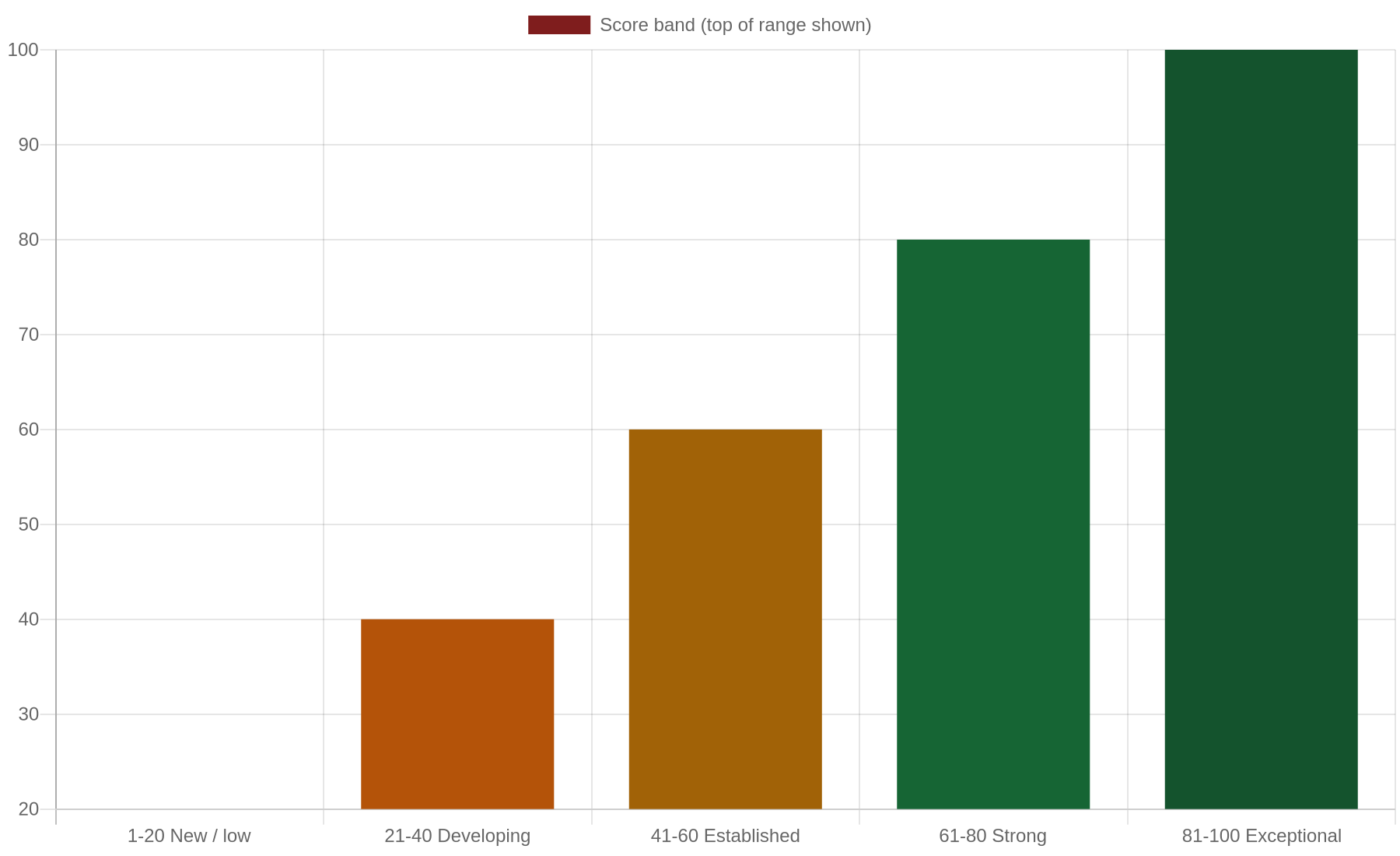
    Bar chart showing the Domain Authority scale from 1 to 100 as a general guide to score bands

    A general guide to how Domain Authority scores are typically interpreted. These bands are illustrative, not an official Moz classification, and vary by industry.

    What actually correlates with strong rankings

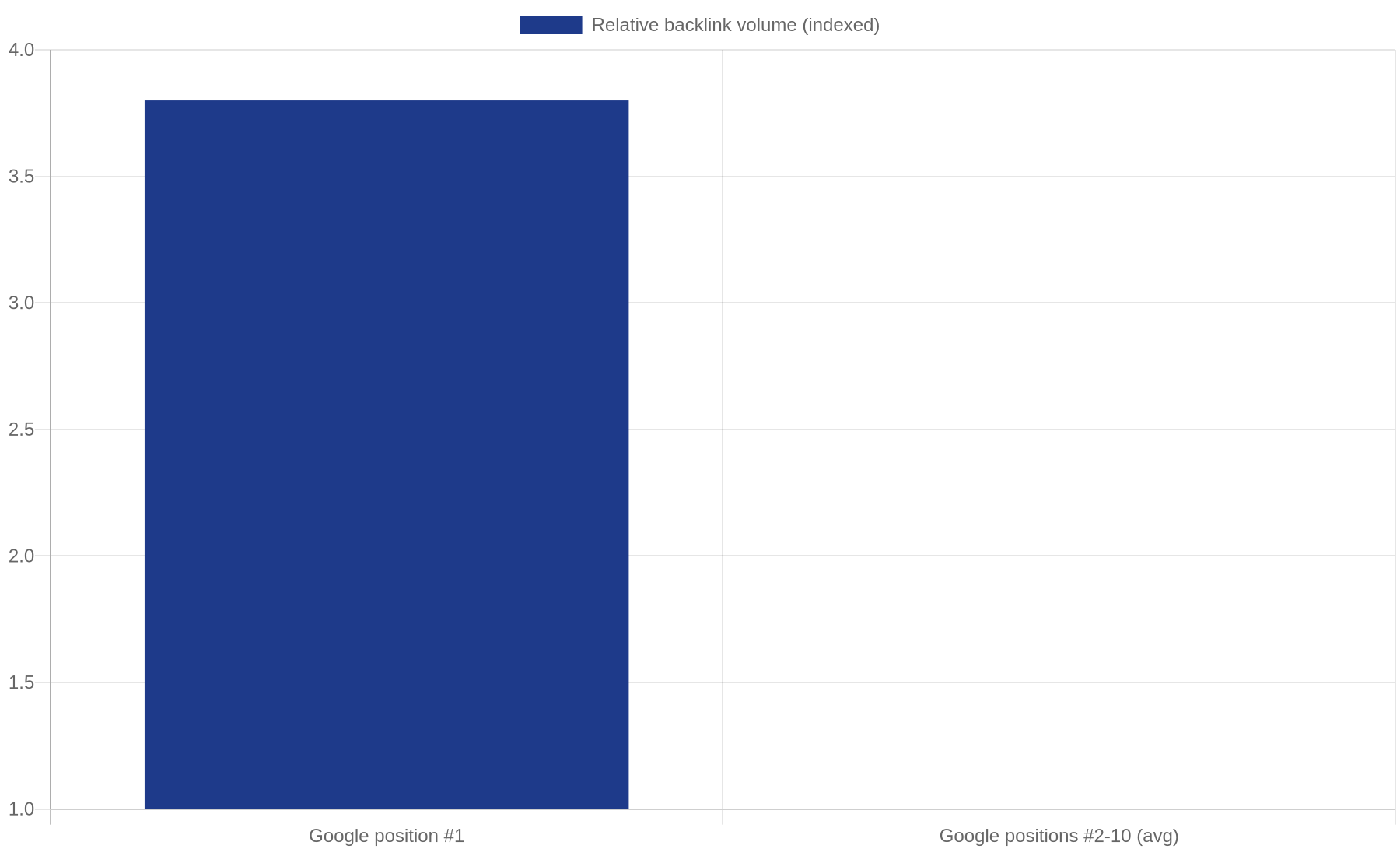
    Backlink data does matter, just not as a direct Google ranking input called “Domain Authority”. Backlinko’s large-scale analysis of 11.8 million Google search results, last refreshed for 2026, is one of the most cited studies on this, and it found that the number of unique referring domains linking to a page correlated with higher rankings more strongly than almost any other factor measured, with the average result in position #1 holding 3.8 times more backlinks than the average result sitting in positions #2 to #10. That is a genuinely useful data point. It just describes backlinks and referring domains directly, not a proprietary score built on top of them.

    Bar chart comparing backlink volume between Google position 1 and positions 2 to 10, based on Backlinko's ranking study

    If a competitor with a lower DA than yours keeps outranking you, the DA number is not the mystery to solve, the gap in real backlinks, content depth and technical health on the page in question is. If that sounds like your situation, talk to our Melbourne team about what is actually driving the gap before spending another dollar chasing a higher score.

    What this means for your SEO budget, and what goes wrong

    Chasing a DA number directly is one of the more expensive mistakes a Melbourne business can make with its SEO budget. Buying links purely to move a score, rather than to genuinely earn coverage, wastes money and can attract a Google penalty if the links look manipulative. A more sensible approach costs a similar amount, usually $1,000 to $3,000 a month for an ongoing authority-building program depending on competitiveness, but spends it on content worth linking to and genuine outreach to real publications, which raises DA as a side effect rather than the goal itself. Expect early movement in referring domains within two to three months and a meaningful shift in rankings for competitive terms over six to twelve months. Anyone offering to raise your DA by a set number of points on a set date is describing a link-buying scheme, not SEO.

    The most common mistake we see Melbourne businesses make is checking DA obsessively while ignoring the technical basics that let the site convert the traffic it already has. A site with a DA of 45 and fast, well-structured pages will usually outperform a DA 60 site that takes eight seconds to load. The score is a symptom to read occasionally, not a dashboard to check daily.

    We have seen this play out with real clients. A Melbourne trade business with a modest DA in the low 30s, but fast pages, clear service information and consistent reviews, regularly outranks a competitor sitting in the high 40s whose site takes over six seconds to load on mobile. The number on the browser extension told the wrong story entirely. Judging two competitors by DA alone would have pointed the client in exactly the wrong direction.

    Common questions

    Can Domain Authority go down even if I have done nothing wrong? Yes. Moz updates its index and model regularly, and DA is always relative to every other site it measures, so if competitors gain strong links faster than you do, your score can drop without your site losing a single backlink.

    Is a low Domain Authority a reason a new website will not rank? Not on its own. New sites naturally start with a low score and can still rank for specific, well-targeted local terms well before their overall authority catches up, particularly with the on-page and content fundamentals covered in our FAQ.

    Should I pay for a tool subscription just to track Domain Authority? Only if you also plan to track referring domains and link quality alongside it, since the score alone tells you very little about what to actually do next.

    Backlinks do not exist in isolation from the rest of your site’s content either. If duplicate pages are splitting the authority you already have, our guide to resolving duplicate content issues covers the fixes. And because content and links tend to be judged together, it is worth checking your site is not competing against itself for the same keyword before investing further in link building.

    The takeaway

    Domain Authority is a useful comparison tool and a poor obsession. Treat it as a rough temperature check on your backlink profile relative to competitors, not a Google ranking factor to chase directly. Focus the budget on genuine content and outreach instead, and the score will follow. Book a free 30-minute audit with a senior Melbourne consultant and we will show you exactly where your real opportunities sit. No lock-in contracts, response within 24 hours. Claim your free audit, or read more on our SEO blog.

  • On-Page SEO Fundamentals: What Every Melbourne Business Should Know

    Most Melbourne business websites are quietly losing rankings to mistakes that take an afternoon, not an agency retainer, to fix. Not backlinks. Not some secret algorithm update. A missing meta description. A second H1 buried in the code. Product photos still named IMG_4021.jpg. On-page SEO is the collective name for everything you control directly on a page: title tag, headings, content, images and internal links, that tells Google, and the person reading it, what the page is about. Google now rewrites most title tags it finds, which makes how you write yours matter more, not less. This guide sets out the on-page SEO fundamentals every Melbourne business should have in place, with a checklist you can work through this week.

    What “on-page SEO” actually means

    On-page SEO is one of three broad categories of SEO work. Technical SEO covers whether Google’s software can find, read and load your site at all, site speed and broken links, for example. Off-page SEO covers signals from outside your website, mostly backlinks vouching for yours. On-page SEO sits in between: every element on the page itself that helps Google understand the topic and helps a visitor decide to stay and enquire. That includes the title tag, the meta description underneath it, your headings, written content, image files, and the links between your own pages. Get these right and you give a Melbourne business owner searching at 9pm a reason to keep reading instead of hitting back.

    The on-page SEO fundamentals checklist

    Before touching anything else, run through this list. Each item is explained in more depth further down, or in one of the linked guides below.

    On-page element What it is Why it matters
    Title tag Clickable headline in search results and browser tabs Google rewrites most titles it dislikes, but a clear one still shapes rankings and clicks
    Meta description Summary shown under your title in results No direct ranking effect, but a good one lifts click-through rate
    Heading structure (H1, H2, H3) The hierarchy organising a page, like book chapters Helps Google and readers scan a page’s topic quickly
    URL slug The page’s web address, e.g. /blog/on-page-seo-fundamentals Short, descriptive URLs are easier to understand
    Image alt text and file names Written description plus what the file is called Lets Google and screen readers understand images they can’t see
    Internal links Links from one page on your site to another Spreads authority and helps visitors find related information
    On-page SEO fundamentals checklist A checklist graphic showing six on-page SEO fundamentals for Melbourne businesses: title tag, meta description, headings, URL slug, image alt text, and internal links. ON-PAGE SEO FUNDAMENTALS A checklist for Melbourne business owners 1 Title tag 2 Meta description 3 H1 & heading structure 4 URL slug 5 Image alt text & file names 6 Internal links Work through each row before moving to backlinks or paid ads. Best SEO Agency Melbourne
    An on-page SEO checklist showing the six fundamentals every Melbourne business page should have.

    Not sure how many of these six fundamentals your own site has in place? That’s exactly what our free 40-point SEO audit is for, an obligation-free review worth $1,200, turned around within 48 hours.

    Title tags and meta descriptions: the fundamentals Google actually rewrites

    Title tags deserve special attention because Google frequently changes them before displaying them. A 2025 study of more than 80,000 title tags found Google rewrote 76% of them at least partially, most often when a title was too long, stuffed with keywords, or didn’t match the page’s main heading. Google’s own documentation confirms it weighs several signals, including your visible H1, when deciding what to show. Keep your title to roughly 50-60 characters, put your primary keyword near the front, and make sure your H1 says something close to the same thing. “Brunswick Cafe | Handmade Pastries & Specialty Coffee” is far more likely to survive intact than “Home | Welcome To Our Website”.

    Ranking well still pays off disproportionately. A 2026 meta-analysis by First Page Sage found position one earns around 39.8% of clicks on a clean results page, against 18.7% for position two and 10.2% for position three. Meta descriptions don’t influence rankings directly, but a specific, honest one, mentioning price, location or a point of difference, earns more clicks from the same position. Keep them under 160 characters and write a different one for every page. See our guide on writing title tags and meta descriptions that rank and get clicked.

    Headings and content structure that both readers and Google can follow

    Every page should have exactly one H1, the main heading stating what the page is about, followed by H2s for major sections and H3s for sub-points. Skipping from an H1 straight to an H3, or using multiple H1 tags because a theme’s styling looked better, confuses the outline Google builds of your page and makes it harder for a visitor scanning on their phone to find the answer. Headings aren’t a place for cleverness either; “How much does a website redesign cost in Melbourne” does more work than “Let’s Talk Numbers”.

    Content structure matters just as much as the headings themselves. Break up long paragraphs, use shorter sentences, and answer the reader’s question early. A Melbourne plumber’s page on hot water system repairs should state a same-day callout price in the first few sentences, not the fifth paragraph. We’ve broken down correct heading structure, and the five most common mistakes, in our guide to header tags and content structure for SEO.

    If your site was built a few years ago, its headings and page structure probably haven’t been touched since. Restructuring an existing site, without a full rebuild, is exactly what our SEO Content Strategy team handles for Melbourne businesses every week. Book a no-obligation consultation and we’ll tell you honestly what your site actually needs.

    Images, internal links, and the technical basics behind on-page SEO

    Images are one of the most commonly ignored on-page elements. Every image needs a descriptive file name, like brunswick-cafe-interior.jpg rather than IMG_4021.jpg, and alt text, a short description of what it shows. This helps Google Images rank the picture, and lets screen readers describe it to visually impaired visitors. Large, uncompressed images are also a common cause of a slow-loading page, which drags down your Core Web Vitals, Google’s measure of how quickly a page responds.

    As of May 2026, only 55.9% of websites pass all three Core Web Vitals checks, according to Google’s own Chrome User Experience Report. The individual metrics: 68.6% of sites have a good Largest Contentful Paint (how fast the main content loads), 81.3% a good Cumulative Layout Shift (how much the page jumps while loading), and 86.6% a good Interaction to Next Paint (how quickly it responds when clicked). Nearly half of websites are still handing rankings to a faster competitor.

    Core Web Vitals pass rates, May 2026 Bar chart showing the percentage of websites passing Core Web Vitals checks as of May 2026: 55.9% pass all three checks overall, 68.6% pass Largest Contentful Paint, 81.3% pass Cumulative Layout Shift, and 86.6% pass Interaction to Next Paint. Source: Google Chrome User Experience Report (HTTP Archive), May 2026. CORE WEB VITALS: % OF SITES PASSING May 2026, Chrome User Experience Report 55.9% Overall (all 3) 68.6% LCP 81.3% CLS 86.6% INP Source: HTTP Archive / Google CrUX, May 2026 Best SEO Agency Melbourne
    Core Web Vitals pass rates, May 2026: 55.9% of sites pass all three checks; 68.6% pass LCP, 81.3% pass CLS, 86.6% pass INP.

    Internal links, links from one of your own pages to another, deserve similar attention. Linking from a blog post about hot water repairs to your plumbing services page, using the words “hot water system repairs” rather than “click here”, helps Google understand what that page is about. Our internal linking strategy guide covers how many links to use and where, and our image SEO guide covers file names, compression and format choice. If you haven’t chosen which phrases to target on each page, our keyword research guide is the starting point.

    What this costs, how long it takes, and what goes wrong

    On-page fixes are some of the least expensive SEO work available, since you’re optimising a page that already exists rather than building new backlinks or content. A single-page tidy-up, title tag, meta description, headings, images, typically takes a few hours. A full site with a blog and a dozen service pages needs one to two weeks. Most Melbourne businesses see ranking movement within four to eight weeks, faster than technical SEO changes, which take longer to be recrawled.

    The most common mistake is treating on-page SEO as a one-off task rather than routine housekeeping. A new product range or blog post published without a proper title tag and headings undoes months of good work. The second is keyword stuffing, repeating a phrase so often the writing reads awkwardly; Google recognises this and can suppress rankings. The third is duplicating the same title tag or meta description across dozens of pages, usually a leftover from a template nobody has reviewed since launch.

    Frequently asked questions

    Does on-page SEO alone get a Melbourne business onto page one of Google?
    It gives Google clear signals about what your page offers, but it works alongside technical SEO (making sure Google can crawl and load your site) and off-page SEO (backlinks from reputable sites). For competitive Melbourne keywords, all three usually need attention. See more in our FAQ.

    How often should on-page SEO be reviewed?
    Review title tags, meta descriptions and headings whenever you publish new content, and do a full site review every six to twelve months, since Google’s guidance and rewrite behaviour change over time.

    Can I do on-page SEO myself, or do I need an agency?
    Most fundamentals here are things any business owner can do with an afternoon and a checklist. Where it gets harder is prioritising which pages to fix first, and diagnosing why a page isn’t ranking despite ticking every box, that’s where an expert opinion pays for itself.

    The takeaway

    On-page SEO isn’t glamorous, but it’s the fastest, cheapest set of fixes most Melbourne websites can make this month. Start with the checklist above: one clear title tag, one accurate meta description, a proper heading structure, named and compressed images, and internal links that use real words instead of “click here”. Do that consistently and you’ve done more for your rankings than most competitors bother to. For a second opinion on where your site stands, book a free consultation with our Melbourne team, no lock-in contract, and we reply within 24 hours. For more guides like this one, visit our SEO blog.
  • How to Avoid Keyword Cannibalisation on Your Website

    You have published forty blog posts, your traffic has plateaued, and two of your own pages seem to be fighting each other for the same search term. This is what most people mean when they say “keyword cannibalisation”, and it is one of the most misunderstood problems in SEO. Some of it is genuinely costing you rankings. Most of it is not the problem you think it is, and treating every overlap as an emergency wastes time you could spend on content that actually needs it. Here is how to tell the difference, and what to actually do about the part that matters.

    What keyword cannibalisation actually is, and isn’t

    Cannibalisation happens when two or more pages on your site target the same search intent closely enough that Google cannot decide which one deserves to rank, so it splits authority between them and both perform worse than a single strong page would. That is the real, costly version. But a large-scale Ahrefs study of 9,700 cases where a site ranked multiple pages for the same keyword found that only 1 in 80 actually needed fixing. In most cases, when two pages both rank in the top 10, the lower-ranking page picks up an extra 2% to 10% of traffic, not the 50% you would expect if the pages were truly cannibalising each other. Most of what looks like cannibalisation is just Google diversifying results because the pages answer slightly different questions. The version worth fixing is same-intent overlap: two pages that would satisfy the exact same searcher, word for word.

    📊 Infographic: Only 1 in 80 “cannibalisation” cases actually need fixing

    (Branded data graphic — pending upload to media library)

    The signs your pages are actually competing

    A handful of signals separate real cannibalisation from harmless diversification. Watch for two pages consistently swapping ranking positions for the same query in Search Console week to week, neither page ever reaching the top 3 despite decent content on both, or two blog posts that, if you deleted one, nobody would notice the gap because the other already covers it. If your pages are targeting genuinely different angles, a beginner’s guide and an advanced technical breakdown, for instance, that is healthy topical coverage, not a problem.

    There is also a newer reason this matters more than it used to. AI-generated answers in Google’s AI Overviews and tools like ChatGPT tend to pick a single URL per query to cite, rather than blending several. When your own pages compete for the same query, you are not just splitting a ranking anymore, you are reducing the odds that any one of your pages gets picked as the source. A single strong, unambiguous page now has a real advantage over two good-but-overlapping ones in a way it did not five years ago.

    Not sure whether your pages are actually competing or just covering related ground? Our free 30-minute audit will tell you, even if you never become a client. Claim your free audit.

    How to check for it properly

    Open Google Search Console, go to the Performance report, filter by your suspected keyword, then switch the grouping from Queries to Pages. If you see two or more of your own URLs receiving impressions for the same query over the same weeks, with rankings that move inversely, that is your first real signal. Confirm it by searching the exact phrase yourself in an incognito window and checking whether Google is genuinely alternating between your two pages in the results, rather than showing them for two subtly different variations of the term.

    What you see Likely cause What to do
    Two pages ranking positions 8-15, swapping weekly Genuine cannibalisation Consolidate into one stronger page
    Two pages both ranking top 10 for related but distinct terms Healthy diversification Leave both, strengthen internal links between them
    Old page and new page targeting the identical query Content overlap from not checking existing content first Merge and 301 redirect the weaker page
    Category page and blog post both ranking for a broad term Site architecture overlap Differentiate intent or canonicalise

    📊 Infographic: The 4-step process to diagnose and fix keyword cannibalisation

    (Branded checklist graphic — pending upload to media library)

    If a Search Console check like this feels like more time than you have, our content strategy team can run a full cannibalisation audit alongside your existing keyword map — usually a two-week turnaround for a site your size.

    Fixing it: consolidate, redirect, or differentiate

    Once you have confirmed genuine cannibalisation, there are three real fixes, and which one applies depends on whether the pages are actually different enough to both deserve to exist. If they are near-duplicates, merge the better content from both into a single page, 301 redirect the weaker URL to the stronger one, and update your internal links to point at the survivor. If the pages serve genuinely different purposes but Google is still confusing them, add a canonical tag pointing to the version you want indexed, following Google’s own guidance on consolidating duplicate URLs. If neither applies and the pages are simply too similar in scope, rewrite one to target a clearly different angle or funnel stage, a comparison page versus a how-to guide, for example, so each has its own reason to exist.

    Before you touch anything, write down which page has more backlinks, more historical traffic, and a cleaner URL, and make that the survivor by default. Merging into the weaker page just because it happens to be newer wastes the authority the older page already earned. Once the merge is live, update every internal link across your site that pointed to the removed page, a lingering internal link to a redirected URL is not fatal, but cleaning it up speeds up how quickly Google re-evaluates the surviving page.

    What you should not do is delete content reflexively the moment you spot overlap. A surprising number of “cannibalisation” cases we are asked to fix turn out to be two pages doing their job correctly, and removing one just loses you a ranking with no replacement.

    What this costs and how long it takes

    A proper cannibalisation audit for a site with 50 to 100 published pages typically takes three to five days: pulling Search Console data, cross-referencing rankings, and deciding which overlaps are real. The fixes themselves are usually fast, a redirect and a content merge can be live within a day, but the ranking recovery takes longer. Expect four to eight weeks after a consolidation before Google fully re-evaluates the merged page and rankings stabilise, sometimes higher than either original page achieved alone since authority is no longer split.

    Larger sites, anything past a couple hundred published pages, should budget closer to two to three weeks for the audit alone, simply because there are more query and page combinations to cross-reference manually. This is exactly the kind of work that benefits from a second set of eyes: it is easy to talk yourself into “fixing” a healthy pair of pages because the overlap looks alarming at first glance, when the Search Console data would tell a calmer story if you gave it the full week-by-week view rather than a single snapshot.

    Frequently asked questions

    Is keyword cannibalisation the same as duplicate content?
    No. Duplicate content is near-identical text across pages, which we cover in our guide on resolving duplicate content issues. Cannibalisation is two different pieces of content competing for the same search intent, even if the wording is completely different.

    How many pages should I expect to find overlapping on a typical site?
    Based on the Ahrefs data above, expect most overlap to be harmless. Start your content audit with your highest-traffic pages first rather than trying to review everything at once.

    Should I plan my content differently to avoid this from the start?
    Yes. Our keyword research guide covers how to map one primary keyword per page before you write anything, which prevents most cannibalisation before it starts. See our FAQ for more on how we structure content plans.

    Fixing overlap is only half the job. Once you consolidate two pages into one stronger page, that page needs a proper internal linking plan to actually benefit from the merge. Our guide on internal linking strategy for Melbourne beginners covers exactly this, including the five mistakes that quietly waste the authority you just consolidated.

    Most sites do not have a cannibalisation problem anywhere near as large as they fear, and the fix, once you have confirmed it is real, is usually a redirect and a rewrite rather than a rebuild. Check Search Console, confirm the overlap is genuine, and consolidate only what needs it. Book a free audit and we’ll tell you exactly which pages, if any, are actually competing with each other. No lock-in contracts, response within 24 hours, Melbourne-based team. Claim your free audit. For more guides like this, visit our blog.

  • Content Length and SEO: Does Word Count Really Matter in 2026?

    Every Melbourne business owner has heard some version of the rule: blog posts need to be at least 1,000 words, or 2,000, or whatever number a marketer once mentioned in a meeting. The truth is more useful and less tidy. Google has repeatedly said it does not use word count as a ranking factor, yet long articles consistently outperform short ones in the real world. This guide explains why both things are true, what the 2026 data actually shows, and how many words your next page really needs.

    It’s a question we get from almost every new Melbourne client, usually phrased the same way: “how long does our blog post need to be to rank?” The honest answer disappoints people looking for a magic number, but it’s the one that actually works, and it applies whether you’re writing your first blog post or your hundredth.

    What the research actually says

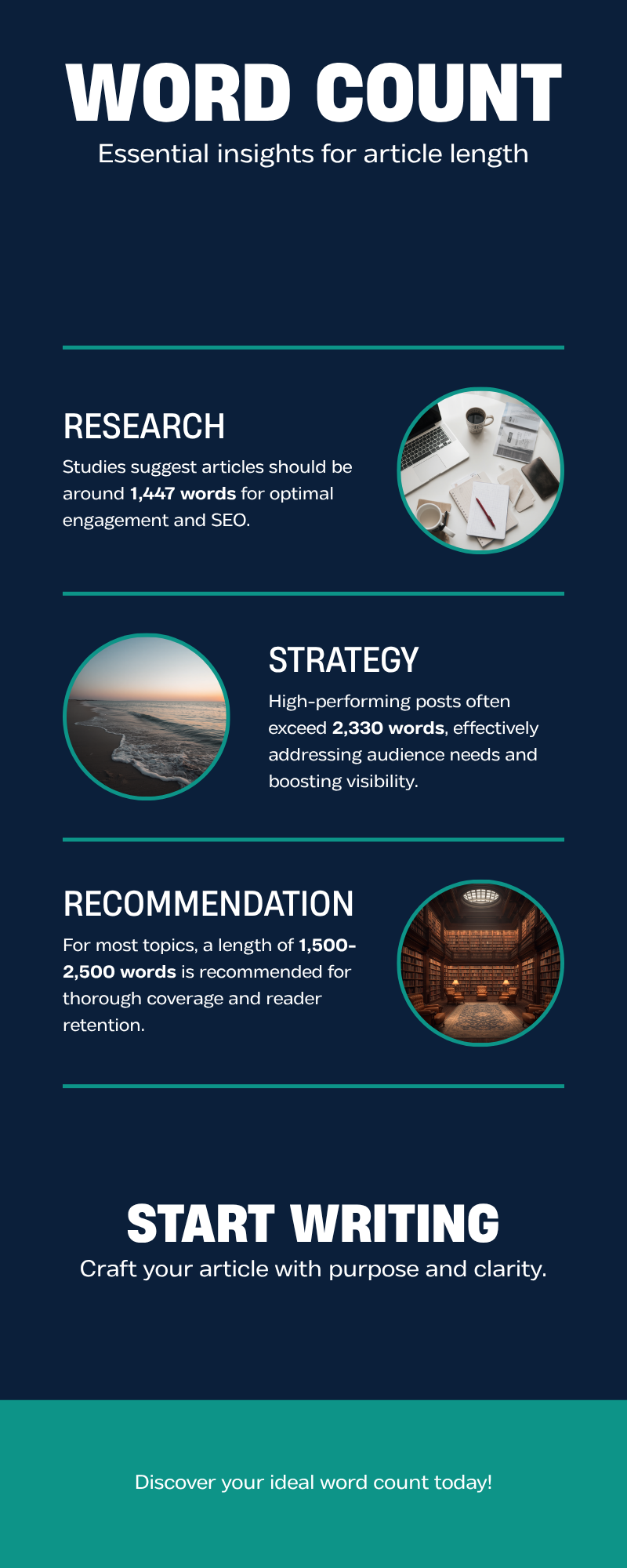
    Backlinko’s analysis of 11.8 million Google search results found the average word count for a first-page result sits at roughly 1,447 words, while HubSpot’s own data shows their highest-performing posts average around 2,330 words. Neither figure means writing exactly that many words guarantees a ranking. It means that articles thorough enough to rank well also tend to run to that length, because covering a topic properly usually takes more than a few hundred words.

    It’s worth being precise about what these numbers are and aren’t. They’re averages across millions of results and thousands of posts, not a target to hit on every single page. A page that ranks at 800 words because it answers a narrow, specific question completely is not an exception to some rule; it simply didn’t need more words to satisfy what the searcher was actually looking for. The average exists because most topics that people search for in competitive categories, including most Melbourne SEO and small business queries, genuinely do need more depth than 800 words allows.

    Not sure if your current content is long enough, or just padded? Enter your website URL below and we’ll deliver a comprehensive, 40-point audit within 48 hours, no obligation. Claim your free audit.

    Infographic comparing 2026 benchmark word counts for page-1 ranking content: Backlinko average 1,447 words, HubSpot top posts 2,330 words, recommended range 1,500-2,500 words

    Why longer content tends to rank, even though length isn’t the ranking factor

    Google measures comprehensiveness, dwell time, backlinks earned and whether a reader’s question actually gets answered on the page, rather than counting words directly. Longer content simply tends to score better on all four measures, because a 600-word page usually can’t cover a topic as thoroughly as one that runs to 1,500 words. Content over 3,000 words earns noticeably more referring domains than short content and tends to attract more organic traffic, social shares and backlinks along with it, largely because other sites have more reason to link to something genuinely useful and complete.

    There’s a second factor worth naming directly: since 2025, a growing share of search traffic is being shaped by AI-generated overviews and chat-based answer engines that summarise multiple sources at once. Thin, generic pages are the easiest to summarise and skip past. Genuinely comprehensive pages, the kind that answer follow-up questions before a reader even asks them, are more likely to be the source an AI system actually cites or a reader clicks through to for the full picture. Length is a side effect of that comprehensiveness, not the cause of it.

    Long-form content performance (3,000+ words vs short content) Reported difference
    Organic traffic 3x more
    Social shares 4x more
    Backlinks earned 3.5x more
    Referring domains +77.2% more

    Source: Long-form content backlink and ranking impact statistics, 2026

    Infographic showing that long-form content over 3,000 words earns 3x more organic traffic and 4x more social shares than short content

    So what should you actually aim for?

    The honest answer is whatever length genuinely satisfies the search intent better than every other page currently ranking for that term. For most informational blog posts aimed at Melbourne small business owners, that lands somewhere between 1,500 and 2,500 words. A simple “what is” question might need only 600 words to answer properly, and padding it out to 1,500 with repetition will hurt more than help. A genuine comparison guide, a full how-to, or anything a reader might use to make a decision usually needs the full range to cover every angle a reader actually cares about.

    This is exactly why our own blog standard sits at 1,450 to 1,600 words per article: long enough to be genuinely useful, short enough that nothing is there just to hit a number. If your own content strategy needs a second opinion, talk to our Melbourne team about what your specific pages actually need.

    Different page types on the same website legitimately need different lengths. A homepage service summary might only need 150 words per service, because its job is to orient a visitor and send them deeper into the site, not answer every question on the spot. A dedicated service page, the one that actually needs to rank for “SEO agency Melbourne” or similar, typically performs better at 1,000 to 2,000 words once you include FAQs, process detail and proof points. A comparison or “best of” style guide, like the ones covering how to choose between agencies or providers, often needs to run longer again, simply because it’s covering more ground on behalf of the reader so they don’t have to visit five different sites themselves.

    What goes wrong when businesses chase word count

    The most common mistake is padding: restating the same point three different ways to stretch a 700-word article to 1,500. Readers notice immediately, bounce rates climb, and Google’s own quality signals pick up on the poor engagement even without directly measuring word count. The second common mistake runs the other way: cramming a genuinely complex topic, such as a full pricing and process explainer, into 400 words because “shorter is better for readability”. Both approaches lose to a well-structured article that uses exactly as many words as the topic needs, broken into scannable sections with clear headings.

    There’s a third mistake that’s become more common since AI writing tools arrived: generating a long draft quickly and publishing it with only a light edit. The word count looks right, but the content is often generic enough that it could sit on any business’s blog in any city. Google’s guidance on helpful content specifically calls out material that shows little real expertise or first-hand knowledge, and generic AI output is exactly the kind of content that struggles here, regardless of how many words it runs to. The fix isn’t avoiding these tools entirely, it’s making sure the finished piece includes specific, first-hand detail that only someone who actually does this work would know to include.

    Structure matters as much as length. A 2,000-word article with no subheadings is harder to read than a well-organised 1,200-word one. Our guide to header tags and content structure covers how to break long content into something readers and Google can both scan properly, and pairs directly with the length decisions covered here.

    How this connects to keyword research and structure

    Word count decisions shouldn’t happen in isolation from the rest of your content plan. Our keyword research guide covers how to figure out what a page actually needs to cover before you write a single word, and our piece on internal linking strategy explains how longer, more comprehensive pages tend to attract more internal links naturally, since they cover more subtopics worth linking to from elsewhere on your site.

    Quick FAQ

    Does Google penalise short content? No, there’s no length-based penalty. A short page that fully answers a narrow question can outrank a long page that wanders. See our FAQ for more on how Google actually evaluates content quality.

    Should every page on my site be 1,500+ words? No. Product pages, contact pages and simple service pages usually work better shorter and more direct. The length guidance here applies specifically to blog posts and guides meant to rank for informational searches.

    How do I know if my existing content is too short? Compare it against what’s currently ranking on page one for the same keyword. If competitors are covering five subtopics your page doesn’t touch, length is masking a coverage gap rather than a word count problem on its own. Read the top three results properly before you rewrite anything; the gap is usually obvious once you see it laid out side by side.

    Word count was never really the point, comprehensiveness was. Chase the second and the first tends to take care of itself. A page that genuinely answers what a Melbourne searcher is asking, in as many or as few words as that takes, will consistently outperform one written to hit an arbitrary number. Claim your free, no-obligation SEO audit and we’ll show you exactly where your content stands. Get free audit. For more guides like this one, visit the blog.

  • How to Optimise Landing Pages for Conversions and Rankings

    Most Melbourne businesses treat their landing page as an afterthought: a page bolted onto the end of an ad campaign or an SEO push, built once and never revisited. Then the enquiries don’t come, or worse, they trickle in but the page never ranks for the term it was built for. Conversion and ranking are not two separate problems needing two separate fixes. Google’s own ranking systems increasingly reward the same things that make a visitor pick up the phone: a fast, clear page that answers the visitor’s question without friction. This guide covers what actually makes a landing page convert, why speed and structure affect both outcomes, what the work costs and takes, and a simple process you can run on an existing page this month.

    What makes a landing page work for people and for Google

    A landing page conversion rate is the percentage of visitors who complete the action the page asks for, whether that’s calling, filling in a form, or requesting a quote. According to Unbounce’s Conversion Benchmark Report, the median landing page across all industries converts at 6.6%, based on an analysis of 41,000 landing pages and 464 million visits (Source: Unbounce, updated July 2025). For professional services, the category most Melbourne trades, clinics and consultancies fall into, the median sits close behind at 6.1%, but the top quarter of pages convert at 14.1% or higher, more than double the middle of the pack.

    That gap matters because Google is watching the same signals your visitors respond to. A landing page that loads slowly, buries its offer under three screens of scrolling, or reads like a legal document is failing on both fronts at once: visitors leave, and Google’s Core Web Vitals data (a set of measurements Google uses to judge how a page feels to use, covering loading speed, visual stability and responsiveness) records that departure as a poor experience.

    One detail worth acting on immediately: mobile now accounts for 83% of all landing page visits, yet mobile pages typically convert worse than desktop equivalents on the same offer (Source: Unbounce, 2025). If you have only ever reviewed your landing page on a laptop, you haven’t reviewed it at all.

    Not sure where your landing pages actually stand? A free audit will tell you within 48 hours, even if you never become a client.

    The five elements every high-converting landing page needs

    Every landing page that consistently converts, regardless of industry, tends to share the same five ingredients. Miss two or three of these and no amount of extra traffic will fix it.

    • Message match: the headline restates the exact promise made in the ad or search result that brought the visitor there. A visitor who searched “emergency plumber Richmond” and lands on a generic “Welcome to our website” headline will leave within seconds. Our guide to writing title tags and meta descriptions that rank covers the same principle for organic listings.
    • A fast-loading hero: the first thing visible without scrolling should render in under 2.5 seconds. Heavy, uncompressed hero images are the most common cause of a slow landing page, which our image SEO guide walks through fixing.
    • Visible proof: a rating, a review count, or a specific result, placed near the top rather than buried in a footer.
    • A plain-English offer: one benefit stated in a single sentence, with any unavoidable jargon explained rather than assumed.
    • One primary call to action, repeated rather than competing with five other menu items and links.
    Element Weak landing page High-converting landing page
    Headline Generic, brand-focused Matches the exact ad or search term
    Load time 4+ seconds Under 2.5 seconds
    Navigation Full menu, 8+ links Minimal, ideally one path
    Proof Absent or buried in the footer Rating or result visible without scrolling
    Call to action Multiple, competing CTAs One CTA, repeated two to three times
    Anatomy of a high-converting landing page 1 Message match Headline mirrors the ad or search term 2 Fast hero Loads in under 2.5 seconds 3 Visible proof Rating or result above the fold 4 Plain offer One benefit, no jargon 5 One CTA Repeated, not competing bestseoagencymelbourne.com
    The five elements of a high-converting landing page.

    Why page speed decides your conversion rate and your ranking

    Page speed is the clearest example of a single fix improving both numbers at once. Largest Contentful Paint (LCP), one of Google’s three Core Web Vitals metrics, measures how long the biggest visible element, usually a hero image or headline, takes to render. Google confirms Core Web Vitals feed into its ranking systems alongside mobile-friendliness and security (Source: Google Search Central).

    The commercial case isn’t theoretical. In a case study Google published in March 2025, telecommunications provider T-Mobile reduced its Largest Contentful Paint by 42% across its site. The result was a 60% improvement in the rate at which prospect visits with buying intent turned into completed orders, alongside a 20% drop in user-reported site issues (Source: web.dev, Google, March 2025). Melbourne businesses don’t need T-Mobile’s engineering team to see similar gains; most of the improvement came from compressing images, removing render-blocking scripts and caching static files, the same checklist covered in our technical SEO audit guide.

    Wondering how your landing page’s load time compares? We’ll run a free Core Web Vitals check alongside your landing page audit and show you exactly which second is costing you enquiries.

    What landing page optimisation costs, how long it takes, and what goes wrong

    Cost and timeframe are the two questions Melbourne business owners ask before anything else, so here’s a straight answer. A conversion-focused rebuild of a single landing page, new copy, a faster hero image, a simplified layout, typically takes one to three weeks once content and approvals are in hand. Ongoing testing, trying a different headline or a shorter form against the original, adds a further two to four weeks per test, since you need enough visitors before you can trust the result rather than a lucky week.

    On cost: a single well-built landing page from an experienced Melbourne agency generally runs in the low thousands of dollars, less if your existing page only needs speed and copy fixes, more for a fully custom design with original photography. DIY is possible with an existing website builder, but budget the time to test properly rather than publishing once and hoping.

    What goes wrong most often, based on the audits we run for Melbourne businesses:

    • Sending paid traffic to the homepage instead of a dedicated page built around one offer
    • Copying the full site navigation onto the landing page, handing visitors an exit ramp before they convert. Our internal linking guide explains why fewer, deliberate links outperform more
    • Never testing the page on an actual phone, only in a desktop browser
    • Treating launch day as the finish line instead of checking Search Console and analytics weekly for the first month
    Landing page conversion rate benchmarks (2025) 3.8% SaaS median 6.1% Professional services median 6.6% All industries median 14.1% Professional services top 25% Source: Unbounce Conversion Benchmark Report, 2025 bestseoagencymelbourne.com
    Landing page conversion rate benchmarks by category, 2025 (Source: Unbounce).

    A simple process to fix an underperforming landing page this month

    If your existing landing page has been live for a while without a second look, here’s the order worth working through:

    1. Pull the last 90 days of data from Search Console and analytics to see whether the problem is traffic, ranking, or conversion.
    2. Check Core Web Vitals in Search Console’s own report, then fix the worst offender first, almost always image weight.
    3. Rewrite the headline to match the exact phrase visitors searched or clicked, in plain language rather than internal jargon.
    4. Cut navigation links and secondary offers down to one path and one action.
    5. Add one piece of specific proof, a review, a number, a completed project, above the fold.
    6. Test the finished page on an actual phone before calling it done.

    This is close to the 40-point process our own consultants run during a free audit, and it sits behind results like a 412% increase in organic traffic for a Melbourne legal client and $2.1 million in annual organic revenue for an e-commerce client (see our case studies).

    Common questions about landing page optimisation

    How long until a landing page change shows up in rankings?
    Google typically recrawls and reassesses a changed page within days to a few weeks, though ranking movement for competitive terms can take two to three months. Conversion improvements are usually visible sooner, often within a week or two of enough visitors passing through.

    Do I need a separate landing page for every service?
    Generally yes, if each service targets a genuinely different search term or ad campaign. One page trying to rank for “bathroom renovation,” “kitchen renovation,” and “extensions” at once usually ranks well for none of them. See our FAQ for more on structuring service pages.

    A landing page that loads fast, matches what the visitor searched for, and asks for one clear action will out-convert and out-rank a slower, cluttered page every time, because Google and your visitors are judging the same experience.

    Ready to see what a properly optimised landing page could do for your enquiry numbers? Book your free, no-lock-in SEO audit, valued at $1,200, with a response within 24 hours.

    For more on turning technical fixes into rankings, browse the rest of our SEO blog.

  • Image SEO: Alt Text, File Names, and Compression Explained

    If you run a small business website in Melbourne, there is a good chance every photo and logo on your site is quietly working against you. Unoptimised images are one of the most common technical SEO problems we see during audits — oversized files slow pages down, meaningless file names tell Google nothing, and missing alt text hands away free traffic from Google Images. The good news is that image SEO is one of the easier technical fixes once you understand the basics. This guide covers file names, alt text, compression and format choice, plus responsive images and lazy loading, in plain English with real 2026 data. If you’d rather have a specialist look at your whole site first, claim your free SEO audit and get a prioritised list of fixes.

    Why Image SEO Actually Matters

    Image SEO covers everything that helps search engines understand, index and rank the images on your website, plus everything that helps those images load fast for real visitors. It sits alongside foundations like clean header tags, internal linking and HTTPS, but gets skipped more often because images feel like a design job rather than an SEO job.

    The opportunity is bigger than most Melbourne owners realise. Image-based queries make up around 22% of all Google searches, and Google Lens (Google’s visual search tool, letting people search using a photo instead of typed words) handled more than 20 billion monthly visual searches in 2025–2026, up from around 3 billion in 2021 (Source: Backlinko, 2026). If your tradie, retail or hospitality site has no image strategy, you are invisible in that channel entirely.

    Images are also the biggest contributor to page weight (the total size of everything a browser downloads to show your page). On a typical mobile homepage, images alone account for roughly 911 KB of data, more than any other resource type (Source: HTTP Archive Web Almanac, 2025). Every kilobyte you shave off is a kilobyte visitors do not wait for, and speed is a confirmed Google ranking signal.

    Start With Descriptive File Names

    Before you touch alt text, look at the file name of the image you are about to upload. A photo straight off your phone will usually be called something like IMG_4021.jpg or DSC00456.png, which tells Google, and anyone browsing your image URL, precisely nothing about what is in the picture.

    Rename every image before uploading, using lowercase words separated by hyphens that describe what it shows. Google’s own documentation confirms file names are a genuine signal it uses to understand an image (Source: Google Search Central, 2026):

    • Bad: IMG_20260115_093211.jpg — Good: melbourne-cafe-fitout-before-after.jpg
    • Bad: photo1.png — Good: plumber-hot-water-system-installation-melbourne.png
    • Bad: image-final2.jpg — Good: custom-timber-kitchen-splashback-richmond.jpg

    Keep names concise, four to seven words is usually enough, and avoid stuffing every keyword you can think of into one file name. One or two natural, relevant terms plus a locality where appropriate beats a wall of hyphenated keywords.

    Alt Text: Where Accessibility and SEO Meet

    Alt text (short for “alternative text”) is a short description added to an image’s HTML code, read aloud by screen readers for vision-impaired visitors and shown if the image fails to load. It is also one of the clearest signals search engines use to understand what an image depicts, since they cannot “see” a photo the way a person can.

    Good alt text describes the image in context, what it shows and why it is on that page, rather than repeating a keyword. Aim for roughly 80 to 125 characters: enough detail to be useful, short enough that a screen reader user is not stuck listening to a paragraph. Write unique alt text for every image; copying the same description across a gallery defeats the purpose for both accessibility and search engines.

    • Poor: plumber Melbourne plumber Melbourne cheap plumber
    • Better: Licensed plumber installing a hot water system in a Melbourne home

    Purely decorative images, background textures, dividers, spacer graphics, should generally use an empty alt attribute (alt="") so screen readers skip them, rather than a forced, meaningless description. Reserve descriptive alt text for images that carry real information: products, team photos, completed jobs, diagrams and infographics.

    📊 A quick five-point checklist for writing alt text that works for both screen readers and Google.

    A vertical checklist infographic titled “Alt Text Checklist” showing five steps: describe the image, keep it under 125 characters, avoid keyword stuffing, skip alt text for decorative images, and write unique text for every photo.

    Infographic file: best-seo-agency-melbourne-alt-text-checklist.png (attach when uploading to media library)

    Choosing the Right Image Format and Compression

    Once file names and alt text are sorted, the next lever is compression: reducing an image’s file size either by removing invisible data (lossless) or slightly reducing quality in ways the eye barely notices (lossy). The format you save in has a huge effect on how small a file can get without looking worse.

    Two newer formats, WebP and AVIF, generally produce smaller files than older JPEG and PNG formats at equivalent visual quality. WebP already accounts for a meaningful share of image bytes served across the web, and AVIF is growing the fastest of any image format (Source: HTTP Archive Web Almanac, 2025). Despite that, JPEG remains the format used on more than half of desktop pages, largely out of habit.

    Format Typical File Size Best Use Case Browser Support
    JPEG Medium (baseline) Photos with lots of colour and detail, e.g. team or product photography Universal — every browser and device
    PNG Large Logos, icons and graphics that need a transparent background or sharp edges Universal — every browser and device
    WebP 25–35% smaller than JPEG at similar quality General-purpose replacement for most JPEGs and PNGs on the web All modern browsers (Chrome, Edge, Firefox, Safari 14+)
    AVIF Often 30–50% smaller than WebP at similar quality Hero images and other large, high-impact photos where every kilobyte counts Most modern browsers; slightly less consistent than WebP on older devices

    In practice, export new images as WebP by default, reserve AVIF for performance-critical hero banners, and keep PNG only for logos needing transparency. Whatever format you choose, resize the image to the dimensions it will actually display at — a 4000-pixel-wide photo squeezed into a 400-pixel box is wasted data every load. Unsure how your site stacks up? Run a basic technical SEO audit yourself, or simply get a free SEO audit from our team.

    Responsive Images and Lazy Loading, Explained Simply

    Two more concepts matter once formats and compression are sorted. Responsive images means serving different sized versions of the same photo depending on the visitor’s device, a phone gets a smaller file than a widescreen monitor, since it does not need the extra detail. This is usually handled through the HTML srcset attribute, which most modern content management systems, including WordPress, generate automatically once images are uploaded at a sensible size.

    Lazy loading means telling the browser to delay loading images further down the page until the visitor scrolls near them, rather than loading everything the instant the page opens, cutting the data a visitor downloads on their first visit. Most browsers support this natively with a loading="lazy" attribute, no plugin required. The exception is your hero image, the main one visible without scrolling; it should load immediately, since it is often the element that determines your Largest Contentful Paint score, discussed below.

    How Image SEO Affects Google Images Traffic and Core Web Vitals

    Core Web Vitals are three metrics Google uses to judge how a page feels to use: loading speed, visual stability and responsiveness to taps. The loading speed metric, Largest Contentful Paint (LCP), measures how long the biggest visible element, often a hero image, takes to fully render. Slow, unoptimised images are one of the most common causes of a poor LCP score, and Google has confirmed page experience factors into ranking.

    The commercial impact is not theoretical. In an official case study, Vodafone Italy A/B tested two otherwise identical landing pages and found a 31% improvement in LCP, achieved partly by resizing the hero image, led to an 8% increase in sales, plus double-digit gains in cart and lead conversion (Source: web.dev, 2026).

    Beyond speed, well-optimised images with genuine alt text and file names are also what let you rank in Google Images and visual search at all. With Google Lens now handling more than 20 billion visual searches a month, treating image optimisation as “nice to have” rather than core SEO work leaves an entire, fast-growing channel untapped (Source: Backlinko, 2026).

    📊 The five-step image SEO workflow, from file name to measurable Core Web Vitals and Google Images results.

    A horizontal flow diagram titled “Image SEO Workflow” showing five stages: rename file, write alt text, compress and choose format, apply responsive sizing and lazy loading, then measure results.

    Infographic file: best-seo-agency-melbourne-image-seo-workflow.png (attach when uploading to media library)

    A Simple Starting Checklist

    If your image library has been neglected for a while, do not try to fix everything at once. Start with the pages that matter most commercially — your homepage, key service pages and top product pages — and work through this order:

    1. Rename any obviously meaningless file names (IMG_1234.jpg style) on your most important pages first.
    2. Add or rewrite alt text for every meaningful image, keeping descriptions under about 125 characters.
    3. Re-export oversized images as WebP (or AVIF for hero banners), resized to their actual display dimensions.
    4. Confirm lazy loading is switched on for below-the-fold images, and switched off for your hero image.
    5. Check your Core Web Vitals scores in Google Search Console or PageSpeed Insights, and re-test after each batch of changes.

    Image SEO is easy to put off because it feels tedious rather than difficult, but for a Melbourne small business competing for local search visibility, it is genuinely low-hanging fruit. Descriptive file names and alt text cost nothing but a few minutes of attention, and the payoff shows up in both Google Images traffic and Core Web Vitals scores. This is exactly the kind of technical work our team folds into every engagement, alongside the broader foundations covered in our SEO services. If you would like an expert to review exactly which images are costing you rankings and speed, learn more about our Melbourne-based team or claim your free SEO audit today.

  • Internal Linking Strategy: A Simple Guide for Melbourne Beginners (Plus 5 Mistakes to Avoid)

    Most Melbourne business owners obsess over which keywords to target and forget the pages they have already published. That is a shame, because the fastest, cheapest way to help those existing pages rank better often has nothing to do with new content. It is internal linking: the humble hyperlinks that connect one page on your website to another. Get it right and you help Google find, understand and rank every page on your site. Get it wrong, or ignore it altogether, and you end up with “orphan” pages that quietly attract zero traffic, no matter how well written they are. This guide breaks internal linking down in plain English: what it actually is, how many links to use, a simple process you can follow this week, and the mistakes we see most often when we audit Melbourne websites.

    What is internal linking, and why does it actually matter?

    Internal linking simply means adding a clickable link from one page on your website to another page on the same website, not a link to a competitor or a news article, but one that stays inside your own site. A blog post about choosing a tradesperson might link to your services page. Your homepage might link to your three most important service pages. That is internal linking.

    It matters for two reasons: one for people, one for Google. For people, internal links are signposts that help a visitor who lands on your blog find the service page that actually makes you money, instead of bouncing straight back to Google. For search engines, internal links are literally how they discover and understand your site. Google’s own Search Central documentation puts it plainly: “every page you care about should have a link from at least one other page on your site” (Google Search Central, updated December 2025). Without an internal link pointing to it, a page can sit on your website for months and never appear in search results, because Google’s crawler never found a path to it.

    Melbourne businesses feel this most acutely on service pages. We regularly find local businesses that have written a strong page about, say, bathroom renovations in Brighton or conveyancing in Southbank, but buried it three menu levels deep with no internal links pointing to it from anywhere else on the site. The content is fine. It simply cannot be found.

    The good news is that fixing internal linking costs nothing but time. You do not need a developer, a new plugin, or a redesign, just a plan for which pages should link to which, and some sensible anchor text. If you are not sure whether your own site has orphan pages like this, our team can run a free SEO audit worth $1,200 and show you exactly what Google can and cannot find on your site, no obligation attached.

    How many internal links does a page actually need?

    There is no magic number, and anyone who tells you otherwise is guessing. There are, however, sensible ranges backed by real data. Ahrefs, the SEO software company, updated its internal linking research in 2026 and settled on a practical rule of thumb: “keep it intentional: 3-5 contextual links per article is a good starting point” (Ahrefs, 2026). Add more and you dilute the value each link carries, since a page with 100 outgoing links spreads its authority 100 ways instead of concentrating it on the pages that matter.

    Where you place a link matters as much as how many you add, since search engines weight a link partly on how likely a visitor is to actually click it.

    Link location Typical SEO value Why
    Main content (contextual links) Highest Editorial, relevant to the surrounding sentence, and most likely to be clicked by an engaged reader
    Navigation menu Medium Important for structure, but every page uses the same menu, so it carries less unique context
    Breadcrumbs Medium Shows Google the hierarchy of your site, from homepage down to individual pages
    Footer links Lowest Users rarely scroll down and click them, and search engines have adjusted their weighting accordingly

    For most Melbourne small business sites, this means the sentence or two in the body of a blog post, naturally mentioning a related service or another article, does more SEO work than an entire footer full of links. Pairing solid internal links with clear header tags and content structure gives Google the clearest picture of what your page is about.

    Diagram showing an internal linking strategy pyramid connecting a homepage to service pages and blog posts within three clicks

    Picture it as a pyramid: homepage at the top, core service pages one level below, and blog posts below that, linking back up to the relevant service page. As a rule of thumb, keep every page you care about within three clicks of your homepage.

    A simple 4-step internal linking strategy for beginners

    You do not need specialist tools to make a start. Here is the process we walk Melbourne clients through.

    1. List your money pages

    Write down the handful of pages that actually drive enquiries or sales, usually your service pages, key product categories, or a booking page. These are the pages every other page on your site should eventually point back to.

    2. Audit what already links to them

    Open each money page and ask: which blog posts, other service pages, or menu items currently link to it? If the answer is “none,” you have found an orphan page, and it is costing you traffic right now.

    Manually auditing dozens of pages takes time most business owners do not have. If you would rather our team mapped out an internal linking plan specific to your site’s service pages and blog, talk to us about a tailored SEO content strategy.

    3. Add contextual links as you write and update content

    Every time you publish a new blog post, look for a natural place, usually a sentence or two, to link to a relevant service page or an earlier article. Use descriptive anchor text rather than “click here”: a link that says “our guide to keyword research for small Melbourne businesses” tells readers and Google what to expect, while “click here” tells them nothing.

    4. Revisit old content every few months

    Internal linking is not a set-and-forget task. Every new page you publish is a fresh opportunity to link back to older content, and older content is often sitting on authority it is not sharing with anything new.

    What this costs, how long it takes, and the mistakes that undo it

    Fixing internal linking is one of the cheapest technical improvements available to a Melbourne business. Do it yourself and it costs nothing but an afternoon working through your own pages with a spreadsheet. Engage an agency, and expect it bundled into a broader content or technical SEO engagement rather than billed as a standalone project, since it needs ongoing attention rather than a single job. Most sites see crawling and indexing benefits within four to six weeks of adding solid internal links, though ranking improvements for competitive terms take longer, roughly in line with typical Melbourne SEO timelines of two to three months for meaningful movement.

    Infographic showing internal linking strategy statistics including the recommended 3 to 5 links per article and the 3 click rule

    The mistakes we see most often when auditing Melbourne websites:

    • Orphan pages. Service pages with zero internal links pointing to them, often because they were added outside the main menu.
    • Generic anchor text. Dozens of “click here” and “read more” links that tell Google nothing about the page they point to.
    • Over-linking. Stuffing twenty links into a 600-word blog post, which dilutes the value each one passes on.
    • Broken internal links. Old posts linking to pages that were deleted or moved without a redirect, wasting the authority those links were meant to pass on.
    • New content published in isolation. A new page goes live and nothing else on the site links to it, so it takes weeks longer to be discovered.

    FAQ: internal linking questions Melbourne business owners ask us

    Do internal links actually help me rank higher, or just help with navigation?

    Both. Internal links help visitors find their way around your site, and they also pass authority between pages and give Google context about what each page covers through the anchor text you use. Have a look at our full FAQ section for more on how we measure SEO results for Melbourne clients.

    How many internal links is too many on one page?

    There is no hard limit, but Google’s own guidance is refreshingly simple: “if you think it’s too much, then it probably is” (Google Search Central). Three to five genuinely useful contextual links per blog post is a sensible starting point for most Melbourne small business sites.

    The takeaway

    Internal linking will not win you a design award, but it is one of the few SEO levers a Melbourne business owner can pull this week without a developer, a budget, or a single new piece of content. Start with your money pages, make sure something on your site actually links to them, and use anchor text that describes where the link goes. If you would like a second pair of eyes on your site’s structure, get in touch for a free, no-obligation audit. We reply within 24 hours and there is never a lock-in contract. For more plain-English guides like this one, visit our SEO blog.
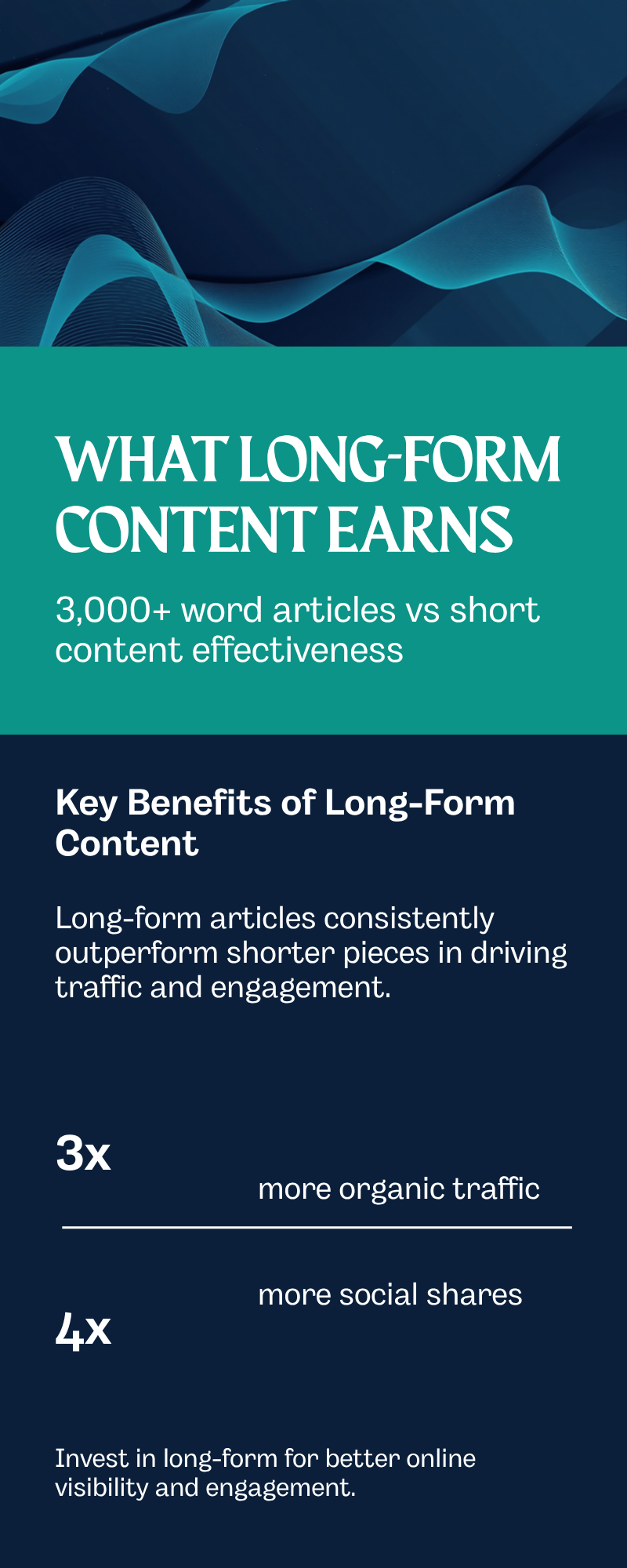
  • Header Tags and Content Structure: Getting It Right for SEO

    Open the page source on most small business websites and you will find headings picked for size, not structure: a big bold line because it “looked like a title”, a handful of bold paragraphs pretending to be subheadings, and sometimes three H1 tags on a single page. None of this breaks your site outright, but it makes Google’s job harder and it costs you featured snippets and AI-generated answers that a properly structured competitor picks up instead. This guide covers what correct header structure actually looks like, why it still matters in 2026, and the specific fixes worth making this week.

    What header tags actually do

    Header tags, H1 through H6, are the outline of your page. Search engines read that outline to work out what the page is about and how the sections relate to each other, the same way a reader skims a table of contents before deciding whether to read further. Google has said for years that headings alone do not guarantee a ranking, but a clear structure directly affects two things that do matter: whether Google can accurately summarise your page for search results and AI-generated answers, and whether real visitors stay on the page once they land on it.

    The current best-practice pattern is simple: one H1 for the page’s main topic, H2s for each major section, and H3s for supporting points within a section. Most business pages never need to go past H3. For the fundamentals of how we approach content structure across a whole site, see our SEO content strategy service.

    Not sure if your own site’s headings are set up correctly? Our free 40-point audit checks this along with everything else holding your rankings back. Claim your free SEO audit.

    Comparison graphic of correct versus broken header tag hierarchy for SEO content structure, showing proper H1 to H3 nesting against common mistakes like multiple H1 tags and skipped heading levels
    Comparison graphic of correct versus broken header tag hierarchy for SEO content structure, showing proper H1 to H3 nesting against common mistakes like multiple H1 tags and skipped heading levels.

    Screen readers rely on the same outline to let vision-impaired visitors jump between sections, so a broken hierarchy is an accessibility problem as much as an SEO one. A skipped heading level, or a heading used purely for its font size, can leave a screen reader user confused about whether they have moved into a new section or are still reading the same one. Getting headings right the first time solves both problems with the same fix, which is one reason it belongs near the top of any technical audit rather than being treated as a nice-to-have.

    The header mistakes we see most often on Melbourne business sites

    Two mistakes dominate almost every audit we run. The first is multiple H1 tags on one page, often because a website builder automatically styles the page title and the hero banner text as H1 by default, and nobody has gone back to fix it. The second, more common in 2026, is skipping a heading level entirely: a page jumps straight from an H1 to an H3, or has a wall of H2s with no H3s underneath even when a section clearly has sub-points. This is a particularly common problem on newer Shopify builds, where the homepage and category pages often forgo the H1 entirely, which is now the single most common heading mistake technical auditors encounter.

    Article length Recommended H2s Recommended H3s
    Under 800 words 2–4 0–3
    800–1,500 words 3–6 0–6 (only for long sections)
    1,500–2,500 words 5–10 4–12

    If a quick look at your homepage’s page source shows more than one H1, or headings that jump straight from H1 to H3, talk to our Melbourne team — this is usually a same-day fix once we know which template is causing it.

    Worth checking too: many page builders and themes let editors change a paragraph’s visual size without changing its underlying tag, which is the opposite problem, text that looks like a heading to a human reader but is invisible as one to Google. Open your browser’s “Inspect” tool on any heading-looking text and confirm it is actually wrapped in an h1 to h6 tag, not just a bold, oversized paragraph. This single check catches a surprising number of the header problems we find during a first audit.

    Writing headings people and Google both understand

    A good H1 states the page’s main topic in plain language and, where it reads naturally, includes your primary keyword. A good H2 does the same job for its section: describe what the section actually covers rather than being clever. “Pricing” tells a reader less than “What SEO costs for a Melbourne small business”, and the second version is also easier for Google to match against a real search query. Keyword-stuffing every heading with the same phrase is a mistake in the other direction — it reads badly and modern ranking systems are built to recognise the pattern.

    Content depth matters alongside structure. First-page content in competitive categories now averages around 1,890 words, and pages at that length typically carry five to ten H2s if the topic genuinely needs that many sections. Padding a short topic out to hit a word count with extra, thin headings does not help; a shorter, well-structured page usually outperforms a long, poorly organised one.

    Bar chart showing the recommended number of H2 headings by article length in 2026: 2 to 4 H2s under 800 words, 3 to 6 H2s for 800 to 1500 words, and 5 to 10 H2s for 1500 to 2500 words
    Bar chart showing the recommended number of H2 headings by article length in 2026: 2 to 4 H2s under 800 words, 3 to 6 H2s for 800 to 1500 words, and 5 to 10 H2s for 1500 to 2500 words. Source: 2026 header tag SEO research and content-length benchmarking guides.

    We track exactly this kind of structural improvement in the client audits behind our case studies, including a Melbourne CBD legal firm where fixing header structure was one of several technical changes behind a 412% organic traffic increase.

    Multi-location and franchise sites tend to compound header mistakes fastest, because a single broken template can duplicate the same wrong structure across dozens of pages overnight. If your Melbourne business runs several location or service pages built from one template, checking the template once and confirming the fix carried through to every page it generates is far more efficient than fixing pages individually, and it prevents the same issue reappearing the next time a new location page is added.

    What this costs, how long it takes, and what goes wrong

    Fixing header structure on an existing site is usually one of the cheapest technical SEO wins available, because it rarely requires new content, only reorganising what already exists. For a typical small business site of 10–30 pages, a full heading audit and fix usually takes a few hours to a day of work, and changes take effect as soon as Google recrawls the page, often within a week or two for actively updated sites. The main risk in doing it yourself is treating headings as a styling tool: changing a heading level to make text bigger or smaller, rather than to reflect the actual structure of the content, which quietly re-breaks the fix a few months later when someone edits the page again.

    A second common mistake is over-correcting: forcing every paragraph under its own H3 in an attempt to “structure everything” ends up fragmenting the page and confusing readers as much as having no structure at all. The goal is an outline that would still make sense read on its own, the way a table of contents does.

    Common questions

    Can I have more than one H1 on a page? Technically HTML5 allows it, but for SEO purposes stick to one H1 per page. It removes any ambiguity about what the page is actually about.

    Does changing headings on an old page hurt my existing rankings? No, provided the actual content and its meaning stay the same. Reorganising structure without changing the substance is low risk and often helps. See our FAQ section for more on how we handle changes to already-ranking pages.

    Do headings matter for voice search and AI answers? Yes, arguably more than for traditional search. Clear, well-labelled sections are exactly what AI systems extract when pulling a direct answer from a page, which is closely related to the meta description and title tag work we covered in our recent guide to writing title tags and meta descriptions that rank.

    Header structure will not single-handedly fix a struggling Melbourne website, but it is one of the fastest, cheapest technical wins available, and it compounds with everything else you do on the page. Check your homepage’s headings this week, fix any duplicate H1s or skipped levels you find, and keep every new page you publish to one clear H1 with logically nested H2s and H3s beneath it. Want a second set of eyes on your site’s structure? Claim your free $1,200 SEO audit — no lock-in contracts, response within 24 hours. For more technical SEO guides, visit our blog.